Asset Manager makes it easier for you to manage scripts on your note templates.
Features
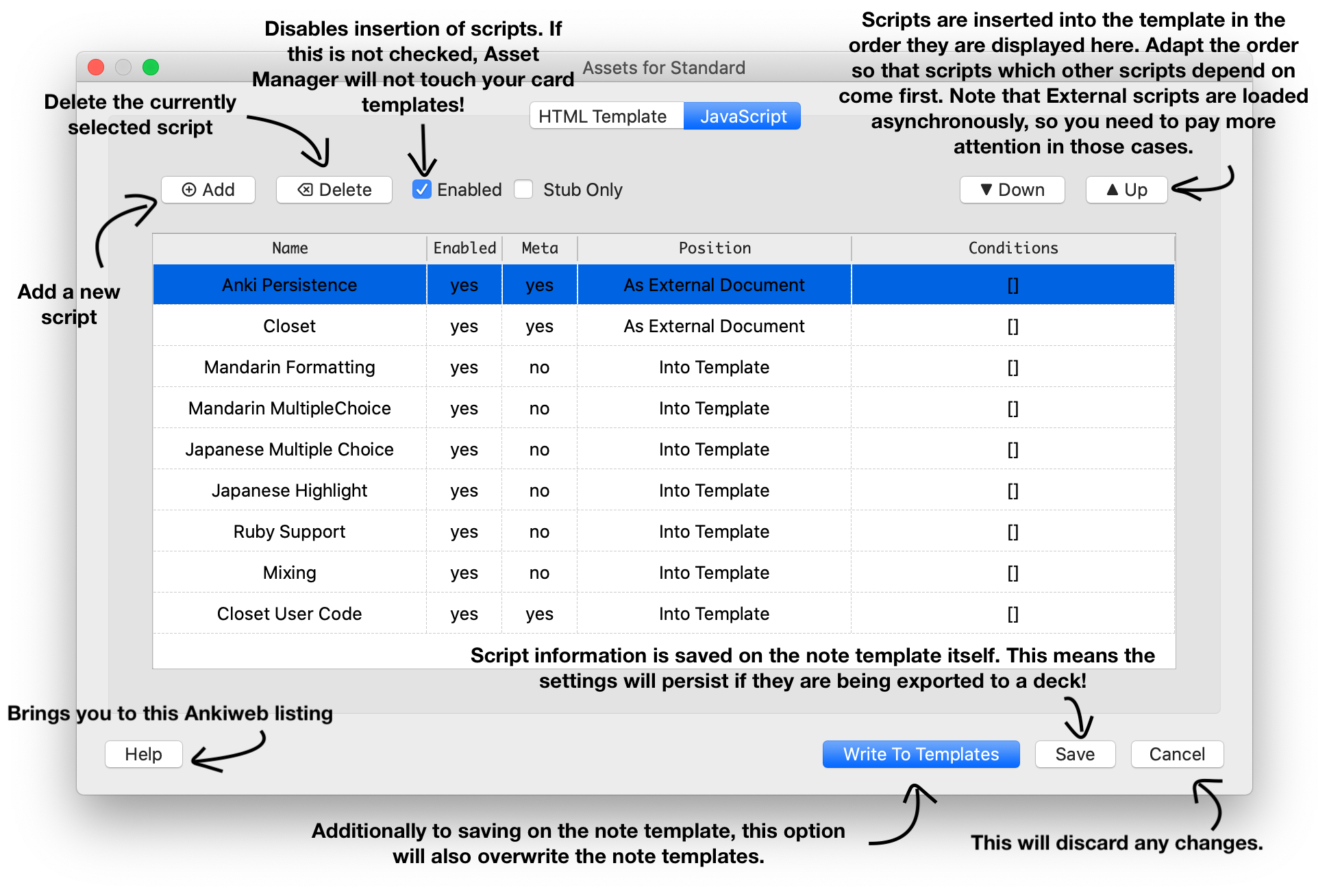
Easily insert JavaScript snippets into your note templates. Change the code in one place and Asset Manager will change the code on all templates for you. Restrict scripts to only be inserted for specific cases. For example only on the frontside of your templates, or only for specific card types. You can use Asset Manager in two different ways:
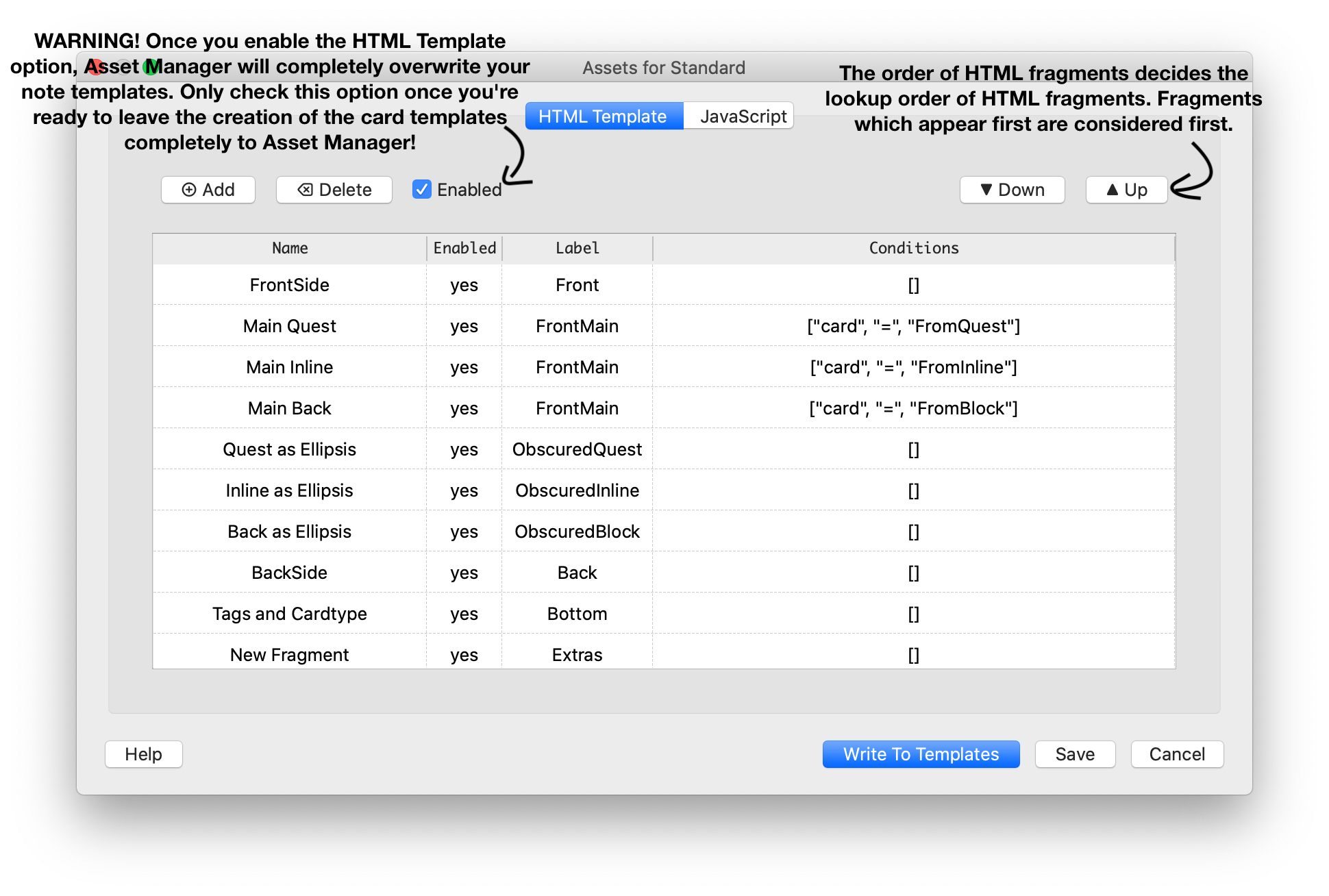
Manage JavaScript associated with a note type, and easily insert it into card types, or link against it. This will be the case if you do not enable the HTML Template functionality, but you do enable the JavaScript insertion. This will only add a segment to your card types, but not delete / remove anything. By disabling the Script Insertion, you can easily remove this segment again. Manage the complete card templates with it. This allows you to define HTML elements in your card templates in a component-wise structure. This will be the case if you do enable the HTML Template, in this case you should also enable the JavaScript Insertion. This will overwrite your templates, if carelessly executed, so be cautious when enabling it for the first time. It is very helpful, if you have many card types which are written in a formulaic way, and a change in one card type means you must also edit another card type.
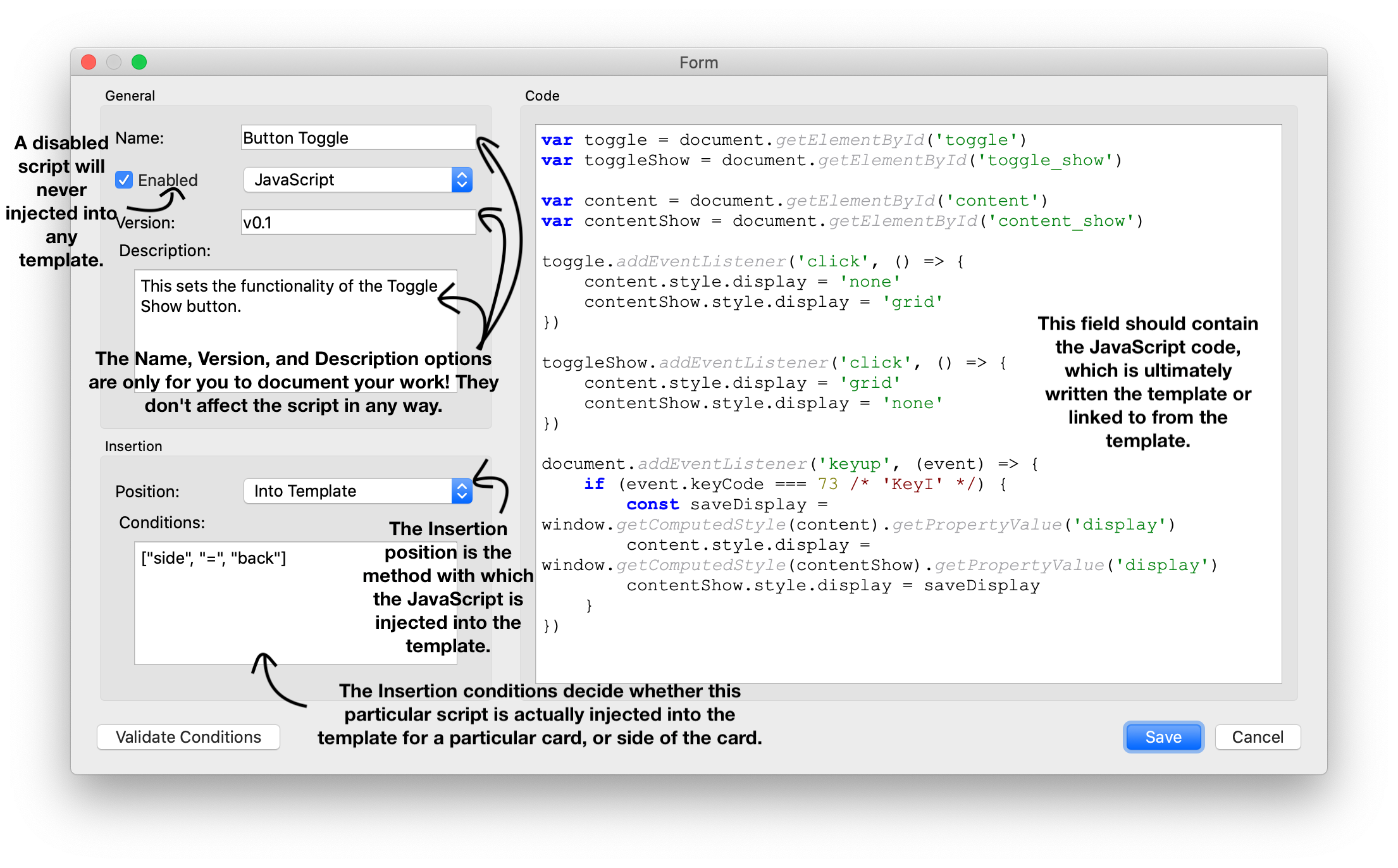
Functionalites Script Tab Script Config
Insert Stub: Exchanges the Div Element with an HTML stub. This makes it is easier to edit the card types, without having to scroll through all the JavaScript, but Asset Manager will still the remember the position in the document for the scripts to insert. Label (not depicted): Used to merge multiple code snippets into one script “unit”, this takes effect for insertion positions “Into template”, and “As External Script”. The resulting script will adopt the name, version, and conditions from the uppermost snippet in the list. Insertion Positions: As External Document: Will copy the script to media folder and paste a script element referencing this external script. Note, that this means that scripts may execute asynchronously and out-of-order! Document Head: Uses an Anki webhook to inject the script into the document header. Will not work on mobile! Document Body: Uses an Anki webhook to inject the script into the document body. Will not work on mobile! Into Template: Will inject the complete script into the template body. This will ensure that scripts are executed immediately and in order.
Insertion Conditions: Restrict to a specific side: [“side”, ”=”, “front”] or [“side”, ”=”, “back”] Restrict to a specific card: [“card”, ”=”, “NameOfTheCard”] Combine conditions: ”&” stands for conjunctions (and), ”|” stands for disjunction (or): [”&”, [“card”, ”=”, “Card 1”], [“side”, ”=”, “front”]]
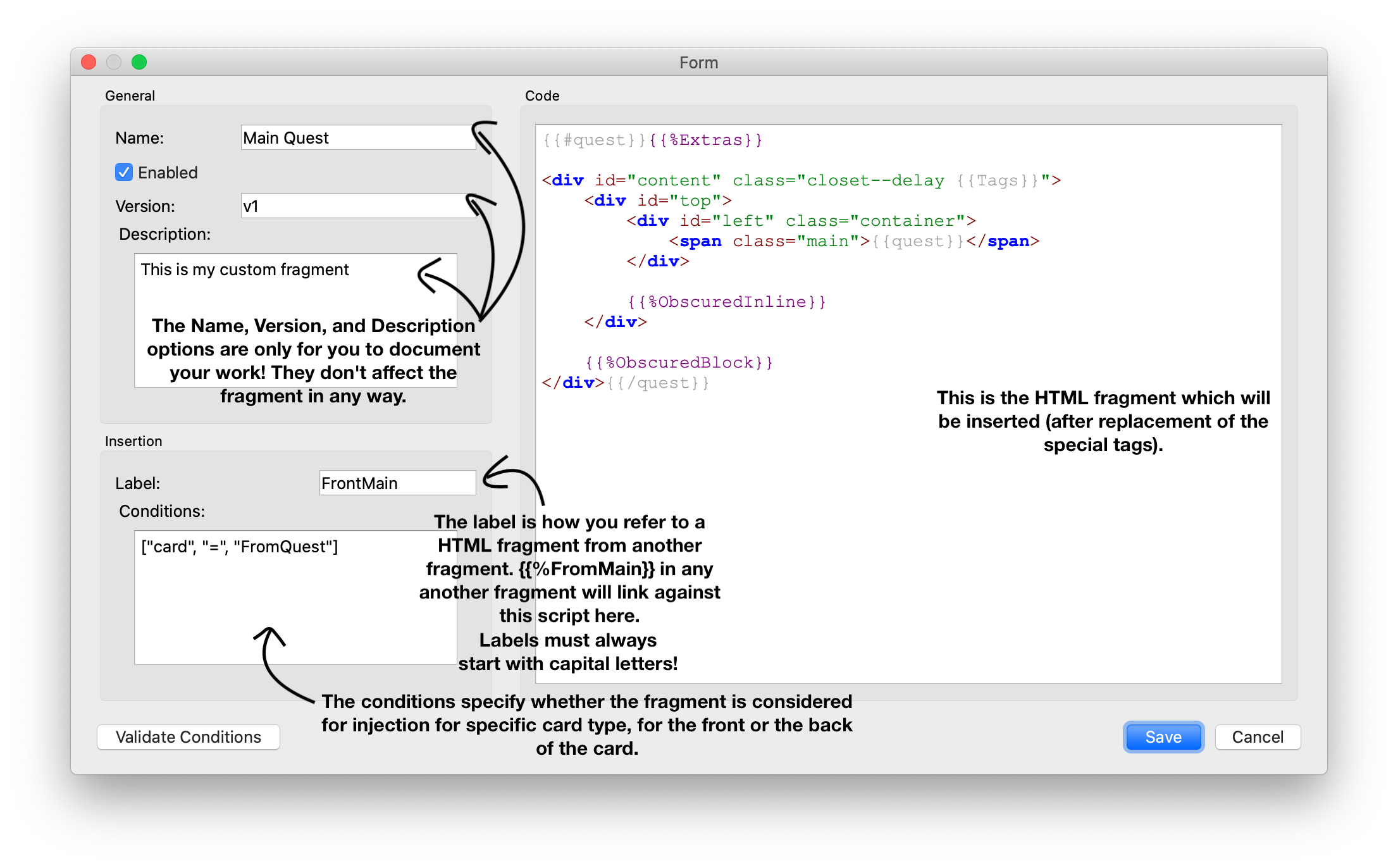
HTML Tab HTML Config
Labels: Labels identify your HTML “snippets”, or “fragments”. Insertion begins with the “Front” label for the frontside of the card, and “Back” for the backside of the card. When using a label like {{%MyLabel}} in the template, it will be replaced with a fragment with a label “MyLabel”. Special Labels: There are multiple special labels defined, which you can use. These always start with a small letter: {{%idx: will be replaced with the numerical ID of the card {{%cardidx}}: will be replaced with an ID that is found on the tail of the card name. If the card is named “Card 25”, this value will evaluate to 25, even if it is in first position. {{%scripts}}: This will evaluate to the output of the JavaScript functionality of the add-on
Insertion Conditions: Same as above. This way you can make a label {{%MyLabel}} be replaced with a different code snippet depending on the side of the card, or the card type name.
For Developers Asset Manager offers a hook for you to insert your own JavaScript snippet via your own add-on. That way you can easily offer your script, give it a name, version it, and update it through the AnkiWeb platform, without making users have to care about pasting the JavaScript to their templates, copy the code to the media folder, etc.
Examples include: Anki Persistence Japanese Kanji RTX popup for note types Closet For Anki
Updates 2020-12-22:
- Fix insertion as external file
- Add support for syntax check
- Add support for minified insertion
- Add support for extra button “Assets…” in editor (can be turned on in the add-on settings) 2021-03-11:
- Fix minification on Anki 2.1.41+ 2021-08-29:
- Fix error when writing to templates
- Fix Assets button not showing and not being able to remove Cards button
Support If you like my add-ons, you can consider supporting me. My add-ons will always be freely available for everybody, but what I can offer you is my sincere thanks, and first-hand technical support, if you have any questions/issues with my add-ons. At the same time it allows me to put more time and focus into developing these and making them as powerful and user-friendly as they are. Thanks for considering!
ko-fi.com/hgiesel patreon.com/hgiesel
Screenshots


Liên kết hỗ trợ
Reviews (9)
👍 2025-10-12
Can be made to work by replacing a lot of python text, see https://forums.ankiweb.net/t/asset-manager-official-support/7510/43?u=khonkhortisan
👍 2024-03-27
Anki 23.12.1. doesn’t work
👍 2021-09-04
cant live wihtout this tool anymore
👍 2021-07-31
Will this addon be fixed for 2.1.45? I’ve noticed that the Assets button disappeared from the latest update. Thank you for this addon btw! Comment from author The add-on is fixed for the current version (2.1.47). As long as you update your Anki, you should be fine.
👍 2020-11-26
Is there a way to add a script so that it can be activated on all other notes? because it would be interesting to add a script just once. Congratulations on the addon! Comment from author At the moment, the asset manager only works per note type. However it is a very common request to have this kind of feature. I will think about a way to implement this.
👍 2020-11-19
Amazing!
👍 2020-09-26
Sounds great!
👍 2020-09-18
It works and it is useful, though poorly documented, but the support from the author is great.
Regards,
https://forums.ankiweb.net/u/andr
👍 2020-07-11
Working perfectly!!! Save a hell lot of time. ^^;
:]
