you must adjust the shortcut in the add-on config before you can use this.
This add-on is intended as a companion to the add-ons Browser Maximize/Hide Table/Editor and Browser Table word wrap.
In the add-on config there’s a setting that allows to set the width of the info bar if you also use the add-on Browser side-by-side (horizontal split).
Versions
2022-01-26 different menuView detection for better compatibility with other add-ons 2022-01-19 first fix for Anki 2.1.45+ 2020-11-03 make the date() function more robust. This may or may not fix issue #5. 2020-08-01 (optionally) add background colors if suspended or many lapses which might be useful if you have hidden the table with Browser Maximize/Hide Table/Editor; in 2.1.28+ use col.format_time_span() instead of col.backend.format_time_span() 2020-07-07 option to move the deck into an extra line (in the default wide view), disabled by default 2020-07-03 better compatibility with other add-ons that use the “View” menu 2020-07-02 better adjust width, word wrap 2020-05-05 update for 2.1.24+: “named arguments in queries will go away in the future” 2020-04-16 fix for 2.1.22 or later: fmtTimeSpan() has become col.backend.format_time_span() 2019-12-22/25 better compatibility with Browser side-by-side (horizontal split). 2019-05-25 bug fixed (thanks @ lovac42) 2019-05-19 initial release
Problems, Bugs, Errors, Improvements If you find a bug or have a bug fix or improvement please tell me in the official anki support forum, on github.
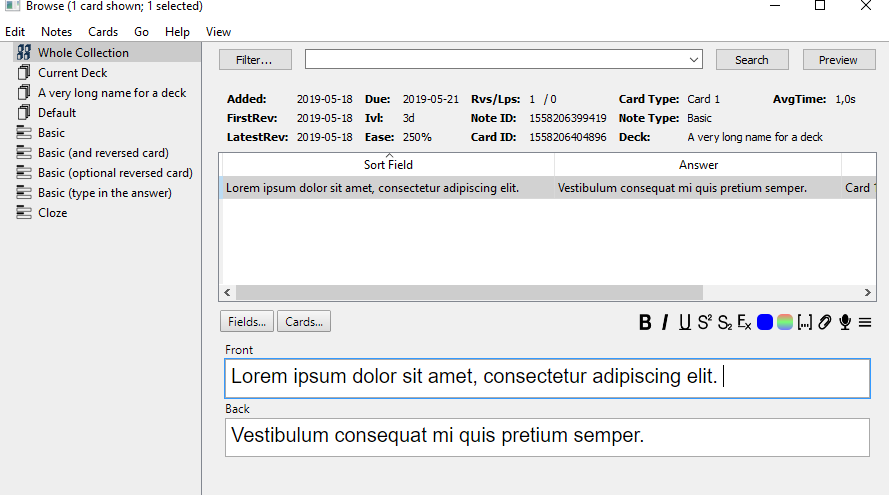
Screenshot
Screenshots
Liên kết hỗ trợ
Reviews (11)
👍 2025-08-22
Works as advertised, but would be nice to have the option to choose which info items to include, as I would like the full review history shown. Would also be great if it were adjustable height, ideally via click-and-drag.
👍 2024-07-15
Good stuff. Exactly what I’m looking for.
👍 2024-04-06
Please fix this if you have the time to🙏 ⚠️Addon Startup failed - (fixed) so info removed (cuz makes the comment too big)
🟢Edit After ur reply - Thanks a lot, it’s working perfectly fine🙏
🔴There is a little bug - We can’t click on the ‘View’ button of the browser’s top menu when this addon is enabled, but can click on that when it’s disabled. When the addon is enabled - when we hover over the ‘view’ button, it doesn’t get a little darker or show any change as normally other buttons beside it w
👍 2022-08-23
Can I use this as a search filter? I mean to find the cards which have a specific interval or repeated x amount of time. Now that I am asking it, I think I might be able to do this using the Anki iteself. I will check that too :)
👍 2021-03-19
I appreciate and like the idea. I don’t need the info often, but have limited screen space. Therefore I prefer to view the info via Ctrl+Shift+i when I need it. I would prefer this add-on if there was a button to collapse and expand it.
It would be cool to see more info in the Ctrl+Shift+I window.
👍 2020-12-21
Works on 2.1.37 👍
👍 2020-07-04
It’s a cool contribution. However, I think that an assigned location of each item is not good. It would be better that “Deck:” is independently located in the lower area because the Deck’s full-path name tends to be long according to classification. Comment from author I just uploaded a new version that offers this: “option to move the deck into an extra line (in the default wide view), disabled by default”
> an assigned location of each item is not good.
You can adjust the source code of
👍 2019-08-09
it’s a good idea,but the information is wrong Comment from author This shouldn’t happen. You would help me a lot and other people if you could offer more details.
What is wrong: Are all fields wrong which means that information is shown that does not match the selected card? Or are some fields correct and only one or a few fields are wrong? If it’s the latter, which ones? Does this happen all the time or only sometimes?
which Anki version do you use and which other add-ons do you use? I n
👍 2019-05-30
useful
👍 2019-05-22
I see anything from u/ijgnord, I like :)
👍 2019-05-19
Very nice and comes with config options.
