CSV Import Plus for Anki
CSV Import Plus is an Anki add-on that provides a streamlined and intelligent workflow for importing notes from CSV files or pasted text. It simplifies the import process by auto-detecting formats, suggesting the best note type, and allowing for quick imports with minimal configuration.
It is designed to be a faster alternative to the built-in Anki importer for common import scenarios.
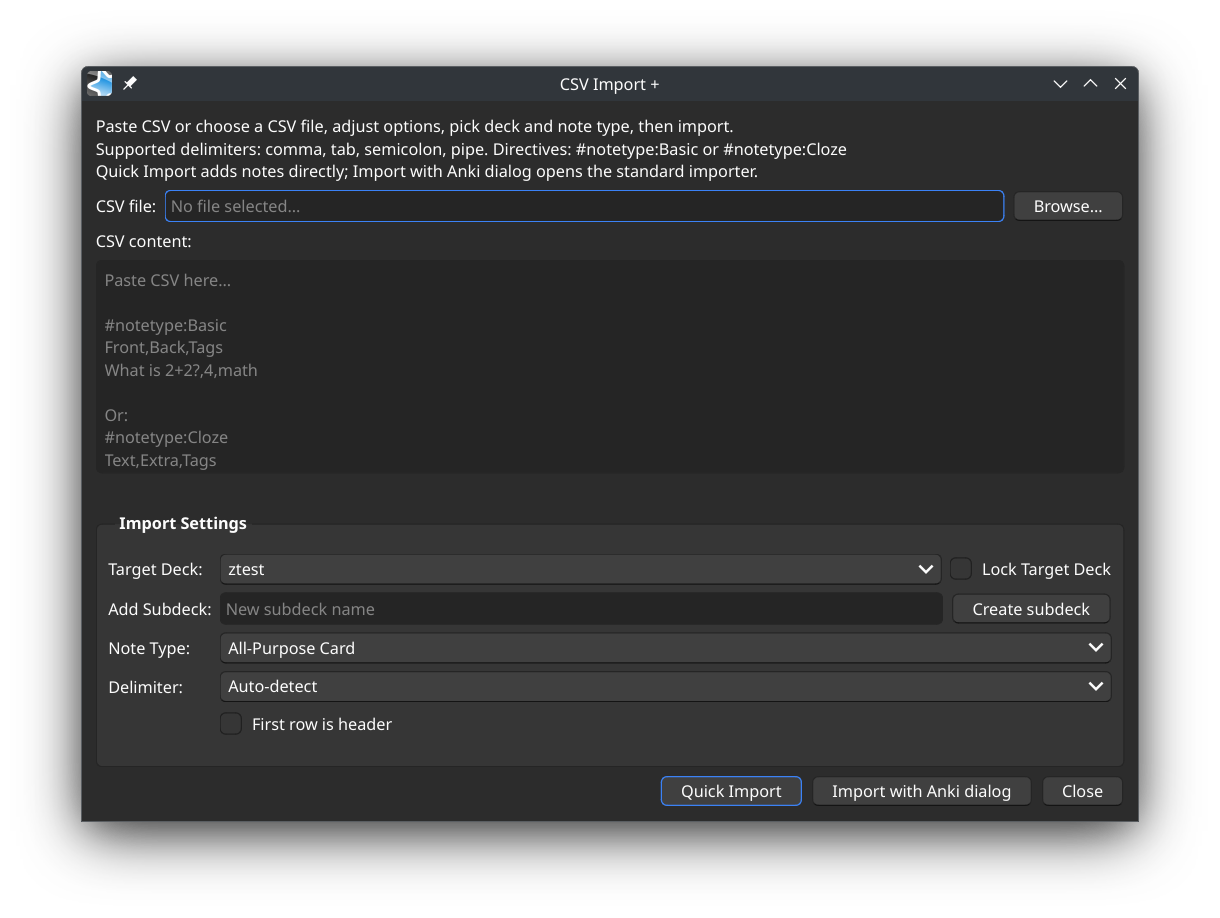
Features Auto-Detection: Automatically detects the CSV delimiter (comma, tab, semicolon, etc.) and the most likely note type for your data. Live Delimiter Preview: The delimiter dropdown updates live to show the currently detected delimiter while you type or paste. Paste or Pick File: Import data by either picking a .csv file or pasting CSV text directly into the dialog. Quick Import: A one-click import that uses the auto-detected settings to add notes instantly. Lock Target Deck: A checkbox to lock the selected target deck. The addon will remember your locked deck even after restarting Anki. Smarter Imports with Locked Deck: When a deck is locked, you can still create a new subdeck and import into it. After the import, the target deck selection will automatically revert to your locked deck. Note Type Suggestion: Analyzes the number of columns in your CSV to find and select the best matching note type. On-the-fly Subdeck Creation: Quickly create a new subdeck to import your cards into, with the name conveniently pre-filled from your filename. #notetype Directive: Force a specific note type by adding a special comment to your CSV data. Tag Importing: Automatically add tags to new notes by placing them in an extra column at the end of your data. Fallback to Anki Importer: For complex cases, you can easily send the data to Anki’s standard import dialog to handle advanced field mapping. How to Use Go to Tools → CSV Import +… in Anki’s main menu. In the dialog, you can either: Click “Pick File…” to select a .csv file. Or, paste your CSV-formatted text directly into the “Paste CSV Text” area. The status bar updates live to show the detected delimiter, the number of rows, and the suggested note type. The delimiter dropdown also shows a live auto-detect preview. Choose a target Deck. You can also type a name in the “Create Subdeck” field and click the button to create a new deck inside the one selected above. If the suggested Note Type is not correct, you can manually select another one from the dropdown. Click “Quick Import” to import the notes immediately using the current settings.
Import status is shown inline in the main addon window.
Special Features #notetype Directive
To ensure your CSV file is always imported with a specific note type, add a line at the top of your file or pasted text like this:
#notetype: My Custom Note Type …your,csv,data,here…
The add-on will read this directive and automatically select “My Custom Note Type”, overriding the auto-detection.
Tag Importing
If your CSV data has one more column than your note type has fields, the content of that last column will be treated as tags. You can include multiple tags separated by spaces.
Example: For a note type with Front and Back fields:
What is the capital of France?,Paris,geography europe What is 2+2?,4,math basics
The first note will be tagged geography and europe, and the second will be tagged math and basics.
Changelog [2026-02-23] Changed: Removed the Quick Import completion pop-up dialog. Changed: Quick Import completion details are now shown in the main window status line. Changed: Pasted CSV text is cleared automatically after a successful Quick Import. Changed: Delimiter auto-detection preview in the dropdown now updates live as content changes. Fixed: Resolved an intermittent issue where the addon window could close unexpectedly. Fixed: Header-only CSV input now correctly stops import when “First row is header” is enabled. Improved: Live delimiter/note-type preview is now debounced to reduce UI lag on large pasted CSV content. [2025-11-01] Added: “Lock Target Deck” option to persist the selected deck across imports and sessions. Added: The success message now shows the name of the deck cards were imported into. Improved: The addon window is now non-modal, allowing interaction with the main Anki window. Fixed: The addon window no longer always stays on top of the main Anki window. Fixed: Resolved a crash on startup with newer Anki versions related to window handling. License
This add-on is licensed under the MIT License. See the LICENSE file for details.
Screenshots
Liên kết hỗ trợ
Reviews (6)
👍 2026-02-16
This add-on worked perfectly first time. The author has brought care and great coding skills to the project. It is clear that he thought threw just how to make this comprehensive yet user-friendly. Thank you! Comment from author Thnk you for your review , Try out my other addons from my profile
👍 2026-02-12
happened upon this great plugin while looking for “ways” to update existing notes .. works great for importing
but (not sure if this is a bug), when I chose to “update existing notes ..” it will update ALL existing (duplicate) notes throughout the deck when I only want to update note(s) IN the specific sub-deck I chose. (I misunderstood and thought “Lock Target Deck” would target notes in the specified sub-deck, but now understand it only pertains to the “settings” of this plugin.)
is there a
👍 2026-01-22
..
I noticed your Anki version is 25.02.6 .. I had the same problem as I was using a portableapps version 25.02 (038d85b1) Python 3.9.18 Qt 6.6.2 PyQt 6.6.1.
You’ll may need to update/upgrade your Anki to their “new”er version (currently 25.09.2) in order to run this plugin. If you need a “portable” version of Anki, there are instructions on how to install is as a (limited) portable copy of Anki (executed from a batch file).
👍 2026-01-22
I couldnt install the Addon. I got the following message. They may need to be updated to support this version of Anki. Click the Check for Updates button to see if any updates are available. You can use the Copy Debug Info button to get information that you can paste in a report to the add-on author. For add-ons that don’t have an update available, you can disable or delete the add-on to prevent this message from appearing. Anki 25.02.6 (6381f184) (ao) Python 3.9.18 Qt 6.6.2 PyQt 6.6.1 Platfor
👍 2025-12-14
Works well. Thanks Comment from author Thank you for your comment, check out my other addons
👍 2025-11-07
There is not enough preview before importing. Comment from author verify your data before importing, this addon is for quick importing
