If you find a bug let me know in the official anki support forum.
On Anki 2.1.55+ this add-on only supports Anki versions built with pyqt6!
On Anki 2.1.55+ css for classes applied by this add-on is not shown in the editor. The styling is only visible in the reviewer. If you also want to have them in the editor you also need the add-on CSS Injector. Copy the content of the file “_editor_button_styles.css” from your media folder into the file “field.css” in the css injector add-on or use this modification.
This description only refers to the add-on for the Anki versions 2.1.60 (which was released in 2023-02) or later. Older versions of this add-on for older anki versions had more limitations/quirks because in older Anki versions the editor was more limited. Older versions of this add-on are no longer supported.
If you use an iphone/ipad, see the section “updating the styling on AnkiMobile” below.
This add-on offers more styling options for the Anki editor: You can quickly set different font colors, background colors, font sizes or apply custom classes or styles. You can use shortcuts, buttons from the top of the editor or the context menu.
If you want to use a custom style but don’t know css there are online sites that make creating styles easier. A google search lead to sites like this one or this one.
Functions
This add-on offers the following options:
- directly changing the font color by changing the html color attribute. This is also built into Anki but switching between different colors is time consuming. You can set different font colors with the “Quick Colour Changing” add-on. This add-on additionally gives you the option to have multiple dedicated buttons or menu entries for font colors you often use. But my add-on might be easier to use.
- you can set the background color directly using the html background-color attribute. The option to change the background color is also available in the add-on “Mini Format Pack”. But switching between different colors is time consuming.
- you can style text with the html style attribute.
- you can set css for custom classes and apply these classes to the text selected using the inline “span” tag or using the “div” tag which is a block element which means you’ll have a line-break before and after it. Some styling only makes sense when it’s applied to a div.
- There’s are easy to use dialogs/options to change the font color, the background color, and the font size by using css and html classes. This has some advantages and some drawabacks: html classes are roughly similar to “styles” that you can apply in Word or LibreOffice. When you use html classes you can later change the color for all the fonts you’ve highlighted at the same time and you can also set different colors for night mode.
- You can wrap the text selected with custom text snippets, see below.
Text Wrapping
You can wrap selected text with fixed text snippets, e.g. you can set up a shortcut with “before” set to “Art ”, and “after” set to ” TFEU”. This lets you wrap, e.g., “2” in the Editor, and it will become “Art 2 TFEU” (which is Article 2 of the Treaty on the Functioning of the European Union). This is useful for any kind of repetitive typing.
the text wrapping function is useful for hgiesel’s Closet For Anki. Text Wrapping also supports counters that take the current field into account. The best way to show this is with an example:
- Having “before” set to “{{c%i::”, and “after” to ”}}”, makes a text wrapper that mimics the built-in Ctrl-Shift-C cloze shortcut (think of %i as increment).
- Having “before” set to “{{c%t::”, and “after” to ”}}”, makes a text wrapper that mimics the built-in Ctrl-Alt-Shift-C cloze shortcut (think of %t as top). This is useful if you want to set the cloze shortcut to a custom key, or any add-on that mimics the built-in clozes in some way, see e.g. here. If you want a naked percentage sign, use ”%%”.
Setup
Each note type MUST have the string @import url(“_editor_button_styles.css”); at the top(!) of the “Styling” section in the “Card Types for …” window. I’ve had many “bug” reports where people didn’t do this so this add-on offers to automatically adjust all notes types.
updating the styling on AnkiMobile
(In 2021) changes to your config are only applied in AnkiMobile on my iphone after I force close and reopen Ankimobile. With “force close” I mean: double click the home button, then swipe up on the app’s preview.
bugs, errors, feedback
Please do not use reviews for bug reports or support requests. I don’t get notified of your reviews, and properly troubleshooting an issue through them is nearly impossible (formatting is limited and I can’t reply multiple times). If you find a bug let me know in the official anki support forum.
Alternatives
If you just want to sometimes change the text color or background color this add-on might be overkill. Or maybe you find the config too complicated. Or maybe you run into an error with this add-on. Then you could have a look at these options:
- The option to change the background color is available in the Mini Format Pack. But switching between different colors is time consuming.
- Anki has a function to change the font color. But switching between different colors is time consuming.
- There’s the add-on Quick Colour Changing that allows to set shortcuts for different font colors.
- the extended editor for field allows to edit one field in a powerful WYYIWYG editor (TinyMCE)
- Wrapper meta-addon for wrapping text, etc.
- …
Authors
- Henrik Giesel/hgiesel: Many contributions and fundamental improvements since 2020, and maintainer since 2020-09
- ijgnd: Original add-on creator, all versions until 2020-09.
Versions
- 2023-02 update for Anki 2.1.55+
- 2021-03-03 update for 2.1.41+ …
- 2020-06-26 Text Wrapper extended with counter …
- 2019-08-06 v0.3: new configuration dialog …
- 2019-02-19 v0.2: added context menu, styles, classes …
- 2019-01-16 initial release
Screenshots
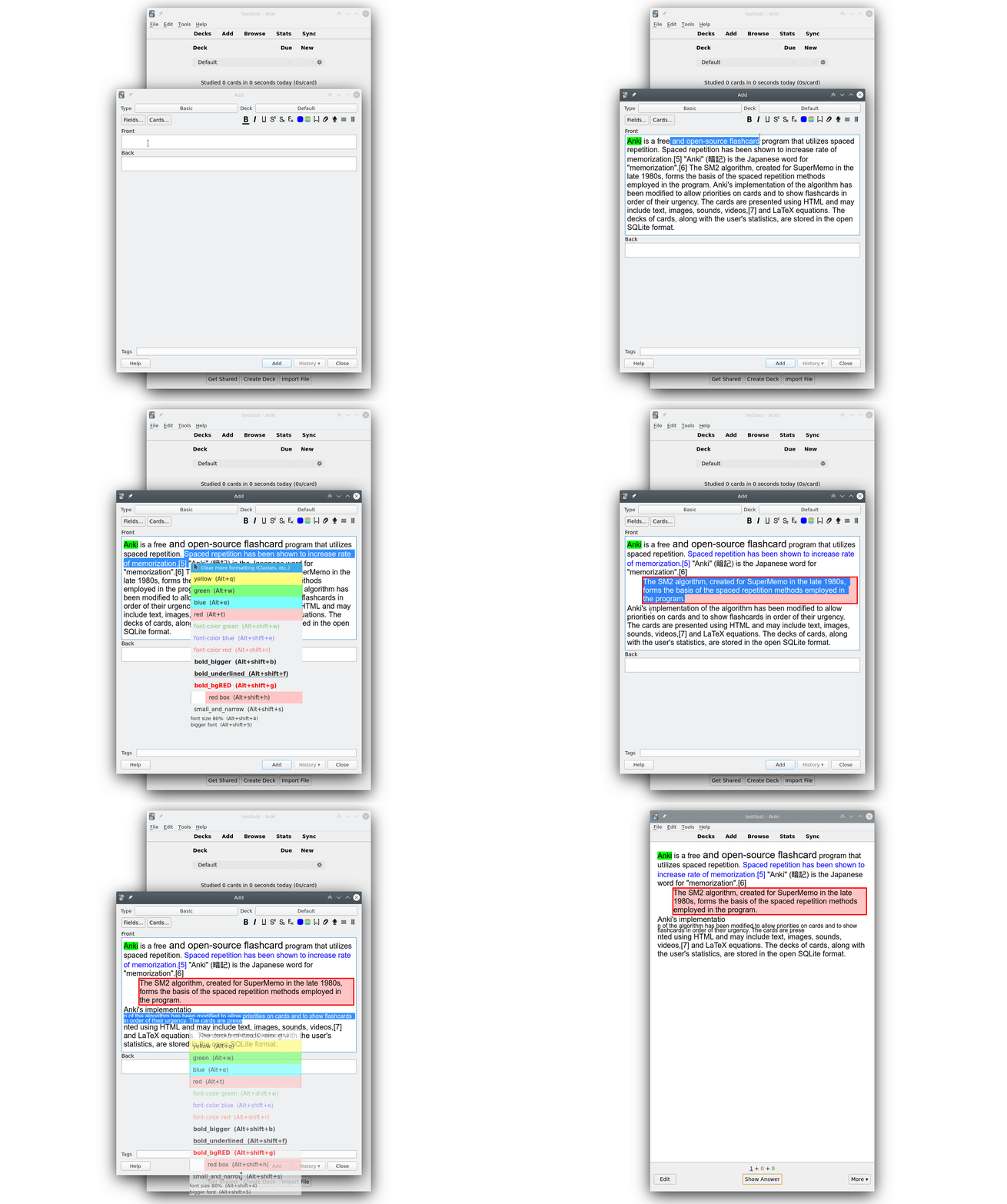
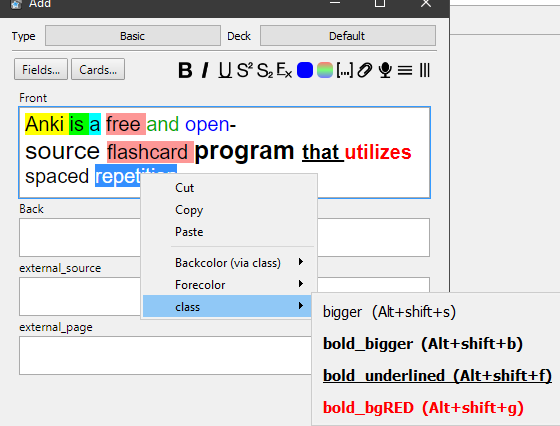
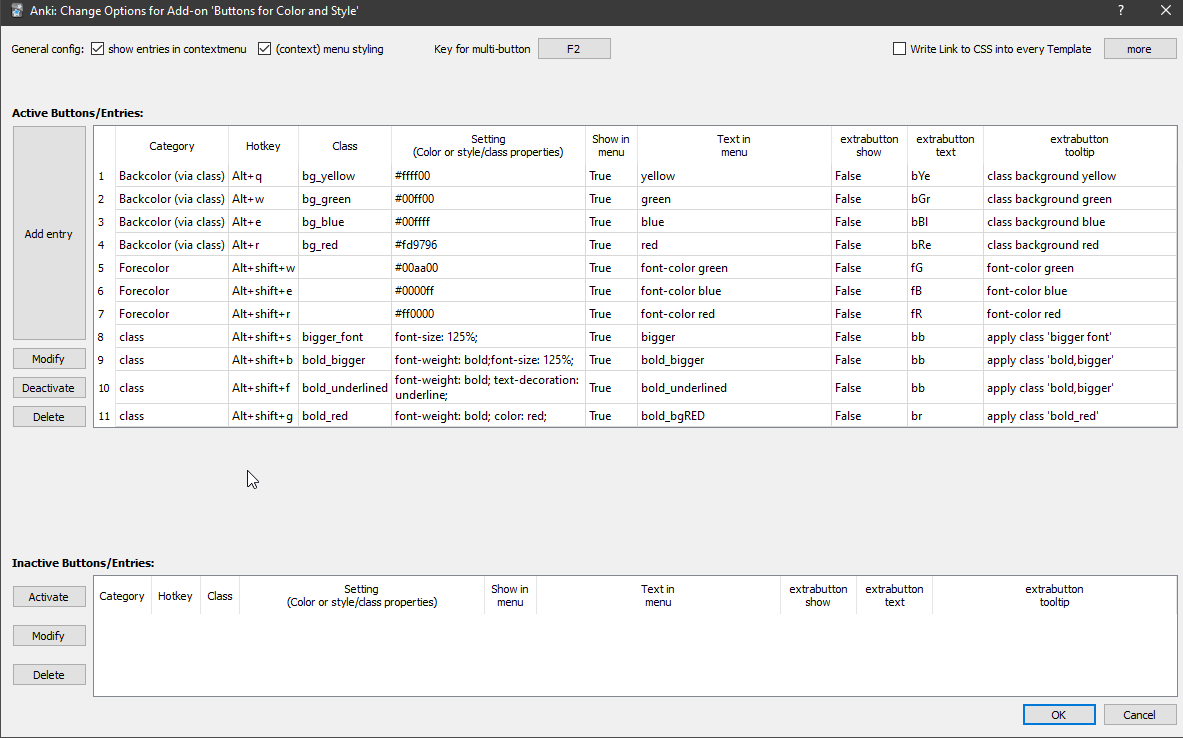
Liên kết hỗ trợ
- Contact Author
- in the official anki support forum
- https://github.com/ijgnd/anki__editor__apply__font
- in the official anki support forum
- Contact Author
Reviews (30)
👍 2025-06-22
Works!
👍 2025-02-05
It would be useful to have an option to back up all settings and restore them later. Perhaps there’s a file somewhere that just needs to be copied to a new computer…
👍 2024-09-06
I love the custom styling. easy for me to figure out the config.
👍 2024-08-24
Great addon ! Thank you man for crafting this masterpiece. keep the good work
👍 2024-08-14
有人知道怎么改变按钮的顺序吗?不胜感激!邮箱:xiao20020220@qq.com Does anyone know how to change the order of the buttons? Thank you very much! Email: xiao20020220@qq.com ボタンの順番を変える方法を知っている人はいますか?感謝に堪えません。メールボックス:xiao20020220@qq.comです。
👍 2024-06-29
Exactly what I needed. Will save me a lot of time. Thanks
👍 2024-06-04
Very useful.
👍 2024-04-24
muito bom.
👍 2024-03-26
Muito obrigada! Atualizei minha versão do Anki e perdi meu add-on de editor de texto. Poderia criar um add-on para justificar e centralizar o texto?
👍 2024-03-26
Where is Pop-Ups or some edit buttons?..
👍 2024-03-19
好牛逼的插件,解决我大问题!!! 学会一点css知识,然后搭配这个插件简直无敌!!! 可以直接实现: 加点:text-emphasis: dot;text-emphasis-position: under; 加波浪线:text-decoration:underline wavy red; 以及所有能想到的
👍 2023-08-09
定义 text wrapper, 运行产生错误,再重新安装后,过一段时间又会产生错误!
错误
运行出错。请在启动Anki时按住「Shift」键以临时禁用插件加载。 如仅在插件启用时出错,请使用「工具」>「插件」功能禁用部分插件后重启Anki,请重复上述步骤找出引起错误的插件并反馈给插件作者。 调试信息:
Anki 2.1.64 (581f82c5) Python 3.9.15 Qt 6.4.3 PyQt 6.4.0
Platform: Windows-10-10.0.22621
Flags: frz=True ao=True sv=2
Add-ons, last update check: 2023-08-08 18:01:01
Caught exception:
Traceback (most recent call last):
File “C:\Users\wangcb9000\AppData\Roaming\Anki2\addons21\1899278645\editor\menu.py”, line 99, in my_highlight_hel
👍 2023-01-22
Addon is broken in Anki 2.1.56 , Comment from author Add-on works again for Anki 2.1.60
👍 2022-12-16
Error:
Anki 2.1.55 (01caec2a) Python 3.9.15 Qt 6.3.2 PyQt 6.3.1
Platform: macOS-13.1-x86_64-i386-64bit
Flags: frz=True ao=True sv=2
Add-ons, last update check: 2022-12-16 15:33:52
Add-ons possibly involved: Custom Styles font color background colour classes
Caught exception:
Traceback (most recent call last):
File “/Users/cso/Library/Application Support/Anki2/addons21/1899278645/main_window.py”, line 35, in on_settings
dialog = MainConfDialog(getconfig())
File “/Users/cso
👍 2022-11-23
Working nicely in 2.1.49. I’m in love with the GUI, not only I don’t have to mess with any python files, it also lets me “deactivate” things I don’t want in the context menu without having to completely delete them (easy to recover if needed). Really appreciate that extra effort from the dev!
PS: I hit “no” to the auto-insert to all cards at the start because I was scared, haha. But adding the @import url(“_editor_button_styles.css”); to my Card Styling works like a charm.
👍 2022-10-31
This is an essential function to Anki. This must be integrated into Anki.
👍 2022-09-22
It doesn’t work at all, nearly all my cards are not compatible or sth.
It says: You have the add-on “Custom Styles font color background colour classes” installed. This add-on will NOT work with these note types:
👍 2022-08-22
font-family cannot be changed. Would you be kond enough to fix this bug?QAQ
👍 2022-08-12
Not version 2.1.54
👍 2022-07-20
essential tool!
thank you!
👍 2022-07-13
Essential. Please update to newer versions of anki (2.1.54 Qt6).
👍 2022-07-13
It doesn’t run with new update 2.1.54 Qt5 … Hoping you guys will be able to do something
👍 2022-05-30
I have been using it for years but it doesn’t function in the newer anki (2.1.51 and up). I hope you will update it soon
👍 2022-04-28
An absolute essential for me. It’s extremely powerful as you can add your own styles with custom HTML/CSS. It has a few quirks with editing, removing formatting and stuff like that but nothing too bad. Especially since Anki now has a colored HTML editor, simply toggle it and there you’ll be able to quickly remove the formatting or solve your small issues. All of this is detailed in the very in depth add-on page.
It’s not the simplest “enhanced editor” addon, put it certainly is the most powerfu
👍 2022-01-06
addons worked perfectly.
please update!
👍 2021-12-12
Very nice ADDON,
glad to have the “text wrapper” feature
i’m using it to insert selected in a formatted <table></table> environnement
time saver! thank you
👍 2021-11-23
Works PERFECTLY, thanks!
👍 2021-10-18
sorry Comment from author before post was edited This shouldn’t happen …
The information you provide does not suffice to give definite advice.
A general idea: At the top of my description of this add-on there is this bold sentence: “You must adjust the styling section of your templates. Otherwise your markup won’t be shown while reviewing. Check the section ”# Setup” below.”. This means: Each note type must have the string @import url(“_editor_button_styles.css”); at the beginning/top(
👍 2021-09-28
so far so good but I’d really like to be able to use undo (ctrl+z) instead of manually removing added format.
👍 2021-06-03
Work very well for me. Using to format ‘code’ text:
-
can customize own style _ shortcut _ padding (many with CSS)
-
quick response (add and remove)
