This add-on is an updated version of the original External Editor add-on (link) by github user pointtonull.
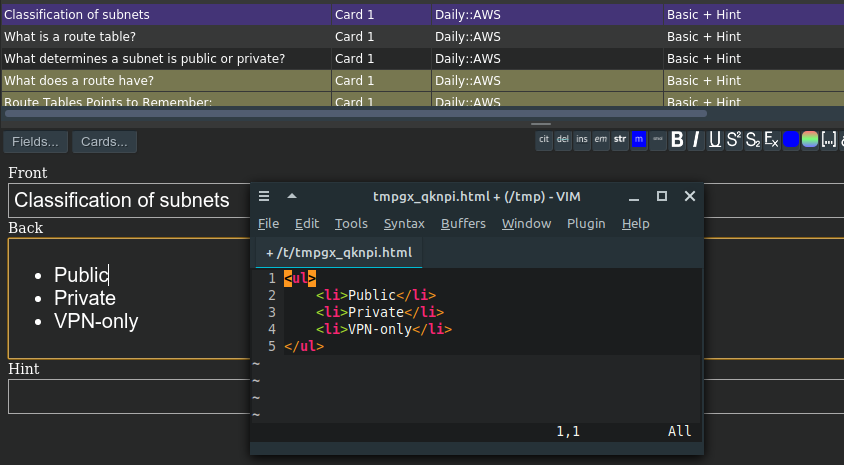
Next time you press Ctrl + Alt + X while editing a field it’ll open your configured editor. (The shortcut is configurable) Note: When you press the shortcut and nothing happens it may be because there is a conflicting shortcut. Try setting a different shortcut in the add-on config and reopen the editor window for the changes to take effect.
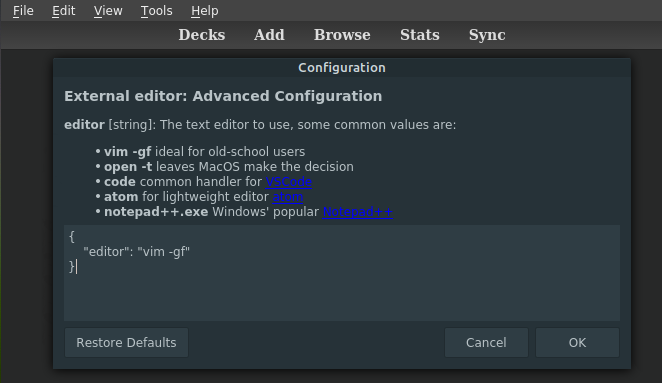
It allows you to specify your editor of preference.
For Windows users, remember to escape (duplicate) the backslashes in the path (json uses backslash as a special character):
{ “editor”: “c:\Program Files\Notepad++\notepad++.exe” }
Problems, Bugs, Errors, Improvements If you have an idea for an improvement or encounter a problem please create an issue on Github.
Support my work If this add-on is useful to you please consider buying me a coffee:
Updates: 2022-05-17: Added config option for file extension of the temporary file created when editing note contents 2022-04-25: Adjusted default shortcut for mac, add more information on setup in config 2022-02-06: Added compatibility with Anki 2.1.28 2022-01-28: Changed how editors can be configured 2021-11-5: File editor launch commands can now be specified as a list to allow white space in arguments (e.g. [“command”, “arg1”, “arg with spaces”]). (Contribution by github user jack-faller.) 2021-9-22: Initial Release (Update for Anki 2.1.45)
Screenshots

Liên kết hỗ trợ
Reviews (22)
👍 2025-06-02
Only notepad.exe works. Does not work, tried gvim, vim, and full path of notepad++. For notepad++.exe, notepad.exe opens up no matter what. Using Windows 10. The notes says an error message should pop up, but nope no error message. Escape characters used. Plugin is plain broken, or the documentation is not thorough enough. I accidentally gave this a thumbs up, if it still shows it should be a thumbs down.
👍 2025-03-14
Works as advertised.
If you want to use sublime, you can first check “which” sublime you’re running by first asking (in the terminal) “which subl” and then using whatever the terminal returns for the setup, e.g.:
{ “editor”: “/opt/homebrew/bin/subl —wait”, “file_extension”: “tex”, “shortcut”: “cmd+shift+E” }
where “/opt/homebrew/bin/subl” what whatever my terminal returned when I asked it “which subl”.
👍 2025-03-13
Update: This is a bad idea. When you save the card, some formatting will be stripped. better to copy paste from vscode.
Works on mac. My settings are: { “editor”: “/opt/homebrew/bin/code -w”, “file_extension”: “md”, “shortcut”: “cmd+shift+x” }
I also make use of Github Markdown plugin
- Write in markdown format using this plugin inside Vscode
- Format using markdown plugin awesome preview
👍 2024-04-04
This is great if you want to edit the HTML directly, but not if you want to edit LaTeX, since each line is separated by <br>
👍 2024-02-14
Anki 23.12.1 macOS Sonoma
Launches Neovim as my external editor, which is what is configured, but when I exit the editor (and save the buffer) the changes are not reflected in the card editor.
I should note that I also have “Markdown and KaTeX Support” and “Markdown input” add-ons installed. Perhaps there’s a conflict, not sure.
👍 2023-09-12
Only seems to work for notepad by default. Can’t use Sublime nor Notepad++ on Windows even after giving path as well as \\.
👍 2023-05-06
Does not work with W11.
👍 2023-02-11
If you want to use this with Sublime Text, ensure you add the —wait flag:
Here’s what this would look like on Mac:
{
“editor”: “/Applications/Sublime\ Text.app/Contents/SharedSupport/bin/subl —wait”,
“file_extension”: “html”,
“shortcut”: “cmd+alt+x”
}
👍 2023-01-23
In Windows 11 it opens the html in notepad instead of notepad++.
Also Vscode doesn’t work when i put the exe path or the handler.
👍 2022-11-15
Windows don’t work with -f option according to help manual. Neovim client like goneovim works.
Vim will automatically add a new line at the end of the file when writing a file. It should be turned off by set nofixendofline.
👍 2022-11-07
In windows 11, it does not open other text editor than notepad (I’ve tried with notepad++, vs code, sublime text…) Either with full path in the string or adding the binary to PATH variable, doesnt appear to work. It just places cursor at the end of the note. Comment from author before post was edited I’m not sure how it works in sublime text but you have to save the file before exiting the editor. Hope this helps!
👍 2022-09-27
Unfortunately this doesn’t work for me. When I try to configure it to use gvim instead of notepad, it either opens notepad anyway or does absolutely nothing when I press the keyboard shortcut. (depending upon the specific string I use)
👍 2022-09-23
Great ad on! BTW, if you don’t have vim -g or gvim like me, and you’re on linux, you can use native vim or neovim by adding “<your-terminal-emulator> vim” or “<your-terminal-emulator> nvim”. It works!
👍 2022-08-16
works as intended
👍 2022-07-05
Windows
When I change editor path. (=c:\Program Files\Notepad++
otepad++.exe) (etc)
It’s not working.
👍 2022-05-17
Fantastic. Does exactly what it says it does, and does it well. My only wish is that it could also be used to edit card templates as easily, but that’s a feature request and not a bug report.
👍 2022-03-06
Unable to configure shortcuts in MacOS. Comment from author Maybe you could try different options for the hotkey? Some key combinations are reserved by Anki.
Cmd+Alt+E should work I think. Note that it is Cmd and not Ctrl.
👍 2022-02-21
I still cannot make it work. I changed everything I changed Ctrl Alt x to other combos, tried vim, neovim path tool Comment from author This config works for me:
{
“editor”: “vim -gf”,
“shortcut”: “Ctrl+Alt+E”
}
If you can open vim using “vim -gf” from a terminal it also should also work in Anki. Let me know if this works for you.
👍 2022-02-06
An add-on you installed failed to load. If problems persist, please go to the Tools>Add-ons menu, and disable or delete the add-on.
When loading ‘External Note Editor vim vscode atom ’:
Traceback (most recent call last):
File “aqt\addons.py”, line 211, in loadAddons
File “C:\Users\cinde\AppData\Roaming\Anki2\addons21\704320065_init_.py”, line 7, in <module>
from aqt.hooks_gen import editor_did_init_shortcuts
ModuleNotFoundError: No module named ‘aqt.hooks_gen’ Comment from
👍 2022-01-12
Great work! And is it possible support edit template? css,html need it
👍 2021-11-29
Doesn’t work on 2.1.48. Tried both on Linux and MacOS, with different shortcuts and editor, and nothing worked
Update:
After updating it now works on MacOS but I’m still having issues on Linux when trying to use vim as an editor. Something about an undefined reference to something sqlite3 related in a shared library named libsparql. I will investigate further, for now I’ve updated my review to positive :) Comment from author before post was edited You have to close and reopen the editor fo
👍 2021-11-15
Thanks! :-)
This add-on works when adding or editing cards, but not in the browser window. Please fix this…
Edit: Thanks for fixing this! ^_^ Comment from author before post was edited This has been fixed! :)
