Support for 2.0.x has been discontinued, will be updated add-on for 2.1.x only in the future. 因时间关系,本插件已停止针对Anki 2.0.x的更新维护,以后只针对Anki 2.1.x进行更新维护,不便之处敬请谅解!
Home Page: https://sth2018.github.io/FastWordQuery Project Repo: https://github.com/sth2018/FastWordQuery If you have any questions, you can open issues HERE
Supported Dictionaries 为单词添加真人发音(朗文mdx词典)
This addon query words definitions or examples etc. fields from local or online dictionaries to fill into the Anki note. It forks from WordQuery, added multi-thread feature, improve stability, and some other features.
Features
Querying Words and Making Cards, IMMEDIATELY! Support querying in mdx and stardict dictionaries. Support querying in web dictionaries. Support Multi-Thread to query faster.
Install
Place addons or addons21 folder of this repository to anki addon folder. OR Use the installation code: 1807206748
Setting
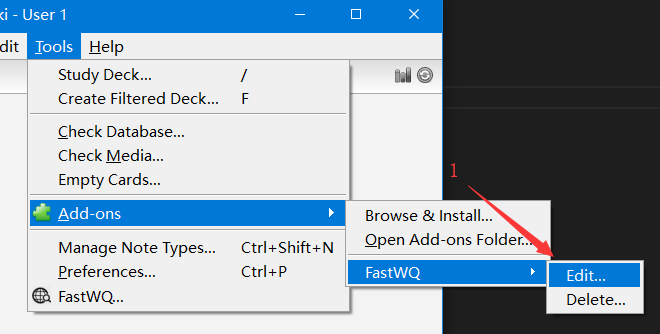
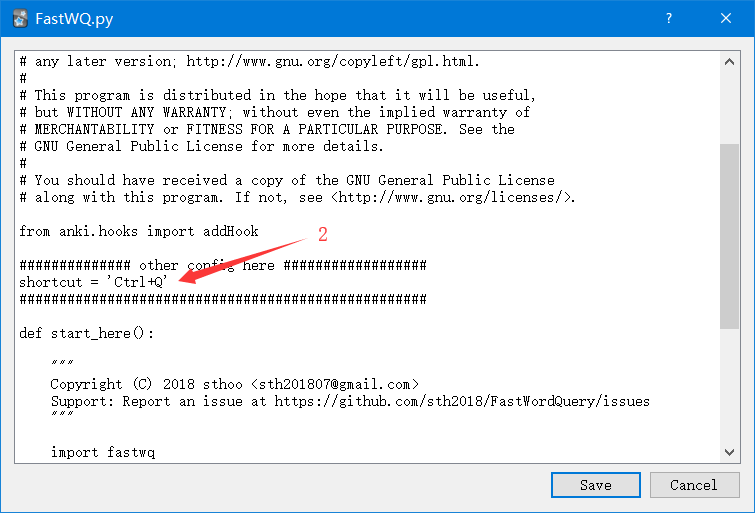
Click Menu “Tools -> Add-ons -> FastWQ -> Edit…” Edit the code and click Save
Config
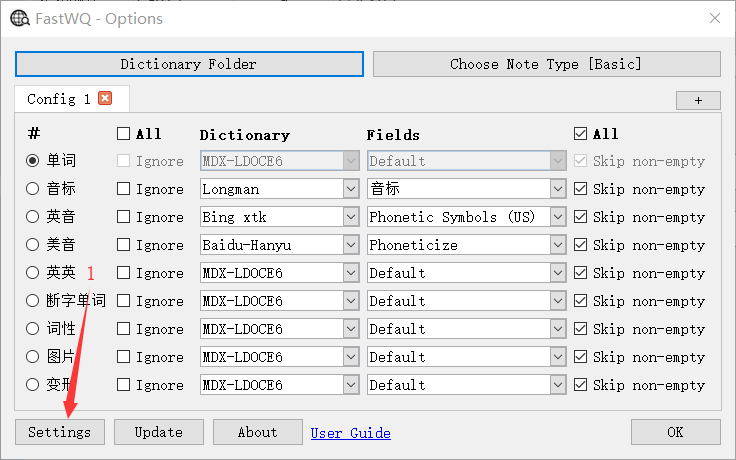
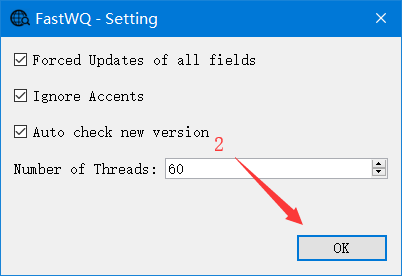
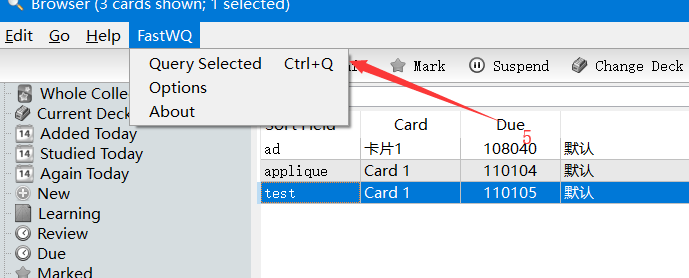
In Browser window click menu “FastWQ -> Options” Click Settings button in the Options window Force Updates of all fields : Update all fields even if it’s None Ignore Accents : Ignore accents symbol of word in querying Auto check new version : Check new version at startup Number of Threads : The number of threads running at the same time
Usage
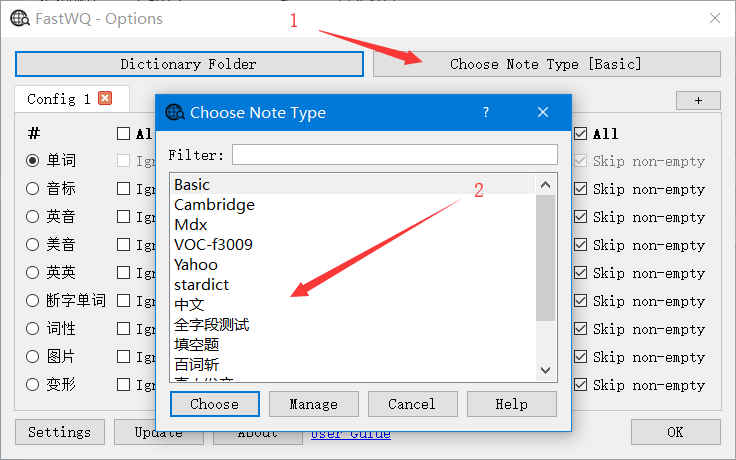
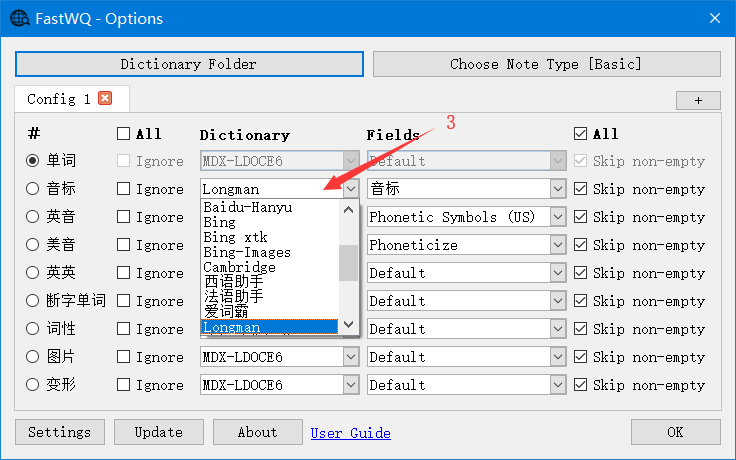
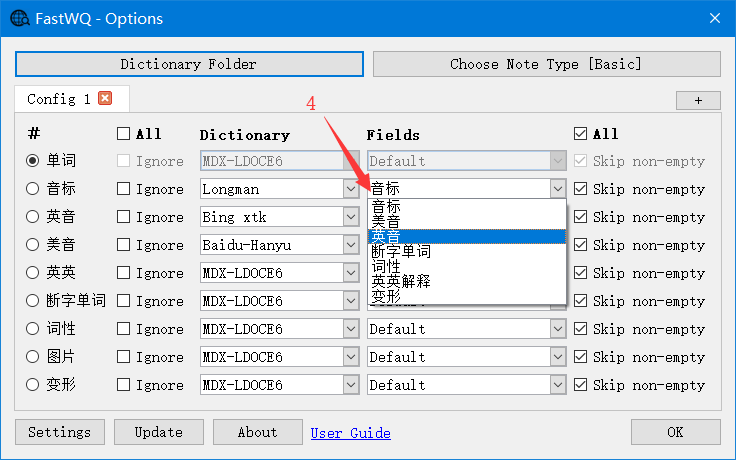
Set the query fields Click menu “Tools -> FastWQ”, or in Browser window click menu “FastWQ -> Options” Select note type Select Dictionary Select Fields Click OK button
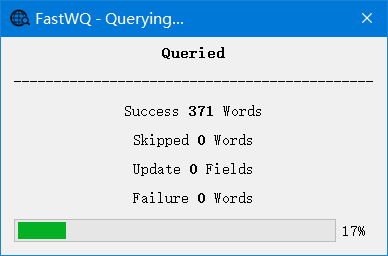
‘Browser’ Window Select single or multiple words, click menu “FastWQ -> Query Selected” or press shortcut Default is Ctrl+Q. Waiting query finished
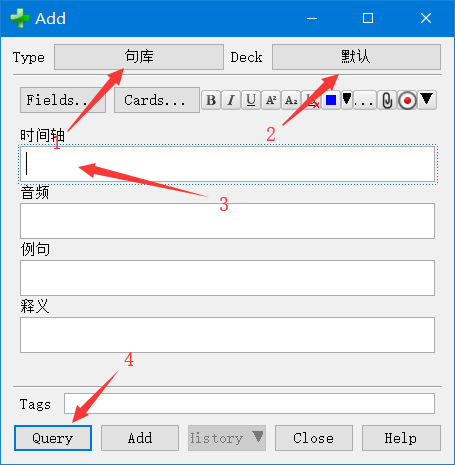
‘Add’ Window Click Add button in Browser window, open Add window Edit key field and click Query button
Other Projects Used
mdict-query pystardict WordQuery AnkiHub
Screenshots
Liên kết hỗ trợ
- https://sth2018.github.io/FastWordQuery
- https://github.com/sth2018/FastWordQuery
- HERE
- Supported Dictionaries
- 为单词添加真人发音(朗文mdx词典)
Reviews (29)
👍 2025-08-24
very nice
👍 2025-04-03
Anki 25.02 (038d85b1) (ao) Python 3.9.18 Qt 6.6.2 PyQt 6.6.1 Platform: Windows-10-10.0.26100
Traceback (most recent call last): File “aqt.progress”, line 121, in handler File “aqt.main”, line 231, in on_window_init File “aqt.main”, line 278, in setupProfileAfterWebviewsLoaded File “aqt.main”, line 330, in setupProfile File “aqt.main”, line 568, in loadProfile File “_aqt.hooks”, line 4107, in call File “anki.hooks”, line 37, in runHook File “C:\Users\otis\AppData\Roaming\Ank
👍 2025-02-17
It has frdict connect to 法语助手. Very helpful. Merci.
👍 2024-04-12
Anki 24.04 (429bc9e1) (ao) Python 3.9.18 Qt 6.6.2 PyQt 6.6.1 Platform: Windows-10-10.0.22621
Traceback (most recent call last): File “aqt.progress”, line 119, in handler File “aqt.main”, line 218, in on_window_init File “aqt.main”, line 265, in setupProfileAfterWebviewsLoaded File “aqt.main”, line 317, in setupProfile File “aqt.main”, line 496, in loadProfile File “_aqt.hooks”, line 4107, in call File “anki.hooks”, line 34, in runHook File “C:\Users\12\AppData\Roaming\Anki2
👍 2024-04-12
Anki 24.04 (429bc9e1) (ao) Python 3.9.18 Qt 6.6.2 PyQt 6.6.1 Platform: Windows-10-10.0.22621
Traceback (most recent call last): File “aqt.taskman”, line 142, in _on_closures_pending File “aqt.taskman”, line 86, in <lambda> File “aqt.taskman”, line 106, in wrapped_done File “aqt.sync”, line 124, in on_future_done File “aqt.main”, line 1060, in on_collection_sync_finished File “aqt.main”, line 1068, in <lambda> File “aqt.main”, line 659, in after_sync File “aqt.mediasync”, line 1
👍 2023-12-17
错误 运行出错。请在启动Anki时按住「Shift」键以临时禁用插件加载。 如仅在插件启用时出错,请使用「工具」>「插件」功能禁用部分插件后重启Anki,请重复上述步骤找出引起错误的插件并反馈给插件作者。 调试信息: Anki 2.1.64 (581f82c5) Python 3.9.15 Qt 6.5.0 PyQt 6.5.0 Platform: macOS-14.2-x86_64-i386-64bit Flags: frz=True ao=True sv=3 Add-ons, last update check: 2023-12-17 10:10:47 相关插件:Fast Word Query Multi-threaded queries for words from local or web dictionaries
[Errno 30] Read-only file system: ‘_fastwqcfg.json’ Traceback (most recent call last): File “/Users/yifanyu/Library/Application
👍 2023-11-04
Doesn’t work in 23.10. Fixed version: https://ankiweb.net/shared/info/1956435337
👍 2023-11-01
not working
👍 2023-09-25
Not working, but this fork provides a fix: https://ankiweb.net/shared/info/103636257
👍 2023-06-29
https://github.com/sirius-fan/FastWordQuery
Bless this man who fixed the issue! He forked the repo and did some adjustment, just download and copy paste all the files in “addons21/fastwq” to the add-on folder “1807206748” and restart the app.
👍 2023-05-23
If you are using the latest version, this add on will pop up error msg.
👍 2023-05-01
大佬可以增加俄语词典吗?网址是这个:https://en.openrussian.org,一个特别好用的俄语词典,简洁清晰。
👍 2023-03-05
Error
An error occurred. Please start Anki while holding down the shift key, which will temporarily disable the add-ons you have installed.
If the issue only occurs when add-ons are enabled, please use the Tools > Add-ons menu item to disable some add-ons and restart Anki, repeating until you discover the add-on that is causing the problem.
When you’ve discovered the add-on that is causing the problem, please report the issue to the add-on author.
Debug info:
Anki 2.1.60 (76d88073) Python 3
👍 2023-02-07
try to use older version of anki like 2.1.49 to query words when needed
I mean ,you can download two versions of anki at the same time!
usually use the latest one 2.2.54,when you need to query a batch of words you can turn back to the 2.1.49 version
REMMBER to use the “downgrade and quit” button when shifting version!!!
这个插件只支持旧版anki,那么同时用两个版本就好了,同步一下
(anki精神股东就是我)
👍 2023-02-05
Try to use older version of Anki.
I got the same problem also just as below.
And the problem was solved when I change Anki version from 2.1.57 to 2.1.35.
“有一个错误发生了.请在按住shift键的同时启动Anki,这样可以临时的忽略掉你已经安装的插件。
如果仅仅是因为插件引起的问题,请选择工具>插件菜单项来将出错的的插件设置成失效,然后重启Anki,重复以上的步骤直到你发现了具体是哪个插件引起的问题。
当你已经发现是因为插件引起的问题,请在我们的支持网站上 add-ons section 上报告问题。
调试信息”
👍 2023-01-31
Error
An error occurred. Please start Anki while holding down the shift key, which will temporarily disable the add-ons you have installed.
If the issue only occurs when add-ons are enabled, please use the Tools>Add-ons menu item to disable some add-ons and restart Anki, repeat until you discover the add-on that is causing the problem.
When you’ve discovered the add-on that is causing the problem, please report the issue on the add-ons section of our support site.
Debug info:
Anki 2.1.5
👍 2023-01-31
无法添加mdx版本的字典了。。。希望能够支持日语
👍 2023-01-06
very helpful
but only available on 2.1.49 or before
anki works fine in Win10 11, Mac will occasionally report errors but you can use shortcuts directly to query
👍 2022-11-12
Error
An error occurred. Please start Anki while holding down the shift key, which will temporarily disable the add-ons you have installed.
If the issue only occurs when add-ons are enabled, please use the Tools>Add-ons menu item to disable some add-ons and restart Anki, repeat until you discover the add-on that is causing the problem.
When you’ve discovered the add-on that is causing the problem, please report the issue on the add-ons section of our support site.
Debug info:
Anki 2.1.5
👍 2022-09-22
Lỗi
Đã xảy ra lỗi. Vui lòng khởi động Anki trong khi giữ phím shift, điều này sẽ tạm thời vô hiệu hóa các tiện ích bạn đã cài đặt.
Nếu sự cố chỉ xảy ra khi bật tiện ích, vui lòng sử dụng Công cụ > Danh mục Tiện ích để tắt một số tiện ích và khởi động lại Anki, lặp lại cho đến khi bạn phát hiện ra tiện ích đang gây ra sự cố.
Khi bạn phát hiện ra tiện ích bổ sung đang gây ra sự cố, vui lòng báo cáo sự cố trên trang tiện ích.
Thông tin gỡ lỗi:
Anki 2.1.54 (b6a7760c) Python 3.9.7 Qt 6.3.1 PyQt
👍 2022-09-07
an excellent work. there is only one little problem, i can’t use it to catch pictures from bing. while a month ago i could even do this.
👍 2022-08-08
can’t use on Anki 2.1.54
👍 2022-07-11
====== July 11, 2022 ==== incompatible with version【macOS 10.14.4+ (Intel, 2.1.54 Qt6)】======
Error
An error occurred. Please start Anki while holding down the shift key, which will temporarily disable the add-ons you have installed.
If the issue only occurs when add-ons are enabled, please use the Tools > Add-ons menu item to disable some add-ons and restart Anki, repeating until you discover the add-on that is causing the problem.
When you’ve discovered the add-on that is causing the pro
👍 2022-06-20
錯誤
發生了一個錯誤。請按住 Shift 鍵啟動 Anki,這將暫時停用你已安裝的附加元件。
若問題只在附加元件啟用時發生,請使用「工具」>「附加元件」選單項目停用部分附加元件,然後重新啟動Anki,並不斷重複,直到你找到導致問題發生的那個附加元件。
當你無法找到造成問題的附加元件時,請回報問題至網站附加元件支援網站。
除錯資訊:
Anki 2.1.53 (96bacf79) Python 3.9.7 Qt 5.14.1 PyQt 5.14.1
Platform: Mac 11.3
Flags: frz=True ao=True sv=2
Add-ons, last update check: 2022-06-20 08:52:25
可能涉及的附加元件:Fast Word Query Multi-threaded queries for words from local or web dictionaries
Caught exception:
Traceback (most recent call last):
File “/Users/lin/L
👍 2022-05-31
错误
有一个错误发生了.请在按住shift键的同时启动Anki,这样可以临时的禁用您已经安装的插件。
如果仅仅是因为插件引起的问题,请选择工具>插件菜单项来将出错的的插件设置成失效,然后重启Anki,重复以上的步骤直到你发现了具体是哪个插件引起的问题。
当你已经发现是因为插件引起的问题,请在我们的支持网站上 插件支持 上报告问题。
调试信息:
Anki 2.1.49 (dc80804a) Python 3.8.6 Qt 5.14.2 PyQt 5.14.2
Platform: Windows 10
Flags: frz=True ao=True sv=2
Add-ons, last update check: 2022-05-30 21:48:25
Caught exception:
Traceback (most recent call last):
File “C:\Users\thingkong\AppData\Roaming\Anki2\addons2
👍 2022-05-30
many thanks
👍 2022-05-03
can be used in 2.1.51
👍 2022-04-30
Some functions can’t work well.
👍 2022-03-26
Nicely done! Works perfectly!
