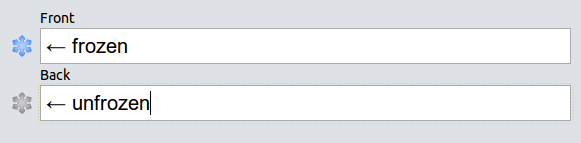
Frozen Fields allows you to conveniently sticky and unsticky a field right from the note editor:
!!!!!!!!!!!!!!!!!!!
IMPORTANT (2021-03-09): Anki 2.1.41 was just released, and while it comes with some cool changes, it does break a lot of add-ons, Frozen Fields included. I am working on a fix as we speak. If your workflow depends on Frozen Fields or any of the other affected add-ons, please hold off on upgrading and/or install Anki 2.1.40 for now.
!!!!!!!!!!!!!!!!!!!
OVERVIEW
Anki supports sticky fields. A sticky field is a field whose value is not deleted when you switch to a different note. This can be very useful if you are making many notes in which a field either has the same value or changes very little.
Unfortunaly, marking a field as sticky is quite complex and breaks your workflow. Frozen Fields allows you to conveniently mark a field as sticky (freeze) or not sticky (unfreeze) right from the note editor. It’s much more convenient than the default way.
To freeze/unfreeze a field, just click the adjacent snowflake or use the corresponding hotkey (F9 by default). A blue snowflake means that the field is frozen and a grey snowflake means that the field is unfrozen.
HOTKEYS
F9: toggle field between frozen and unfrozen Shift + F9: toggle status for all fields
CHANGELOG
Version 2.1.1 – 2020-02-21
Dropped Anki 2.0 builds Improved inter-addon compatibility, e.g. in order to support Resize images in editor (thanks to Arthur and BlueGreenMagick) Fix a small issue with the latest changes (thanks to Arthur) You can view all past releases here.
HELP AND SUPPORT
Please do not use reviews for bug reports or support requests. I don’t get notified of your reviews, and properly troubleshooting an issue through them is nearly impossible. Instead, please either use the issue tracker (preferred), add-on support forums, or just message me at ankiglutanimate@gmail.com. Constructive feedback and suggestions are always welcome!
CREDITS AND LICENSE
Copyright © 2012-2015 Tiago Barroso Copyright © 2015-2019 Aristotelis P. (Glutanimate)
This add-on is based on Frozen Fields by Tiago Barroso. All credit for the original idea and implementation goes to him. The present fork and update to Anki 2.1 was made possible thanks to the generous support of a fellow Anki user who would like to remain anonymous.
Licensed under the GNU AGPLv3, extended by a number of additional terms. This program is distributed in the hope that it will be useful, but WITHOUT ANY WARRANTY. For more information on the license please see the LICENSE file accompanying this add-on. The source code is available on GitHub. Pull requests and other contributions are welcome!
MORE RESOURCES
Make sure to check out my socials for the latest add-on updates and news: @Glutanimate | / Glutanimate New: Receive notifications about new add-on releases via @AnkiUpdates Want to hire me to work on add-on for you? Get in touch at ankiglutanimate@gmail.com
SUPPORT MY WORK
If you like Frozen Fields, please give it a thumbs up and share it with your friends, so that more people can enjoy it!
A kind request: Writing, supporting, and maintaining Anki add-ons like these takes a lot of time and effort. If Frozen Fields has been a valuable asset in your studies, please consider using one of the buttons below to support my efforts by pledging your support on Patreon, or by buying me a coffee. Each and every contribution is greatly appreciated and will help me maintain and improve Frozen Fields as time goes by!
Pro-tip: Lots of exclusive add-ons and other goodies await on my Patreon page. Make sure to check them out!
!!!!!!!!!!!!!!!!!!!
IMPORTANT (2021-03-09): Anki 2.1.41 was just released, and while it comes with some cool changes, it does break a lot of add-ons, Frozen Fields included. I am working on a fix as we speak. If your workflow depends on Frozen Fields or any of the other affected add-ons, please hold off on upgrading and/or install Anki 2.1.40 for now.
!!!!!!!!!!!!!!!!!!!
Screenshots





Liên kết hỗ trợ
Reviews (27)
👍 2025-11-18
Not working
👍 2025-09-08
Not working in the latest version (;′⌒`)
👍 2025-08-24
very useful add-on but it is not working rn
👍 2025-08-10
doesn’t work in latest anki
👍 2025-07-29
Not working on the latest version
👍 2025-07-05
Does not work
👍 2025-02-16
Not compatible with the latest version of Anki
👍 2024-12-28
It isn’t compatible with the latest edition of Anki. Worst add-on ever made.
👍 2024-12-17
Hella good addon!
👍 2024-11-10
Great add-on. It’s part of my daily use in Anki. The newer Anki version included this function, however, I thank the author for keeping up the hard work ever since!
👍 2024-06-14
Thanks Comment from author before post was edited Hi, Frozen Fields is integrated into Anki (see the small pin icon in the top right corner of each editor field). There is no need to install this add-on on newer versions of Anki, which is why it’s marked as only compatible with older versions.
👍 2024-06-06
so good they made it permanent, OGs remember tho :salute: Comment from author 🫡
👍 2024-06-04
Why do people not read? Everybody gets the same comment that this functionality has found its way into the main app. Thanks for developing this, in any case. Comment from author 🤷♂️ just AnkiWeb review things, but thanks for the kind words!
👍 2024-05-31
Needs an update !!! Comment from author Hi, Frozen Fields is integrated into Anki (see the small pin icon in the top right corner of each editor field). There is no need to install this add-on on newer versions of Anki, which is why it’s marked as only compatible with older versions.
👍 2024-04-28
Please update!~ Comment from author Hi, Frozen Fields is integrated into Anki (see the small pin icon in the top right corner of each editor field). There is no need to install this add-on on newer versions of Anki, which is why it’s marked as only compatible with older versions.
👍 2024-04-09
Not working Comment from author Hi, Frozen Fields is integrated into Anki (see the small pin icon in the top right corner of each editor field). There is no need to install this add-on on newer versions of Anki, which is why it’s marked as only compatible with older versions.
👍 2024-04-02
2024.02.04. not working Comment from author Hi, Frozen Fields is integrated into Anki (see the small pin icon in the top right corner of each editor field). There is no need to install this add-on on newer versions of Anki, which is why it’s marked as only compatible with older versions.
👍 2024-02-26
dont work
Comment from author Hi, Frozen Fields is integrated into Anki (see the small pin icon in the top right corner of each editor field). There is no need to install this add-on on newer versions of Anki, which is why it’s marked as only compatible with older versions.
👍 2024-02-12
doesn’t work
👍 2023-11-13
not updated
👍 2023-10-17
not updated
👍 2023-10-08
very good for older versions
👍 2023-09-16
Nice stuff! It’s been helpful for so many people!!
👍 2023-02-12
While not needed anymore, was a great add-on on previous versions!
👍 2022-12-17
Helpful for those who use old versions of anki!
👍 2022-12-13
Updated to new version of anki so no longer need. Was amazing for the last few years. Thank you!
👍 2022-12-08
I’m sorry but this add-on is no longer needed becuase newer versions of Anki has this built in. Comment from author Right, but users on older Anki versions still exist, and they need a way to install Frozen Fields which this add-on provides. So it’s hard for me to understand the downvote here. It’s also kind of sad if every successful add-on that’s re-implemented by Anki ends up with downvotes at the end of its life, just because it was successful enough to be swallowed up by Anki. I think the r
