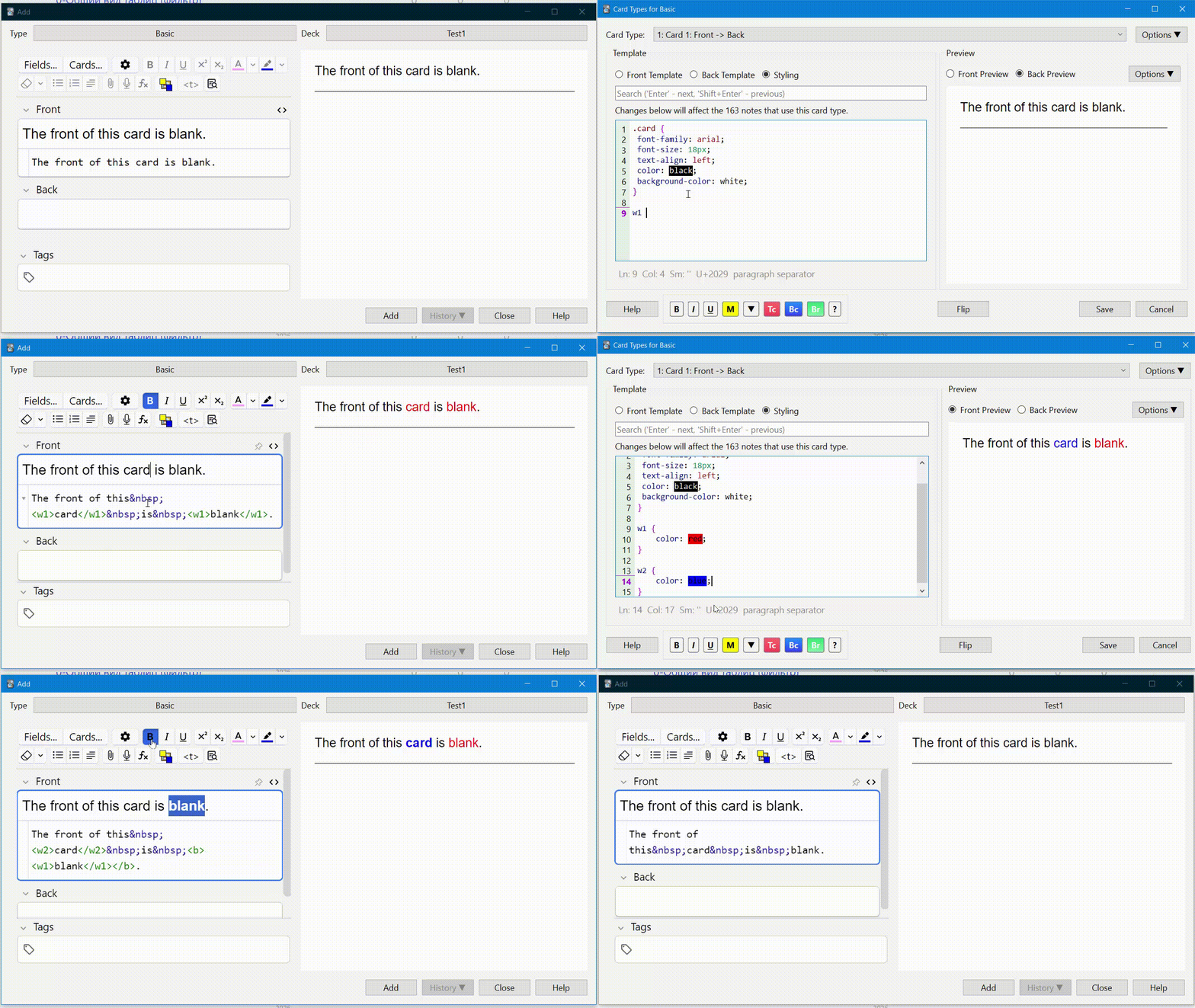
This very simple addon doesn’t even contain 200 lines of code and allows you to add one button with commands for wrapping selected text with your HTML code (you can change this in the configuration).
How to use it:
Why is this necessary?
I’m not a fan of excessive formatting, as the text should be minimal and clear, and important words can be bolded or italicized, with less color. In each note template (CSS applies to all cards in a single note), the user can specify their own style for how they want important words to appear. This could be a specific color or a color that depends on the application’s color theme. Specifying a fixed color would make it difficult for the user to read.
This add-on allows you to wrap your text in custom tags (here, ‘w1’ and so on) and then customize the CSS for these tags to suit your specific note type. Large and complex tags are not recommended, as they make the field’s HTML code difficult to read.
The standard configuration file looks like this:
{
“tags”: [
“<w1>$$</w1>”,
“<w2>$$</w2>”,
“<w3>$$</w3>”,
“<w4>$$</w4>”,
“<w5>$$</w5>”,
“<w6>$$</w6>”,
“<w7>$$</w7>”,
“<w8>$$</w8>”,
“<w9>$$</w9>”,
“<w0>$$</w0>”,
” [Ctrl+Shift+Space]”,
“removeformatALL() [Ctrl+Shift+-]”
]
}
You can change the configuration as needed. The $$ sign separates the code into the beginning and end of the wrapper. If you don’t specify a hotkey in square brackets after the final space, the default shortcuts are Ctrl+Shift+1, Ctrl+Shift+2, and Ctrl+Shift+0. The “removeformatALL()” command is special and is used to completely remove tags, as the standard tag removal doesn’t remove all tags, and the Ctrl+Shift+V shortcut, which should do this, currently doesn’t work in fields when editing.
HELP AND SUPPORT
Please do not use reviews for bug reports or support requests. And be sure to like, as your support is always needed. Thank you. I don’t get notified of your reviews, and properly troubleshooting an issue through them is nearly impossible. Instead, please either use the issue tracker (preferred), add-on, or just message me at andreykaiu@gmail.com. Constructive feedback and suggestions are always welcome!
VERSIONS
1.0, date: 2026-02-15. First release.
=========================
See my other addons and decks here: https://ankiweb.net/shared/by-author/1188253433
=========================
Screenshots