This add-on adds more information to the deck overview statistics.
Column explanation
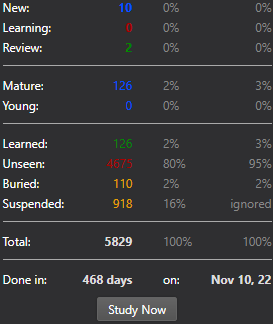
The first column shows how many cards belong to each respective category. (i.e., 711 unseen and 223 suspended cards in the image above) The second column shows what percentage of your cards fall into each respective category. (i.e., 46% unseen and 14% suspended cards in the image above) The third column shows the same information as the second, but does not count suspended cards towards the total number of cards (notice how the third column says ‘ignored’ in the ‘Suspended’ row), thus resulting in different percentages.
What’s new:
2025-02-17 — Fixed date format bug. Thanks to Tsung-Han Yu 2024-08-22 — Fixed an issue preventing the use of filtered decks 2024-08-21 — Added support for deck-specific ‘New cards/day’ daily limits for Anki version 2.1.55 and newer 2024-08-20 — Fixed issues caused by the newest add-on version when using Anki version 2.1.49 or older 2024-08-19 — Fixed congratulations page not showing up
Customization Options:
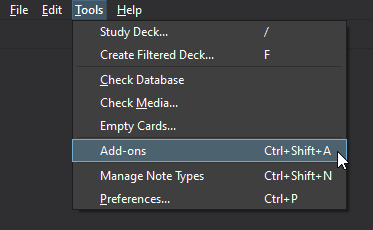
You can edit the config at: Tools — Add-ons — More Overview Stats 2.1 — Config
First click Tools and then Add-ons:
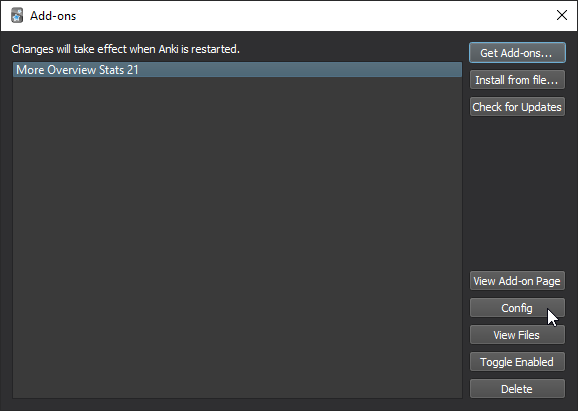
Then select ‘More Overview Stats 21’ in your add-on list and click on ‘Config’ on the right:
Note: If this option is greyed out, the config.json in the add-on folder is likely missing. In that case, simply create an empty text file in the add-on’s folder among the init.py, meta.json and More_Overview_Stats_2_1.py files and rename it to config.json. Make sure that the extension is .json and not .txt or .json.txt etc., otherwise Anki will not recognize the file. Restart Anki to reload the add-on.
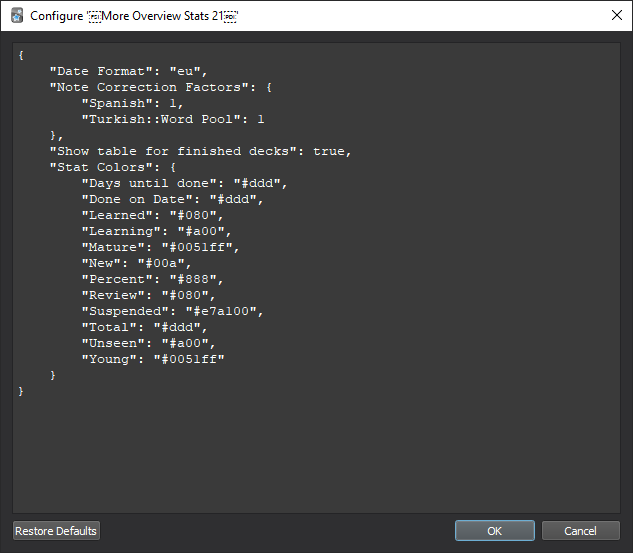
This will open the config screen:
Date formats
There are currently four shorthand forms for the date format with: “us” displaying the same as “%m/%d/%Y”, meaning: month/day/Year, ex: 04/26/2020 “asia” displaying the same as “%Y/%m/%d”, meaning: Year/month/day, ex: 2020/04/26 “eu” displaying the same as “%d.%m.%Y”, meaning: day.month.Year, ex: 26.04.2020 “iso” displaying the same as “%Y-%m-%d”, meaning: Year-month-day, ex: 2020-04-26
You can alternatively directly enter the date format like: “%m/%d/%Y” for the US. The most important directives are:
%d being: Day of the month as a zero-padded decimal number, i.e. 01, 02, …, 31 %m being: Month as a zero-padded decimal number, i.e. 01, 02, …, 12 %b being: Month as locale’s abbreviated name, i.e. Jan, Feb, …, Dec (en_US); Jan, Feb, …, Dez (de_DE) %B being: Month as locale’s full name, i.e. January, February, …, December (en_US); Januar, Februar, …, Dezember (de_DE) %y being: Year without century as a zero-padded decimal number, i.e. 00, 01, …, 99 %Y being: Year with century as a decimal number, i.e. 1970, 1988, 2001, 2013
“Date Format”: “%b %d, %y” would thus result in: Nov 10, 22 as shown in the topmost image. You can find further information and valid directives in the python documentation
Change colors
To change the colors of numbers in the stats screen, you will have to find the hex code of your chosen color and replace the one in the config as above. You can get the hex codes from sites like: HTML color codes Example:
Default: “Stat Colors”: { “Days until done”: “#ddd”, “Done on Date”: “#ddd”, … }
Change to: “Stat Colors”: { “Days until done”: “#ffffff”, “Done on Date”: “#ddd”, … }
This will make the text after ‘Done in:’ white. After that, just close the config with ‘Ok’ and your changes should be visible the next time you open a deck screen. Note: If you already have a deck screen open while changing these values, you will not see any change until you go back to the Anki main screen and click on a deck again.
Hide stats for finished decks
You can disable showing the stats on finished decks by changing: “Show table for finished decks”: true, to: “Show table for finished decks”: false,
Display note instead of card numbers
If you want the add-on to display the number of notes in a deck, instead of the number of cards, you can add the line: “note_correction_factors”: {} to the config.json. You then put the beginning of the deck name (including all parent decks) and the number of different notes. In the example below, we have a deck named ‘Word Pool’ within the deck ‘Turkish’. If this deck were to contain 3 different note types i.e., ‘Recognition’, ‘Production’, ‘Listening’, but we are only interested in how many unique words of this deck we know, we can change the factor to 3 down below. A deck with 500 words and 3 note types would have 1500 cards, changing the factor below to 3 makes the add-on display counts in relation to the 500 words. “Note Correction Factors”: { “Spanish”: 1, “Turkish::Word Pool”: 3 }
Contribute
For contributions, please check out this add-on’s GitHub page.
Credits
This add-on is based on the ‘More Overview Stats 2’ add-on by Martin Zuther (http://www.mzuther.de/) which is based on ‘More Overview Stats’ by Calumks (calumks@gmail.com)
Support my work
Creating and maintaining add-ons takes a lot of time, so if you like my work, please consider supporting me by buying me a coffee on Ko-fi.
Thank you very much!
Screenshots

Liên kết hỗ trợ
Reviews (28)
👍 2026-01-13
Super helpful and motivating after each study session!
👍 2025-09-25
This is perfect for stats I wanted to see regularly and doesn’t clutter up the main screen like other add-ons. I love that the author left instructions to change the colors. That was very helpful. I only wish I could change the bold font settings for individual statistics somehow (e.g. “Total” is displayed in bold, but I would personal like for my “Learned” stat to be displayed in bold). If this add-on is updated in the future, a Tools-menu window to configure colors and other options would be n
👍 2025-09-10
I just discovered this addon, honestly my primary use for it is being able to easily/quicky see my total known and remain per deck. (without having to go into stats and then settings to all (how annoying). What I wish for is like, on the main page, a % right next to the deck that indicates [total learned cards in deck] think something like that would ever be possible? cheers
👍 2025-08-06
Thanks, clean add-on.
👍 2025-05-27
Thank you
👍 2025-05-25
very useful love the skip button and customizations!
👍 2025-02-09
useful
👍 2025-02-06
Nice one. VEry good data showed
👍 2024-12-27
greatfull
👍 2024-12-10
I like it
👍 2024-10-21
Great! I like be able to see when (what date) I will finish a deck.
👍 2024-09-18
Useful!
👍 2024-08-22
Hi, I just updated this add on today, but the new update prevents me from using filtered decks and gives me an error when I click on them. Can you please fix this issue? I’m using version 2.1.65 Comment from author Hey there, I just published a new version of the add-on that should fix this problem. Please update to the latest version and let me know if you continue to have issues.
👍 2024-08-20
Thank you! This is great Comment from author before post was edited Hey there! I seem to have broken the add-on for Anki versions 2.1.49 and older in yesterday’s update, sorry for that! I have uploaded a new version that should fix the add-on for all Anki versions. Please let me know if you continue to have issues.
👍 2024-06-15
Great job! I am not sure how many people like me also want to know the overview for all decks. :)
👍 2024-06-04
Great Addon!!
👍 2024-04-16
For those who want to change the language, you have to do it manually In Anki>Tools>Select Add> View files (it will open the add folder) go to the “data” file and change/replace the words after = labels[“mature”] = “Mature” labels[“Young”] = “Young” labels[“unseen”] = “Invisible” labels[“buried”] = “Buried” labels[“suspended”] = “Suspended”
labels[“total”] = “Total” labels[“learned”] = “Learned” labels[“unlearned”] = “Unlea
👍 2024-03-17
didn’t realize how useful this was until i didn’t have it on a different device. hasn’t been updated since 2021 but still works perfectly on ver 23.12.1
👍 2024-01-23
Very useful
👍 2023-12-03
Great addon for data nerds :) Works without any issues in 23.10.
👍 2023-09-12
Muy bueno.
👍 2023-09-08
Very informative
👍 2023-06-22
Very useful.
Made a slight change in the code (right-aligned the third column because I find that more visually appealing).
👍 2023-05-30
Study english
👍 2023-05-01
Just awesome. This should be a default feature in Anki.
👍 2023-04-01
Works well
👍 2023-02-21
Really nice addon. All of the stats are very handy in assessing how much I have to learn and so forth.
Also, the author fixed the description of grey stats and added a requested feature which allows to customize colors!
Oh, and in case you can’t set the desired date format. You’ve got to change the first “Date Format” in the config, not the last one. Comment from author before post was edited Thanks! I have added explanations in the description above and you can now customize the colors throug
👍 2023-02-04
Hello friends, I would like to change the language. How do I do?
