Une langue s’apprend dans le système d’écriture qui lui est propre — Julien Fontanier
JapaneseFurigana is an Anki 2.1 add-on providing support for adding or removing furigana on Japanese content in cards. It supports ruby tags, bracket notation, bulk card generation and is intended to work cross-platforms, either on Windows, MacOS or Linux. Apple Silicon (M1, M2…) has an experimental support.
Edit > Bulk Generate Furigana to generate furigana on selected cards in the browse window Tools > Use ruby tags to generate furigana using ruby tags instead of bracket notation Tools > Ignore numbers to avoid generating furigana for numbers
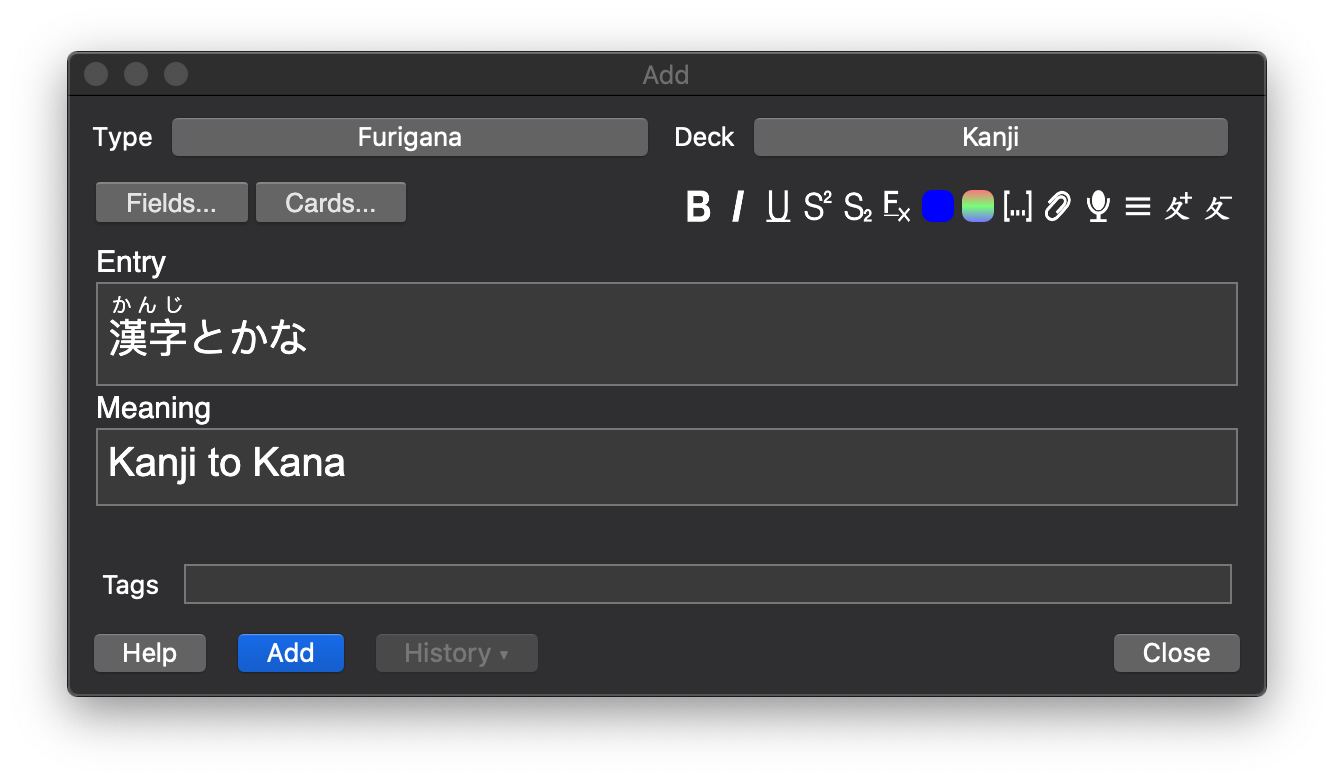
JapaneseFurigana adds two buttons in the card editor toolbar that detects kanjis and generates or removes their respective furigana readings. This tool is provided to the world free of charge, but I would appreciate if you could drop a 👍 as a token of gratitude 😊
Add furigana reading with ⌘R or Ctrl+R Remove furigana reading with ⌥⌘R or Ctrl+Alt+R
This plugin will generate furigana using the recommended bracket notation by default, but also offers compatibility with ruby tags generated by other tools such as ClozeFuriganaTools. I will try my best to offer a backward compatibility with older versions of Anki but I do not guarantee it. Japanese readings are generated by MeCab.
Screenshots
Liên kết hỗ trợ
Reviews (29)
👍 2026-02-22
You did a good job, god bless you!
👍 2026-02-15
Amazing Tool, but the bulk generate function only add normal bracket but not ruby tag, but work fine if I am not using the bulk generate function, so still very good to use.
👍 2026-02-13
This is so helpful easy to use.
👍 2026-01-25
Works on AnkiDroid too!!!
👍 2026-01-22
Love it. Definitely the most useful add-on I have used so far and everything works great! Thank you so much!
👍 2026-01-17
on 2026-01-03 works
👍 2025-12-20
It works, but the shortcuts do not.
Which means i will have to remove furigana one by one, from 5000 cards…
Does anyone know a way around this?
Thanks
👍 2025-12-10
Life saving <3.
👍 2025-12-02
hi, i have a problem, i cannot use the cmd shortcut & it doesnt show small letters (only brackets) when i convert in a bulk
👍 2025-12-01
Works great, thanks
👍 2025-11-22
really useful. had the same bug as already said: bulk only works without ruby characters, but changing the bulk file works. thx to whoever said to do it, btw
👍 2025-11-12
this plugin is fantastic. Head’s up, I’m also seeing behavior where bulk furigana always does bracket even when ruby option is selected. I worked around it by hard coding the function arg to true. Comment from author Interesting, might be a bug due to recent versions of Anki ? I’ll take a look once I get some free time !
👍 2025-11-11
Im just start to use Anki to learn Japanese, idk this is not a feature, is, indeed a great awesome ADD ON. Thank you so much.
👍 2025-10-23
Actually works
👍 2025-10-19
I’m one of those people too normie to fully understand the Anki UI so I expected this to be yet another complicated thing to use and it wasn’t. Super simple and works like a charm.
👍 2025-09-29
Very useful, though it would be better if it was able to apply furigana to selected kanji, so that I can practice reading sentences without it. At the moment I have to manually delete the furigana that I don’t want on the card. Comment from author Unfortunately Anki deleted the API that allowed us to read selected text in recent releases, so we’re unable to know what the user has selected :(
👍 2025-09-26
very nice. thank you author
👍 2025-09-16
I am unable to use the bulk generate feature because I encountered the following error:
“target undo op not found” Comment from author I just tried it, it works. If you can take some of your precious schedule to help a free project you didn’t pay a dime for, please do tell me exactly which card and kanji caused the error. On the GitHub project page made for this obviously. Like stated on this very page. I live for your charity.
👍 2025-09-03
Worked great. Had to set to use ruby tags personally but then everything worked perfectly.
👍 2025-08-28
کصشعر Comment from author Okay
👍 2025-08-25
Just installed it and added the code for the furigana to appear only when hovering over the kanjis and for now it works really well ! On laptop and on the iPad too, I’m impressed, thank you so much !!
👍 2025-08-25
holy, this is amazing, saves me a lot of time, thank you so much for making this
👍 2025-08-19
Works great, thank you!
👍 2025-07-22
Even I changed “useRubyTags” from false to true, Bulk Generate Furigana function can only generate bracket notation instead of ruby tags. Anything I have done wrong?
{ “ignoreNumbers”: true, “keyboardShortcut”: { “add_furigana”: “Ctrl+R”, “del_furigana”: “Ctrl+Alt+R” }, “lastDestinationField”: “漢字”, “lastSourceField”: “漢字”, “useRubyTags”: true } Comment from author Normally you shouldn’t edit directly the setting file, just going to Tools -> Use ruby tag
👍 2025-07-09
mantap
👍 2025-06-13
Works great, exactly as described. Thank you very much!
For those who want the furigana to appear when hovering over the kanji, add the following to the styling section of your card:
ruby rt { opacity: 0; transition: opacity 0.2s ease-in-out; font-size: 0.6em; padding-bottom: 0.5em; }
ruby:hover rt { opacity: 1; font-size: 0.6em; }
ruby:hover rb { font-size: 0.6em; }
👍 2025-06-10
Perfect! 👍 THX! ❤
👍 2025-06-06
Writing my first furigana using ruby and this is going to save hours, days even, switching between English and Japanese to type in Japanese with English brackets. So far, everything just seems to work as expected.
👍 2025-05-31
Thanks! Saved me a bunch of time.
