máobĭ (毛笔) is an Anki add-on to create cards with writing quizzes for Hanzi (Chinese characters). Please visit the maobi Github repository web page for a more detailed README.
Please use the Anki PyQt 6 version with this addon!
Quick start
Install the addon via the code found on the maobi Anki page Download and import the example deck Restart Anki. Open the deck and start writing!
Motivation
Learning Chinese is difficult, remembering what you have learned even more so. I heavily rely on Anki to review my vocabulary. It has changed my study life and made it possible for me to remember all the words, characters, chengyu, sentences and pass my exams.
While Anki itself is good to remember the meaning of words and characters, I found it difficult to use for remembering writing Hanzi. There is the possiblity of using AnkiDroid and the built-in whiteboard or defining a workflow as described in a blog entry of EastAsiaStudent. I tried it, but I did not like it too much.
A paid alternative that I used heavily in the past is Skritter. Right now, I really dislike the Version 2, their update policy and the bugs in the scheduling. It also is really unresponsive, making me wasting (lots of!) time by just waiting for the app. A contender of Skritter for mobile is Inkstone, but I did not get warm with that either.
Another aspect is that I personally do not like to use many different programs and tools to collect vocabulary. Therefore, I built maobi to remember writing Hanzi within Anki. Now, I have all my learning progress in one tool!
Configure the decks and note types for which maobi is enabled
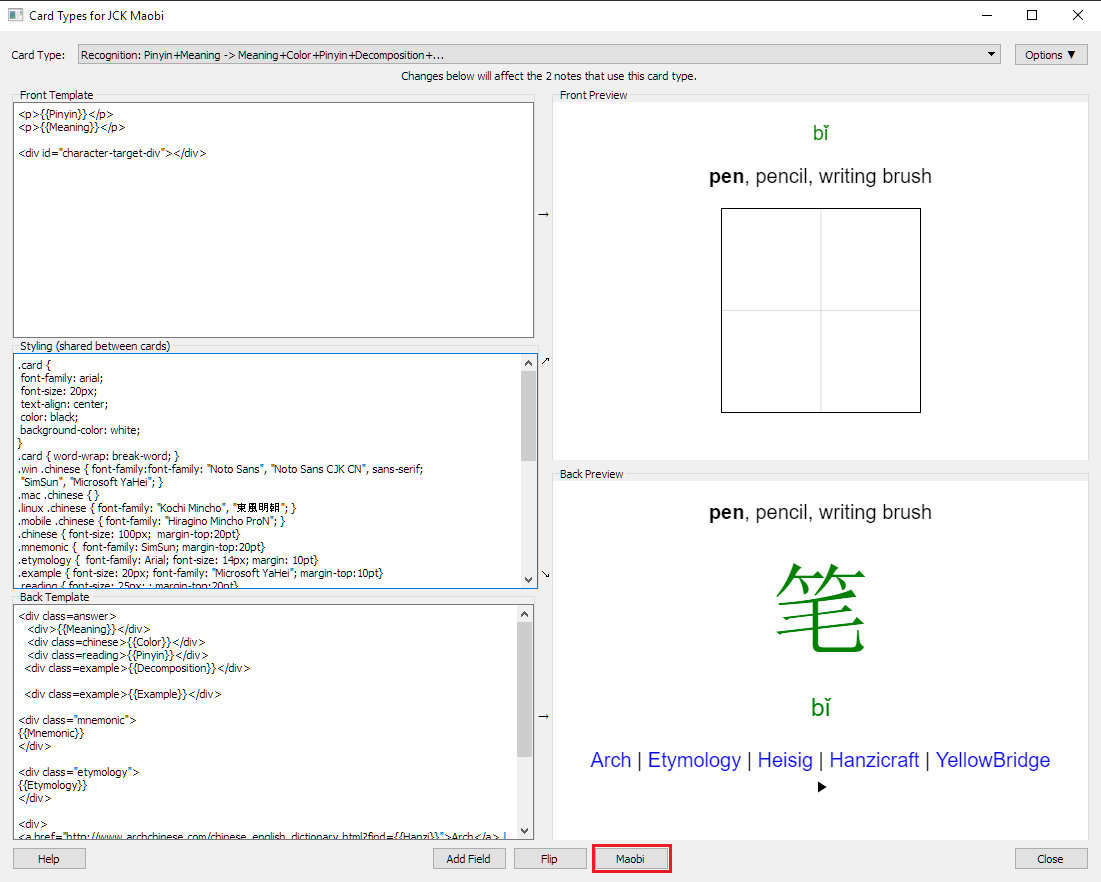
Before using maobi, it has to be specified for which decks and templates the add-on should be enabled. The field that contains the character to write also has to be given.
In order to tell maobi these values, you need to edit the add-on configuration. This can be done in the Card Layout view:
For more information, visit the maobi Github repository web page.
Disclaimer
This add-on right now just contains a basic implementation. It is by no means feature complete or well-tested. If you have feature requests or encounter bugs, please open an issue in the issue tracker.
Change log
0.6.0
Adapt to PyQt 6
0.5.2
Filter non-Chinese characters Adjust stroke color to night mode
0.5.1
Adapt to changes coming with 2.1.33 API
0.5.0
Update to new 2.1.20 plugin API Restart button
0.4.0
Add optional reveal button. Quizzes with multiple characters work. Can configure after how many wrong strokes hints are displayed.
0.3.1
Added missing file to Anki package.
0.3.0
Refactor plugin code. Configuration is now per deck and template Add config dialog Display error messages on exception
0.2.2
Refactor plugin code. Add grid background option
0.2.1
Change default configuration to use example deck parameters
0.2.0
Change configuration to enable different fields for the same deck, e.g. to quiz simplified and traditional Make grid size configurable
0.1.0
First release
Screenshots
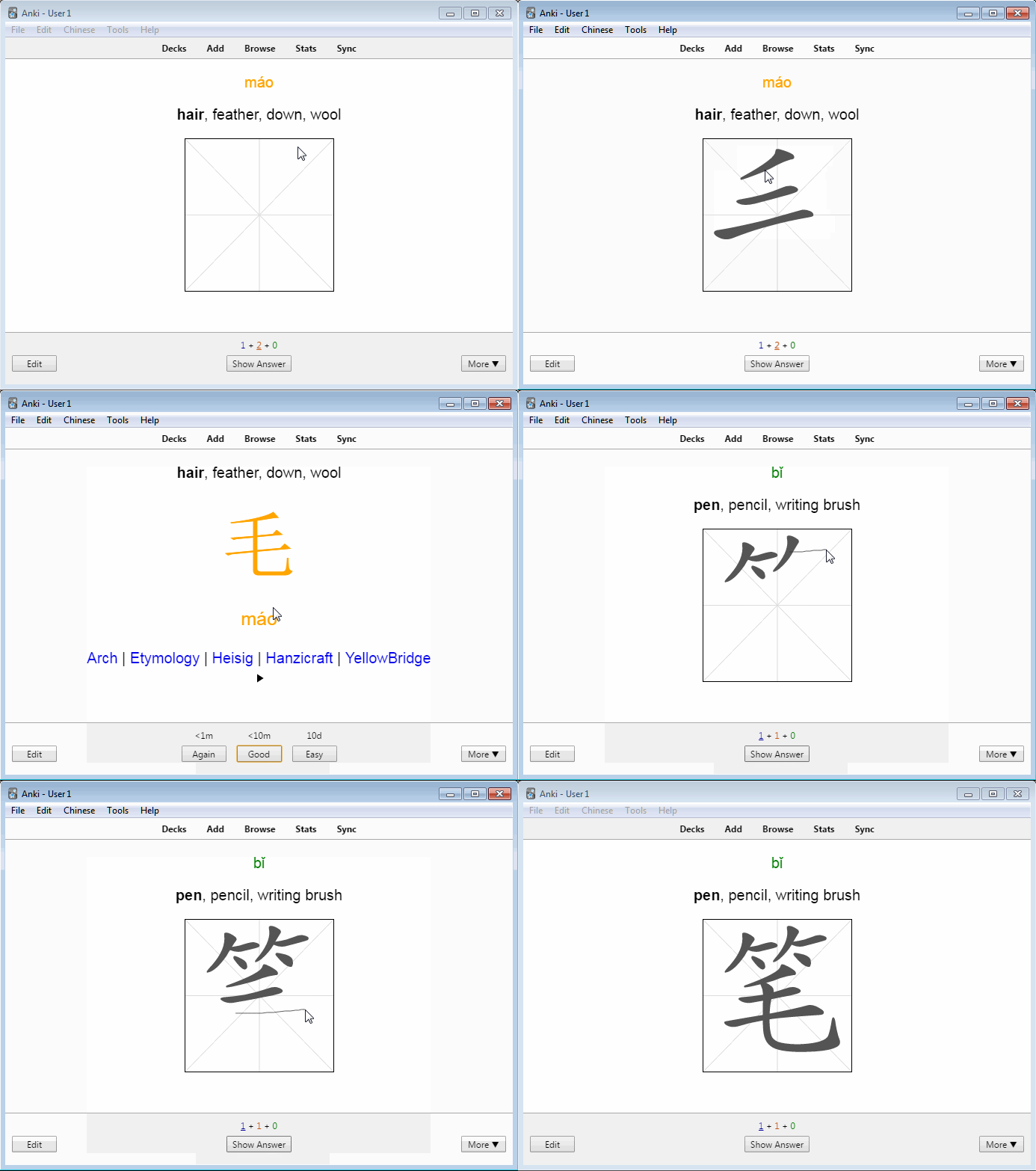
Liên kết hỗ trợ
- Contact Author
- maobi Github repository web page
- example deck
- AnkiDroid
- maobi Github repository web page
Reviews (20)
👍 2025-01-01
Great man, you are really somthing
👍 2024-03-01
Even testing with the proposed example, it doesn’t work. After having managed to make it work by rewriting the field, deck and template data identically, but I have to redo everything every time I launch anki.
When I try to click on “maobi” from the card type configuration menu, it gives me an error message saying: type object ‘Qt’ has no attribute ‘Horizontal’. I don’t know if this is a problem specific to my anki or if it’s generalized.
👍 2023-12-02
This is amazing! Just make sure to go into the card settings and add the <div id=“character-target-div”></div>
Thank you so much author for making this!!
👍 2023-11-15
Very useful!! Thank you very muchh!
👍 2023-11-03
thank youuuuu so muchhhhhh! you save my life bro
👍 2021-07-22
Awesome addon.
👍 2021-07-01
A real helper to learn Chinese! Thank you very much!
I encountered no bugs so far but I’d like you to add a feature if you have the time. Could you merge the {{Hanzi}} and {{Color}} fields together? Pardon me if I miss the point, but I think it’s less intuitive to have the same data twice on one card.
Anyways, thanks for the hard work :)
Edit: Could you also make it work on AnkiDroid? It is way more convenient to write on a phone than a computer. Thanks!
👍 2021-04-07
Hey. I have a problem with this deck. I think the idea is great, but after a couple of days from installing it the tab for writing characters disappears from the front of the card, and it’s impossible to write them. And how to make it work on the phone (I want to practise writing characters on my iPhone 11, I’m going to buy ANKI in App Store). Please help
👍 2020-09-10
pretty good! it works both with mouse and touch screen which is really nice. however, it’s not compatible with the surface pen which is a little downside for me but that’s something small. it’s a useful addon.
👍 2020-07-14
Really helpful add-on! Thank you so much! Can it work on android device (AnkiDroid)?
👍 2020-04-17
It works well! Unfortunately though, it doesn’t seem to work with my Surface Pen (note: I also tried enabling “Let me use my pen as a mouse in some desktop apps” in the pen settings and with an other addon called Touchscreen the pen does work). I can use my finger though which is alright but not ideal.
👍 2020-03-08
Excellent for learning how to write
👍 2020-01-27
Awesome addon! It really helps me to improve my writing and to learn new Hanzi. Maobi is super dynamic, eg it can be used in a separate card type to mix in writing tests in the normal learning schedule. Thanks so much for creating this!
👍 2020-01-12
与此插件冲突:https://ankiweb.net/shared/info/1128979221,冲突会使后者插件无法查询出拼音 Comment from author For me it works, Can you open an issue on https://github.com/jcklie/anki-maobi and give a more detailed error description?
👍 2019-11-16
very good, thank you!
but how can I use it on my phone? Comment from author We have a workaround for Iphone, please see https://github.com/jcklie/anki-maobi#can-this-be-used-on-mobile
👍 2019-10-28
Fantastic resource, thank you ! Surprisingly easy to use and flexible.
Only limitation is it doesn’t seem to work on my phone.
👍 2019-08-18
I get 404 error during installation.
Sorry, wrong version programme.
👍 2019-07-02
very useful!
👍 2019-02-26
Very useful! Looking forward to using it on AnkiMobile for iPhone.
👍 2018-12-18
thank you for the documentation, very helpful!
