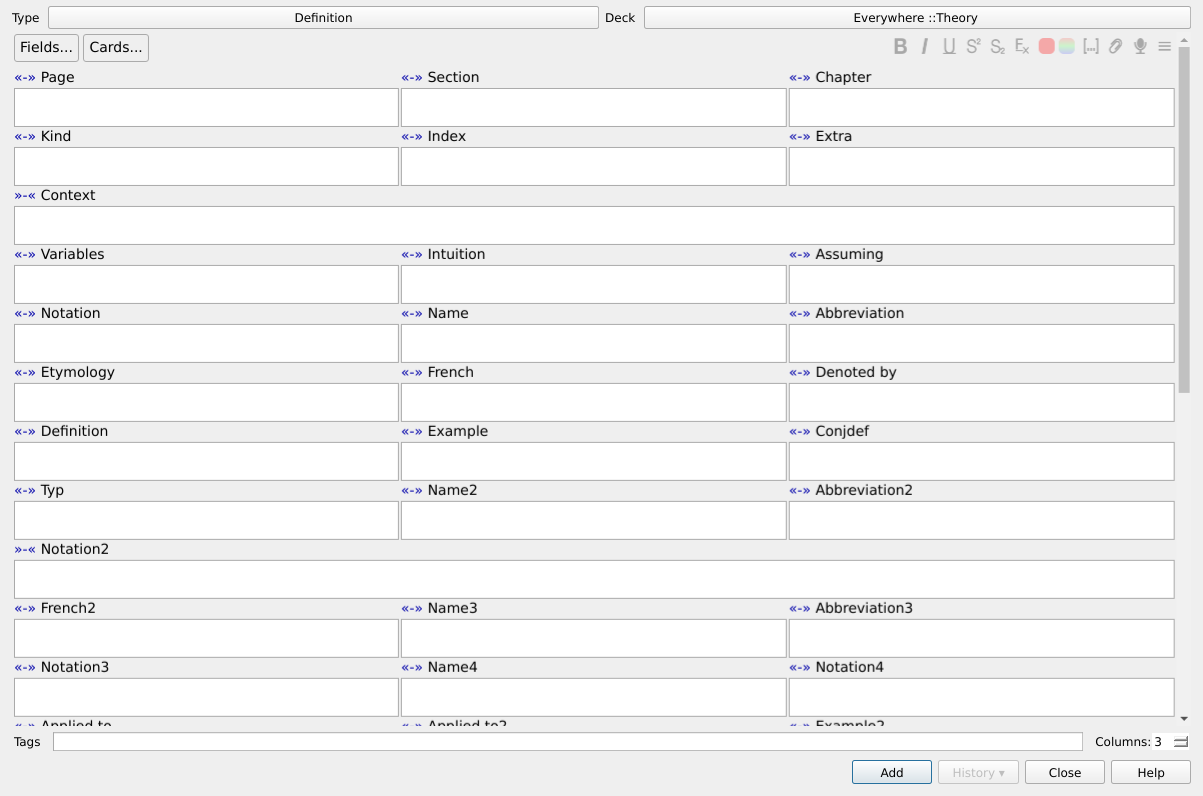
Use multiple columns in the note editor. You can easily change the number of columns shown using the Columns field added by the add-on, and you can have a different number of columns for different note types and window types (browser, note adder, etc).
If you have any fields that take up a lot of space, you can configure them to take up an entire row by clicking on the small link ”»-«” near it, or the shortcut (by default F10)
If you want to use the add-on Frozen Field, please use the version https://ankiweb.net/shared/info/389392894
Current version: 2.6 Changes in 2.6:
- Fix image overflow Changes in 2.5:
- Anki 2.1 support. The add-on will no longer receive updates for Anki 2.0.x Changes in 2.4:
- You can now choose fields to take up an entire row. Changes in 2.3:
- Remember column count on a per-note-type basis (in addition to screen). Changes in 2.2:
- Column count setting is in the corner now instead of own line (more space!)
- Don’t stretch the table vertically (that was annoying and looked bad). Changes in 2.1:
- Remember the column count depending on context (i.e., separate counts for browser, note adder, etc).
Screenshots
Liên kết hỗ trợ
Reviews (29)
👍 2024-09-17
Thank you developers hssm and Arthur-Milchior! This addon has been useful for an extended period of time! Unfortunately version 2.6 of this addon was outdated by Anki browser code update since version 2.1.50.
Workaround: Try the CSS Injector Change default editor styles addon https://ankiweb.net/shared/info/181103283 , in editor.css add
.fields { grid-template-columns: repeat(2,1fr) ;}
That’s it.
👍 2023-11-28
causing crashes everytime
👍 2023-11-21
This was an extremely useful add-on.
👍 2022-10-11
Waiting for the update :))
👍 2022-09-20
The last version of this addon that can work is 2.1.49. I have tried 2.1.50-54, but none of them can work.
👍 2022-08-22
Sorry I have to downvote, but the add on doesn’t currently work for me using 2.1.54. I have the exact same problem as here https://github.com/Arthur-Milchior/anki-Multi-column-edit-window/issues/29
👍 2022-06-06
Amazing add-on, anxiously waiting for the update.
👍 2021-11-18
Great addon, thanks to the authors! very helpful for big notes with many fields.
I found a bug (?) or a drawback rather - after installing the addon and in the Anki (latest to date) nightmode, the pin buttons in the add new note dialog are hardly seen (I even thought they disappeared), black (when pinned) or dark-grey (unpinned) on the dark-grey background of the nightmode Anki.
Please fix this or instruct how to adjust these colors manually.
UPD: just checked in daymode - the behaviour
👍 2021-11-11
Very useful for note types with a lot of fields - in my view a ‘must have’ addin
👍 2021-10-21
Great way to save real estate in the Cards editor.
👍 2021-07-10
it is not good support with Quick Field Focus; can’t change the focus on 9th and above field ,could you have look at it?
wonderful,it is great if it can work with the add-on Custom Styles 1899278645
👍 2021-04-03
I reinstalled this add-on and found it works fine now, thanks. Comment from author before post was edited Can you please post the error on github (use “contact the author”) so that we can discuss it and I can debug
👍 2021-03-01
An indispensable addon. But since Anki 2.1.35 one has to be very careful since the addon surreptitiously injects a lot of HTML junk into one’s own cards – say when one presses the RETURN key. I’ll open a GH Issue in a minute.
I’m on macOS Mojave, with Anki 2.1.40.
👍 2020-10-11
very nice.
👍 2020-09-30
Causes error when moving multiple cards to a different deck in Anki 2.1.33
👍 2020-09-09
Very useful!
👍 2020-07-20
beautiful!
👍 2020-06-01
Very useful addon, fantastic!
👍 2020-05-21
It works well for me. Thanks.
👍 2020-05-21
Newest update (May 21st 2020) is broken! Crashes Anki on launch. Comment from author Would you please be kind enough to post a bug report on github so that it can be debugged ?
👍 2020-04-11
Used to work great but new update made images overflow into other columns. Comment from author Can you please put a bug report on https://github.com/Arthur-Milchior/anki-Multi-column-edit-window/issues and a screenshot, so I know what’s wrong and how to correct it.
👍 2020-04-10
It doesn’t work since the last update Comment from author Can you please put a bug report on https://github.com/Arthur-Milchior/anki-Multi-column-edit-window/issues and a screenshot, so I know what’s wrong and how to correct it.
👍 2020-01-31
great add on. recent update fixed issue with pictures not fitting in their column and overextending into adjacent columns
👍 2020-01-23
Very neat. Plasters the console with “uncaught cmd mceTrigger” and “JS error on line 150: Uncaught TypeError: Cannot read property ‘innerHTML’ of undefined”, though.
👍 2019-09-21
awsome
👍 2019-07-01
Didn’t work for me either - just gave error when I hit edit. Was trying to use on Pepper Sketchy deck. - MacOs Mojave
👍 2019-05-27
Broken in build 2.1.12 (Windows X)
👍 2019-02-11
Does not work for 2.1, provides error message after opening browser and clicking on any card
👍 2019-01-26
Buggy. For a month now, it was absolutely perfect. It saved me so much time. Weirdly enough, it became buggy recently. On one computer, the columns would be ~3 cm away from each other even though anki is in full screen. On another computer, it didn’t work. I tried adjusting the column numbers and reinstalling the addon to no avail.
