It’s an addon that loads toggle lists from Notion as notes to a specified deck.
Short demo and configuration how-to: YouTube
- You provide a set of Notion page ids to export
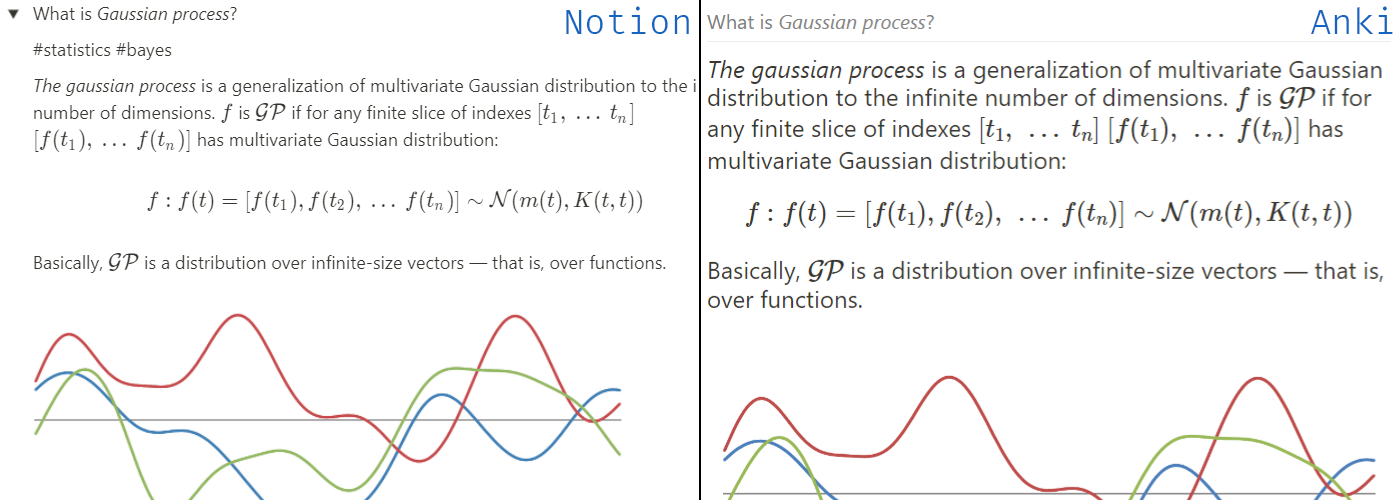
- Every “toggle list” block from Notion will be converted to an Anki note
- Title of the toggle block will become the front side and its content — the backside
- The line starting with #tags will be parsed as tags
- Ignore toggles by putting symbol ❕ in front of a toggle title (type ”:!” in Notion and select the white one)
Clozes can be added via code blocks in toggle titles. Backside will be ignored (apart from tags). Synchronization can work in the background or can be triggered manually from the Notion submenu in the Tools section. Note that background sync does not remove any notes; if you want to remove the obsolete notes, then trigger Load and remove obsolete from the submenu.
Requirements
-
Notion API token To get Notion API token log in to Notion via a browser (assuming Chrome here), then press Ctrl+Shift+I to open Developer Tools, go to the “Application” tab and find token_v2 under Cookie on the left.
-
Notion page ids To get Notion page id open up the page in a browser and look at the address bar. 32 chars of gibberish after a page title is the page id: https://www.notion.so/notion_user/My-Learning-Book-8a775ee482ab43732abc9319add819c5 ➡ 8a775ee482ab43732abc9319add819c5
Edit plugin config file from Anki Tools ➡ Add-ons ➡ NotionAnki ➡ Config and paste Notion token in notion_token config parameter, your Notion username as notion_namespace and fill in notion_pages section.
Known issues & limitations Behind the scenes, the addon initiates Notion pages export to HTML, then parses the HTML into notes. Since non-public Notion API is used, the addon may break without a warning.
- As for now, LaTeX and plain text cannot be used in the same cloze: Notion puts them in separate code tags which leads to the creation of two cloze blocks.
- Some toggle blocks are empty on export which leads to empty Anki notes. The issue is on the Notion side (and they’re aware of it).
Configuration parameters
- debug: bool [default: false] — enable debug logging to file.
- sync_every_minutes: int [default: 30] — auto sync interval in minutes. Set to 0 to disable auto sync.
- anki_target_deck: str [default: “Notion Sync”] — the deck loaded notes will be added to.
- notion_token: str [default: None] — Notion APIv2 token.
- notion_namespace: str [default: None] — Notion namespace (your username) to form source URLs.
- notion_pages: array [default: [] ] — List of Notion pages to export notes from.
Inspiration This project is inspired by a great notion2anki.
Screenshots
Liên kết hỗ trợ
Reviews (24)
👍 2025-03-22
Kinda confusing to use, errors on load
👍 2025-03-22
Did not support importing into multiple decks.
Ended up using this add on https://ankiweb.net/shared/info/576859862
👍 2025-01-24
It’s perfect! As someone who doesn’t know anything about programming, I thought I wouldn’t be able to install it, but with the help video it was easy. It’s the most useful addon. I like to have a deck in Anki and a page in Notion just to sync and thus have more control over how the flashcards arrived in Anki.
👍 2024-05-20
El complemento es perfecto, he estado usandolo varios meses y funciona a la perfeccion, ultimamente he tenido fallas con las imagenes, en notion importo imagenes para las flashcards en anki y aparece una imagen totalmente diferente en mis flashcards y tengo que cambiarla manualmente, agradeceria le hecharas un vistaso, por lo demas me haz salvado horas y horas de estudio, lo agradezco bastante!
👍 2024-04-25
IT WORKS! Thank you very much for doing this, it works well and also includes colors and shapes of notion.
¡FUNCIONA! Muchas gracias por hacer esto, funciona bien y también incluye colores y formas de Notion.
👍 2024-03-30
Works quite good for me, currently the best option to sync from Notion to Anki.
Somehow the configuration of page-IDs is a bit confusing. I configured one certain Page-ID but somehow all Pages of my Workspace are used for the export. Well in my case it’s positive since i wanted to export the toggles of all pages anyway.
Also the syncing process seems to be a bit confusing, sometimes i have to restart anki to be able to see the synced data.
I am using manual syncing but somehow always when i s
👍 2024-03-18
It works! I just followed the instructions. I still have to figure out how to add different sites. Is there a way to add all toggles from all pages that are linked in the main mother page ?
👍 2024-01-18
This is great! A game-changer for studying for board exams. Any way you could specify a particular deck for different notion pages to be synced to?
👍 2023-11-18
Very good, is there a way to have a background for cloze note and not “Clozes can be added via code blocks in toggle titles. Backside will be ignored (apart from tags).” thank !
👍 2023-08-01
It’s great.
👍 2023-05-06
This addon works great. A tool like 2anki.net did not work for me at all, and this is already integrated into Anki, so you do not need to export pages from Notion, upload them somewhere, download results, unzip results, and import them to Anki.
Amazingly, this works with Notion databases flawlessly. And the support for tags is also great! Thank you for this addon!
👍 2023-05-02
I am very grateful for your work and your assistance. You have helped me a lot with this project and I appreciate your efforts. Thank you very much for your dedication and professionalism.
is work perfectly 😍😍😍😍
👍 2023-04-12
Edit ==>> working perfectly well, TKS =]
for me it is an essencial add-on, but a few days ago it stopped working (in linux), tried everything and got nothing, even tried with flatpak version of anki but I get error on inicialization:
“Error
An add-on you installed failed to load. If problems persist, please go to the Tools>Add-ons menu, and disable or delete the add-on.
When loading ‘Notion Toggles Loader’:
Traceback (most recent call last):
File “aqt.addons”, line 247, in loadA
👍 2023-04-10
Stopped working for a few weeks but seems to be working again now after the update! Thank you author for making a great add-on and keeping it up to date!
👍 2022-08-22
Thansk
👍 2022-02-19
I would like to import my Notion pages into different decks in Anki
👍 2021-10-29
Great plugin ! But I still can’t get it work… I get this message when opening Anki : https://pastebin.com/kWGLUj9L
👍 2021-10-07
I love this add on. Notion is my productivity tool and I have been using Anki for examens over the last 3 years. Thanks to that plugin I have a way to link them and do Incremental Reading without effort.
👍 2021-09-15
Very Good. But I found two problems. No 1 is ‘recursive’ option does not work for me and it would be nice if data is synced from different pages have different name
👍 2021-07-03
Unfortunately, this is not working in 2.1.44. I get the notion config and everything seems to be working at that point, but the cards do not load into Anki. I even disabled all of my addons and nothing works. Hope to see this work again soon!
👍 2021-05-30
Good! I like this addon!
👍 2021-05-14
Won’t work on 2.1.35. Make sure you have the right update for anki first!
👍 2021-04-20
I know how useful this could be … I myself was looking for the exact solution to link Anki and Notion … however I get the following error upon loading up Anki
edit: the error is now gone, but I am using Anki on Mac and nothing happens when I click “load notes” … despite having configured the add-on to with my notion data
👍 2021-04-20
Was a little confusing at first, it would be awesome if there was a how-to video, but otherwise, it worked perfectly. Thanks!
