Text Formatting and Editing in the Context Menu
Available on AnkiWeb: https://ankiweb.net/shared/info/2143302836
GitHub: https://github.com/piccoripico/Text-Formatting-and-Editing-in-the-Context-Menu
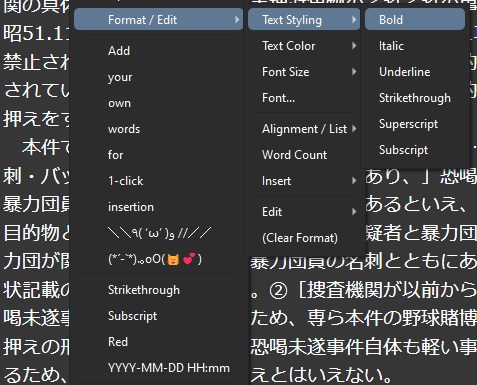
This addon aims to format and edit texts by clicking items in the context menu (right-click menu) in Anki.
Item list Text Styling - Bold / Italic / Underline / Strikethrough / Superscript / Subscript Text Color - Red / Green / Blue / Cyan / Magenta / Yellow / Black / White / backRed / backGreen / backBlue / backCyan / backMagenta / backYellow / backBlack / backWhite Font Size - Size 1 / Size 2 / Size 3 / Size 4 / Size 5 / Size 6 / Size 7 Font… (Font Dialog) Alignment / List - Justify Left / Justify Center / Justify Right / Justify Full / Indent / Outdent / Insert Unordered List / Insert Ordered List Word Count Insert - Link / Image / Blockquote / Date and Time / Horizontal Line / Special Characters Edit - Cut / Copy / Paste / Select All / Undo / Redo (Clear Format) User Words: You can register your own words and easily input them from the context menu. Config
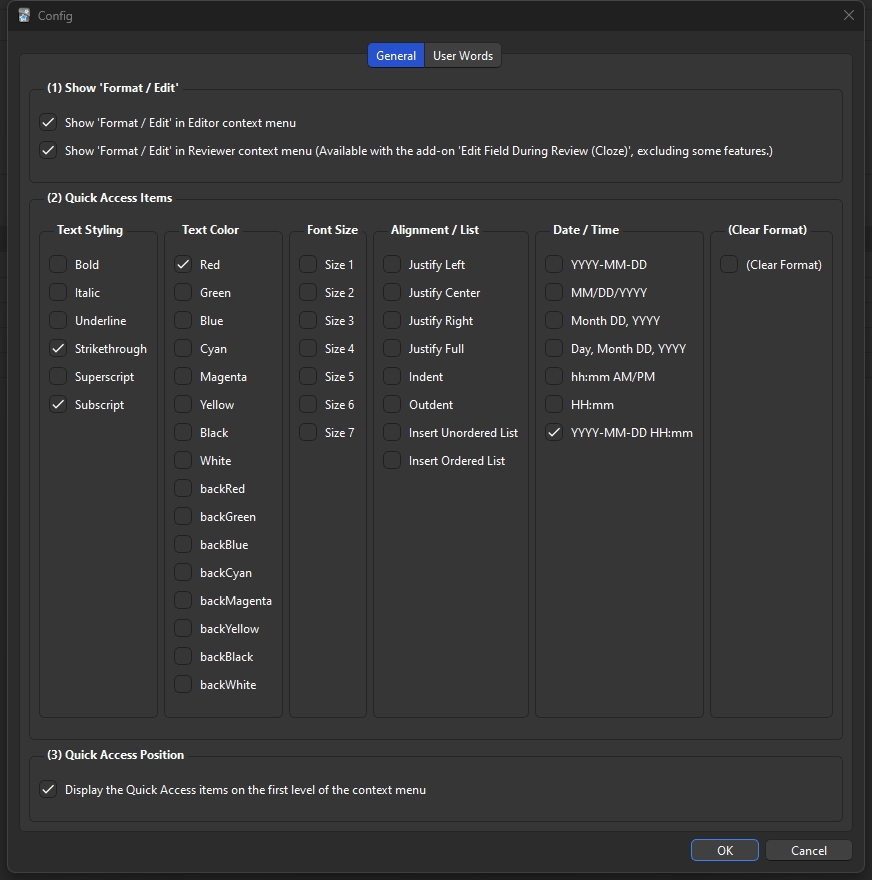
General Tab
(1) Show ‘Format / Edit’ Show ‘Format / Edit’ in Editor context menu. Show ‘Format / Edit’ in Reviewer context menu. (Excluding some features, this option is available only with this outstanding add-on ‘Edit Field During Review (Cloze).’ This is the reason why I created this addon.) (2) Quick Access Items (as listed in the image below) (3) Display the Quick Access items on the first level of the context menu
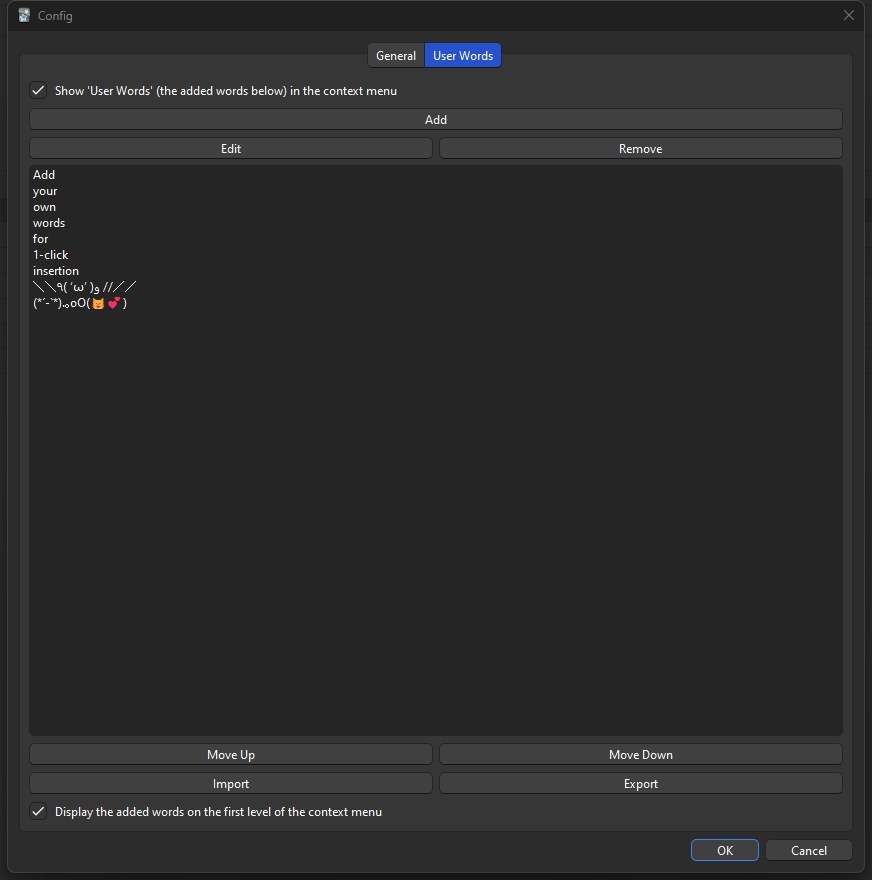
User Words Tab
Show ‘User Words’ in Editor and Reviewer context menus. Word list: Add/Edit/Remove a single word. Move selected item up/down. Import/Export a list (Please note that the file needs to have a line break after each word.) Display the added words on the first level of the context menu Note This addon uses a deprecated Javascript function “document.execCommand”. Official updates to Javascript may affect this addon in the future. Changelog 2025-04-15 Fixed an issue where the config window would not open 2023-07-27 Added config window (after this addon is updated, please restart Anki.) Added Quick Access feature Fixed some bugs 2023-07-29 Added option to display the Quick Access items on the first level of the context menu 2023-08-16 Added User Words feature 2023-09-03 Added explanation about reviewer context menu to config window (thanks for the feedback)
Screenshots
Liên kết hỗ trợ
Reviews (11)
👍 2026-01-01
Does not work with Anki 25.09.2 for windows.
👍 2025-12-18
Very nice, works with Anki Version 25.09.2 (build 3890e12c), running Python 3.13.5, Qt 6.9.1, Chromium 122. A lot of the legacy extensions break with the current Anki / updated anki version.
👍 2025-10-05
excellent addon!
works on Anki 25.09.2 (3890e12c) Python 3.12.11 Qt 6.9.2 Chromium 130 - Linux Flatpak
and with Edit Field During Review (Cloze) addon!!!
👍 2025-04-13
Worked with Anki 25.02 Fix the issue of opening the config form add-ons window.
-
Open add-ons files and edit this file /2143302836/config_ui.py
-
Change line 187 to self.button_box = QDialogButtonBox(QDialogButtonBox.StandardButton.Ok | QDialogButtonBox.StandardButton.Cancel)
-
Change line 307 to dialog.exec() Comment from author Thank you for the information. I’ve revised the addon with your comment as a reference.
I haven’t been using Anki recently and I’m not currently using version 2
👍 2025-04-05
Absolutely amazing!! finally someone with reason! Comment from author I’m really glad to hear that.
👍 2025-02-13
HELLO, LOVE YOU YOUR ADD ON IS VERY USEFUL FOR ME BUT HOW CAN I OPEN THE CONFIG WINDOW TO EDIT LIKE IN DESCRIPTION OF THIS ADD ON I DOWLOADED AND SET UP BUT I CAN’T SEE THE CONFIG BUTTON TO OPEN CONFIG WINDOW Comment from author Apologies for overlooking your comment. I have made adjustments to ensure that the addon functions correctly with the current version of Anki (25.02).
👍 2024-07-06
I LOVE YOU Comment from author ME TOO
👍 2024-06-11
That’s so helpful and awsome, tnx Comment from author I’m glad I could help.
👍 2024-04-02
After doing this add-on, my Anki stopped working, and I restarted my computer multiple times, deleted Anki/redownloaded it. For the life of me, I could not get it to work and eventually had to hold shift while opening the app. Then, once I finally got into it, I deleted this addon. Even after deleting it still had issues and had to revert back to a backup from earlier in the day to undo the damages. DO NOT use this add-on Comment from author I’m very sorry to hear about the situation you encount
👍 2023-08-31
Hello I am using Anki version 2.1.65 The add-on was working for a while, but after the last update (I think) it doesn’t work anymore. Please Help!
Edit 1: Everything looks normal. No error messages. The items appear in the Context Menu. Just when I choose something e.g bold, nothing happens. I am selecting both reviewer & editor options. After further investigation. It works on the browser editor & the normal card editor (the one when you press “E” when reviewing) but it doesn’t work in the re
👍 2023-04-05
Just perfect. Saves so much time Comment from author Thank you for the feedback. I’m glad I could contribute to time-saving. I have updated this addon for usability improvement (2023-07-27). Sorry for the delayed response.
