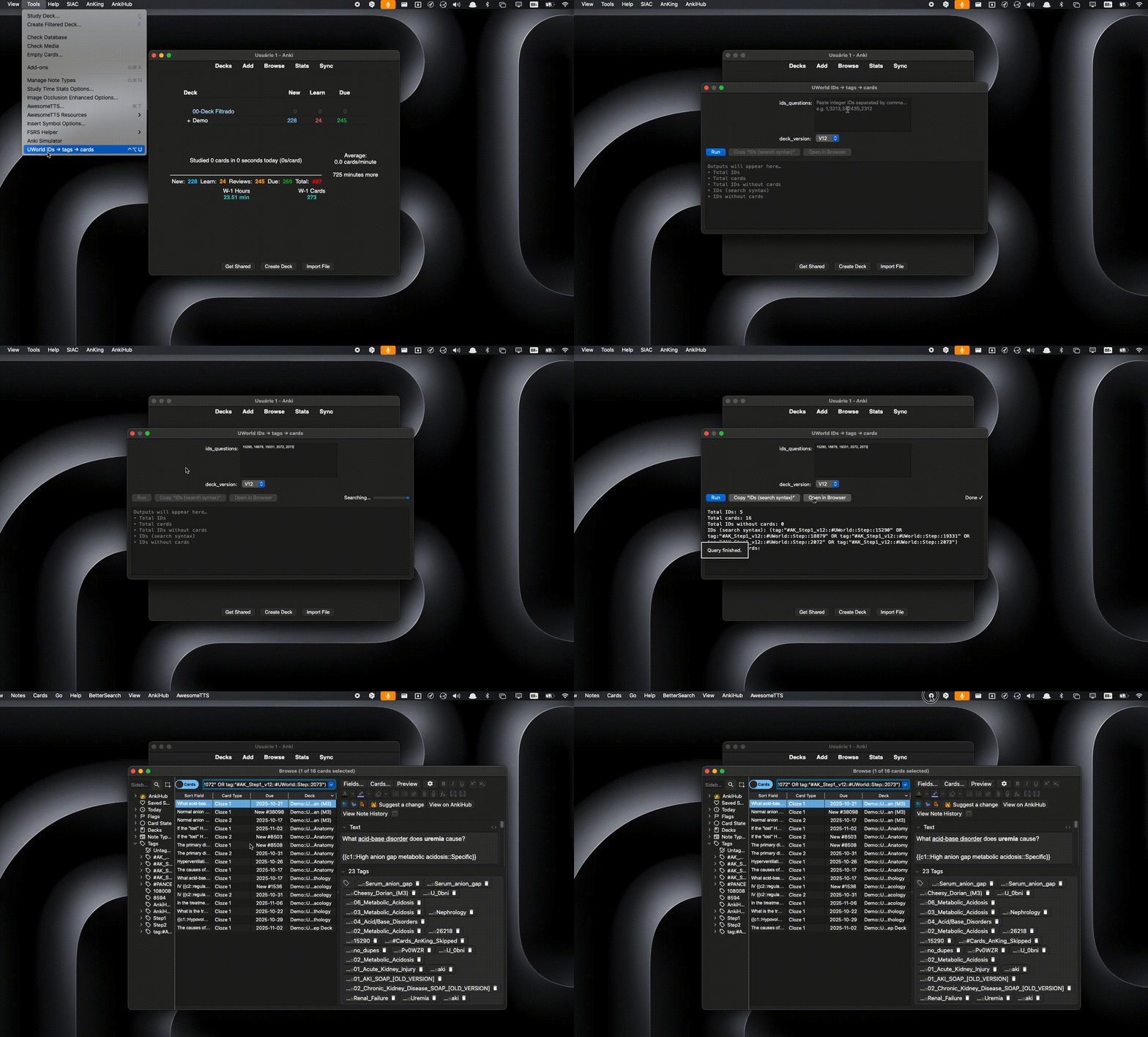
UWorld IDs → tags → cards
Searching questions by UWorld IDs is repetitive because of Anki’s specific search syntax and the risk that some IDs may have no cards attached. This add-on takes your comma-separated set of IDs and returns the correct Anki search syntax, also telling you if there are any IDs without cards and which ones they are.
It looks up integer IDs (e.g., 1,3213,342435) as tags in the pattern #AK_Step1_v12::#UWorld::Step::<ID> (or V11), counts cards found, lists IDs without cards, copies the search syntax, and opens the search in Anki’s Browser (automatically closing the add-on window).
✨ Features Fast input: paste IDs (comma-separated) and click Run Deck version: V12 (default) or V11 — persisted across sessions Automatic counts: Total IDs (input) Total cards found Total IDs without cards Ready-made search syntax: Copy “IDs (search syntax)” Open in Browser: runs the search and closes the add-on window Visual feedback: “Searching…” → “Done ✓” on every run Configurable global shortcut (Add-ons → Config) Compatible with Qt5/Qt6 and Anki 25.x (callback uses Future) No external dependencies 🧭 How to Use Tools → UWorld IDs → tags → cards (or use your global shortcut). Paste the IDs (e.g., 1,2312,3213,342435). Choose the version: V12 or V11. Click Run. Use Copy “IDs (search syntax)” to copy the query, or Open in Browser to run it directly in the Browser (the add-on window closes automatically).
The search runs over the entire collection, with no deck filter.
⚙️ Configuration Global shortcut: in Add-ons → (this add-on) → Config, set your keys (e.g., Ctrl+Alt+U on Windows/Linux; Meta+Alt+U on macOS). Default version (V12/V11): your choice is saved and reused next time. ✅ Compatibility Anki 2.1 (Qt5/Qt6), tested on Anki 25.x. macOS/Windows/Linux. No external libraries (plug-and-play). ❓ FAQ
No cards found, but I’m sure I have the tags. Why? • Make sure your tags exactly follow the pattern: #AK_Step1_v12::#UWorld::Step::<ID> (or #AK_Step1_v11::#UWorld::*::<ID>). • Try copying the query via Copy “IDs (search syntax)” and running it in the Browser.
Can I filter by deck? Currently the search scans the entire collection.
“Open in Browser” didn’t run the search — what now? Open the Browser, paste the search syntax manually into the search field, and confirm. If it still fails, check the add-on console (Tools → Add-ons → View Console) and report the log.
🐞 Bug Reports / Feature Requests
Please open an issue including:
OS + Anki version Steps to reproduce The exact IDs text you used Selected version (V12/V11) Console log (Tools → Add-ons → View Console) 📦 Changelog
1.0.0
Initial release: ID input, persistent V12/V11, counters, copy search syntax, open in Browser with auto-close, “Searching…/Done ✓” indicator, configurable global shortcut. 📝 License
MIT.
Screenshots