Autofills a field with note ID of the card. Starting with Anki version 2.1.28 I had to rewrite the old addon from scratch, because the old approach no longer worked.
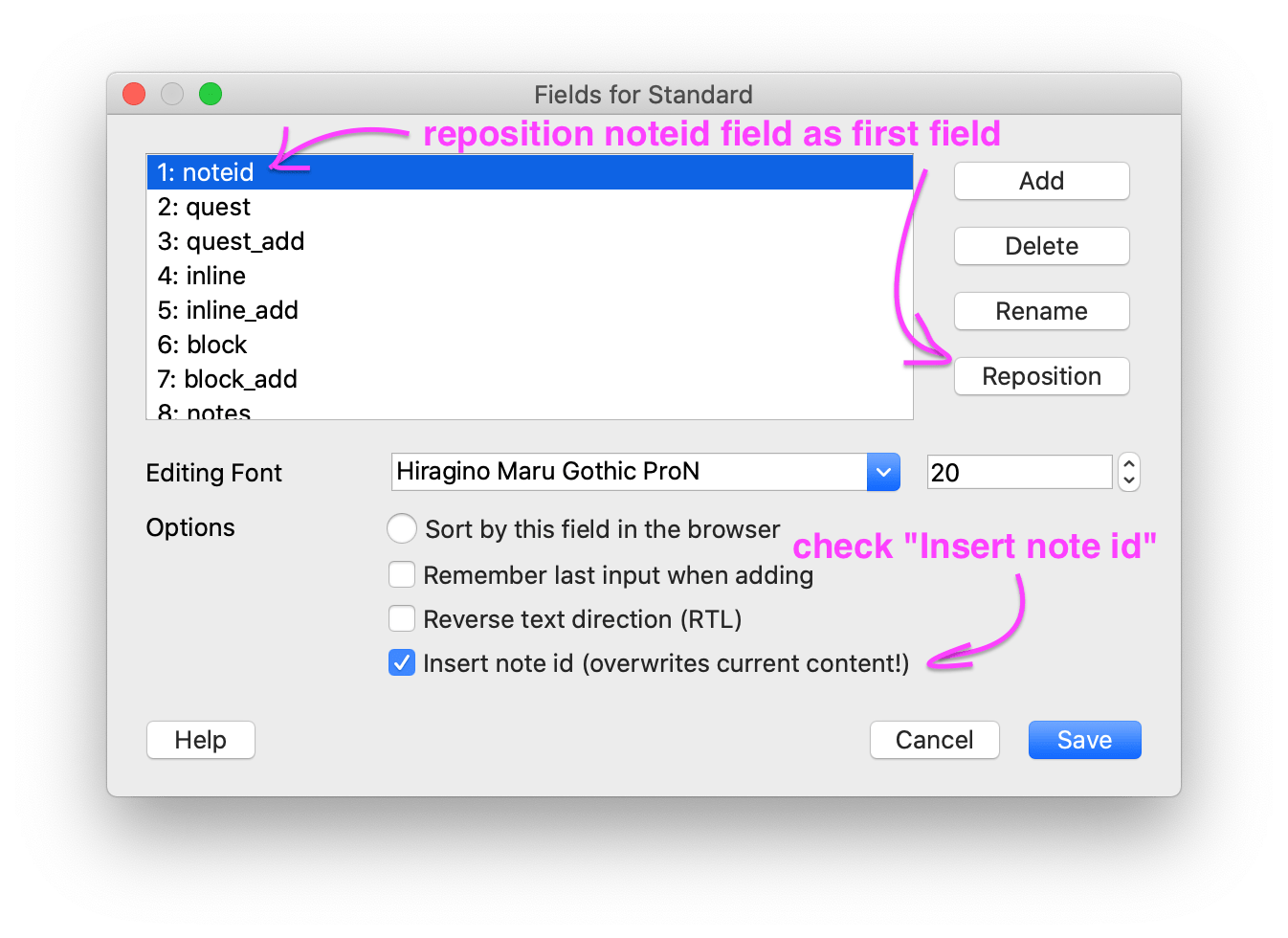
Starting with Anki version 2.1.28, you can enable the automatic insertion of the note id in the field dialog window, which you can access in the browser, or through the “Manage Note Types…” window.
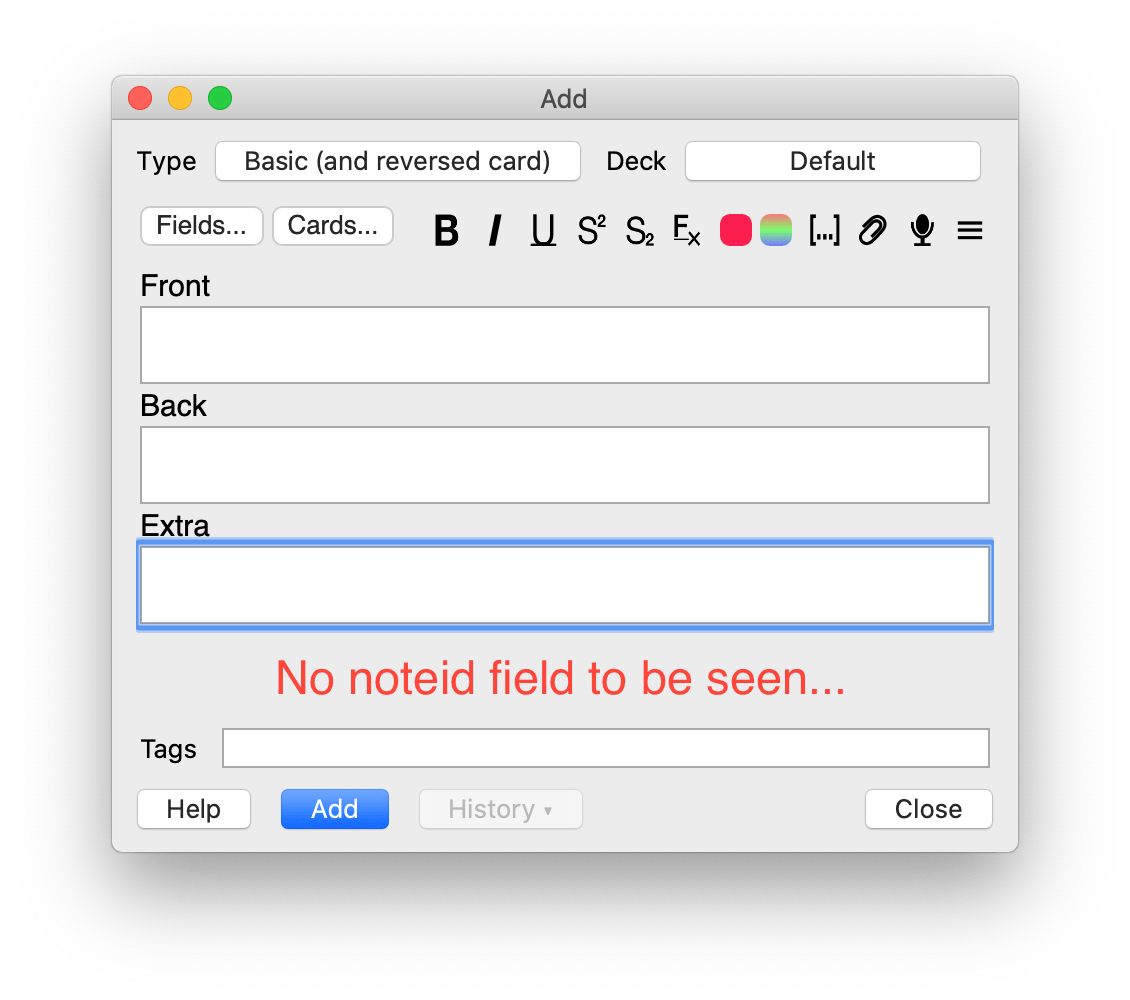
If you decide to turn one field into a note id field, this field will no longer be visible in the Add Cards window. This is because the note id can only be detected, after the card was inserted.
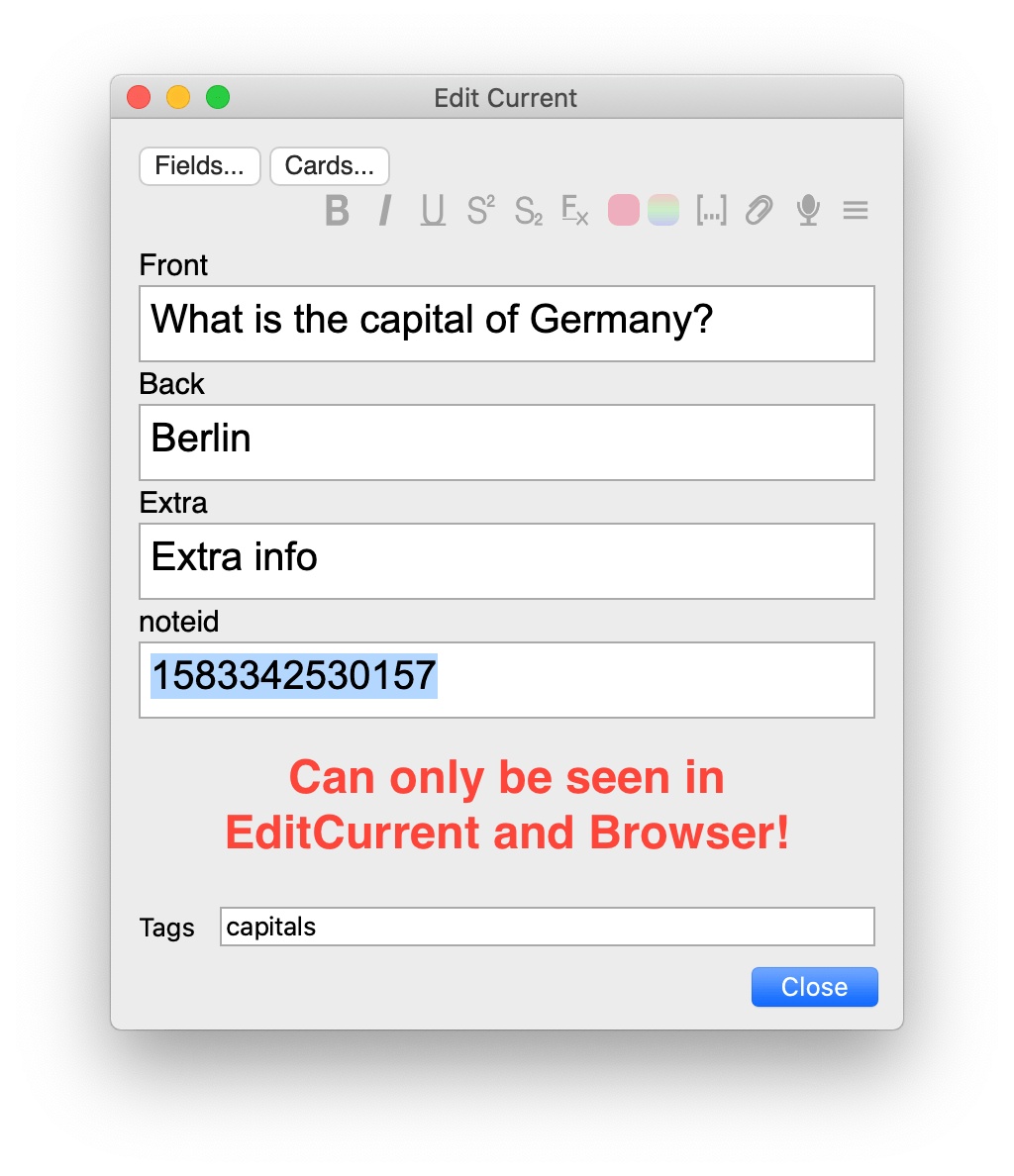
However in all other windows, the noteid field is just visible like normal.
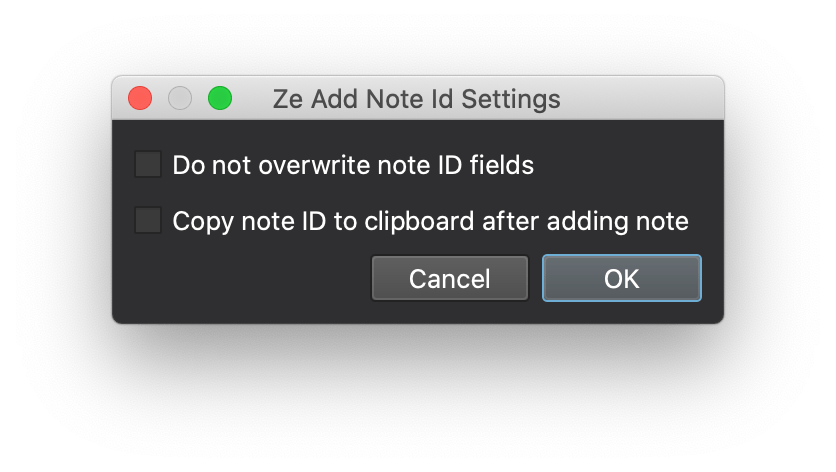
There are also two global settings, which can be used. They can be accessed from “Tools > Add-ons > Ze Add Note Id > Config”.
Do not overwrite note ids: Use this if you previously used ospalh’s Add note id and want to keep the altered note IDs. Note that this add-on did not exactly insert the note id, but rather subtracted constant values from it, which changed over the years. If you only care about having a unique ID, by which you can identify the note, this is sufficient.
Copy note ID to clipboard after adding note: Use this if you want to do something with the note ID after adding the note, e.g. paste it into your knowledge base.
Compatibility with Frozen Fields A big selling point of the old “Ze Add Note Id” (pre Anki v2.1.28) was its compatibility with Frozen Fields. This new version is still mostly compatible, but not 100%. This is however more of an issue with the Frozen Fields add-on rather than Ze Add Note Id. For this reason I made a new add-on Ze Frozen Fields with the same functionality as Frozen Fields, but without this issue.
All credit goes to ospalh for the previous version (before Anki 2.1.28): This previous version was an identical copy of “Add note id”, except two things:
It has the option “ShowFullNoteID”, to add the full note ID, rather than a note ID which has been decreased by the value of 15e11. It works with Frozen Fields, because “Z” alphabetically comes after “F”, as opposed to “A”. The things is, “Add Note Id” wraps a function, which “Frozen Fields” overwrites. First wrapping, then overwriting: No. First overwriting, then wrapping: PROFIT!
Support If you like my add-ons, you can consider supporting me. My add-ons will always be freely available for everybody, but what I can offer you is my sincere thanks, and first-hand technical support, if you have any questions/issues with my add-ons. At the same time it allows me to put more time and focus into developing these and making them as powerful and user-friendly as they are. Thanks for considering!
ko-fi.com/hgiesel patreon.com/hgiesel
Screenshots



Liên kết hỗ trợ
Reviews (30)
👍 2025-03-20
In newer versions of Anki, an internal card ID is assigned so that the first field is no longer required to be unique. This may be why this add-on is not being updated. I have kept my note ID fields, because I have automations in place that rely on a predetermined field order and I’m too lazy to remove the note ID field and change the automation code; so here we are. At any rate the fix is simple. If you are on macOS, from your favourite terminal, it’s just:
### 👍 2024-10-03

Not compatible with latest version of anki Oct 2024

### 👍 2024-02-02

Let's all doff our caps to this great veteran of an add-on, which has done yeoman service over the years … ;)

It seems to have found a worthy successor in 'Add note ID (Fork for Anki 23 by Shige)'.

(an add-on like this is still needed in 23.10+ b/c Anki won't let you add cards with identical first fields)
Comment from author before post was edited
Yes. I also use this search filter, to look for obviously wrong noteids: "(-("noteid:_____________") or (-("noteid:15*" or "noteid:16*")))". I use t

### 👍 2023-12-19

Update on 2023/12/19:
For those facing the compatibility problem, that is, seeing "No module named 'PyQt5'" in the debug report, do the following.
1. Locate 2 files: `886709118/src/field_dialog.py` and `886709118/gui/settings_ui.py`. The full path should be shown in the debug report (the last "File" line).
2. Change the "PyQt5"  to "PyQt6". You should see it at the very first code line.
Enjoy!

Original comment:
Very nice! Not only because the original Add Note ID no longer work smoothly on my m

### 👍 2023-12-12

This add on is awesome. It would be better if I can choose between add Note Id and add Card Id.

### 👍 2023-12-12

Not compatible with the latest Anki version

Anki 23.10.1 (fac9e0ee) Python 3.9.15 Qt 6.5.3 PyQt 6.5.3
Platform: macOS-14.1.2-arm64-arm-64bit
Flags: frz=True ao=True sv=3
Add-ons, last update check: 2023-12-11 09:38:21

When loading Ze Add Note Id:
Traceback (most recent call last):
  File "aqt.addons", line 245, in loadAddons
  File "/Users/q/Library/Application Support/Anki2/addons21/886709118/__init__.py", line 1, in <module>
    from .src import init
  File "/Users/q/Library/Application Supp

### 👍 2023-11-27

Anki 23.10.1 (fac9e0ee) Python 3.9.15 Qt 6.5.3 PyQt 6.5.3
Platform: macOS-13.4.1-arm64-arm-64bit
Flags: frz=True ao=True sv=2
Add-ons, last update check: 2023-11-27 15:59:35

When loading Replay buttons on card:
Traceback (most recent call last):
  File "aqt.addons", line 245, in loadAddons
  File "/Users/q/Library/Application Support/Anki2/addons21/498789867/__init__.py", line 17, in <module>
    from PyQt5.QtCore import QUrl
ModuleNotFoundError: No module named 'PyQt5'

When loading Ze Add Not

### 👍 2023-07-01

Awesome :-)

### 👍 2023-04-17

Is there a GitHub or other place I can report issues? Please respond with a link if there is or how else we should contact you.

### 👍 2022-11-30

Very useful. id seems to be a ms timestamp of note creation time.

### 👍 2022-09-03

Great add, it seems to be working but the id field does not disappear for me in Ubuntu 20.04. How can I do it?

### 👍 2022-08-31

Works good

### 👍 2022-05-17

It worked well

### 👍 2022-02-07

Please update :(((

### 👍 2021-07-08

Very good, very useful! Hiding the id field when adding a note is a clever implementation. Cheers!


To other users, I suggest:


- Before using it the first time either back up your deck or sync with Ankiweb and be prepared to use the 1-way forced sync down from Ankiweb if things go awry (it went awry for me first time, probably because I did something wrong - never happened again).


- If you already have your own manual id field and it is important for some reason (e.g. it is the atomic nu

### 👍 2021-04-28

+ on 9/8/2020, Anki Version 2.1.32 (dee7d45d)

This one actually works! And I liked the implementation.


+ on 10/6/2020, Version 2.1.35 (84dcaa86)

Update: I had a following problem. I entered a note in AnkiDroid, I left noteid empty. I could not change it or set it to a correct value in Anki Desktop later, until I found a workaround: I clicked "Fields...", switched off "insert note id" checkbox, saved it, then clicked "Fields" again, set "insert note id" back on, and saved it again.


on 10/

### 👍 2021-03-24

Thanks

### 👍 2021-02-24

Works great!! Thanks for the clear instructions too:)

### 👍 2020-11-27

Fantastic! With the author's new addon Collapsible Fields, you can even hide the ID field in the browser.
Comment from author
Haha, yes I had that thought too. Make sure to it make "collapse by default", using the Fields dialog.

### 👍 2020-11-03

Working like a charm

since I use Note ID to make sure all my cards are in order

Firstly I choose "Do not overwrite note ids" in the addons configuration menu

2 Then enabled the automatic insertion from fields menu

3 “Note ID” field  disappear when adding new cards but visible on edit current & browser


No issues ....for now ^6^

Version 2.1.35 (84dcaa86)

Python 3.8.1 Qt 5.15.1 PyQt 5.15.1

### 👍 2020-09-08

This one actually works! And I liked the implementation.

Anki Version 2.1.32 (dee7d45d)

### 👍 2020-07-30

Author not only made a good add-on, but is responsive and helpful.  Thanks!

### 👍 2020-06-20

just what i need, + responsive :). thx you!

### 👍 2020-05-12

it works! thank you

### 👍 2020-04-09

works well; thank you!

### 👍 2020-02-05

Neither this nor Add note id work.  The how to use this add-on notes are sparse.  I may be doing it wrong.  After installation: 1. add Note Id field to a note.  2. Click the Tools menu item Add Note Ids.  3. Close and reopen Anki.  4. look for Note Id values.   No values present.
Comment from author
Your cards need to have a field that is identical to the field set in the settings. Inspect the settings going to "Tools > Add-Ons > Ze Add Note Id > Config".


For example, mine says:

{

    "Note

### 👍 2019-11-15

How to: Add a field called "Note ID" to the note template. Then go to Tools → Add note ids.


Sank you for ze add-on. Clever.

### 👍 2019-07-26

thanks for fixed it.very useful

### 👍 2019-06-06

Can we please add this to the top of the add-ons in anki. Thank you SO MUCH. Needed this fix.

### 👍 2019-05-26

very, very useful. thanks for sharing.
