📚 Giới thiệu
Lời đầu tiên, mình xin gửi lời cảm ơn siêu to khổng lồ đến mọi người vì đã ủng hộ bài viết hôm qua nhiệt tình đến vậy. Thú thật là mình không nghĩ bài viết của mình lại được đón nhận nồng nhiệt thế đâu! 🥰
Demo Template Flashcard Tiếng Trung - Preview 1
Demo Template Flashcard Tiếng Trung - Preview 2
Nghĩ lại thì, nếu mình là một Web Designer sinh ra ở thời chưa có AI, chắc mấy bạn IT sẽ khóc thét vì cái tính cầu toàn “đến từng pixel” của mình mất. Có lẽ sau 7749 lần bị bắt sửa code, máy tính của mình cũng bắt đầu lag nhẹ và con AI chỉ muốn thốt lên: “Joyce Louisa thì rất là bạn ấy rồi…” (Ý là cái tham không lẫn đi đâu được 🤣).
Tiếp nối series “hành hạ AI”, hôm nay mình lên sóng tiếp bộ code Tiếng Trung (Chinese) xịn xò cho các bạn đây. Mình cũng có sẵn bộ tiếng Anh (hiện đang cho học trò dùng thử), đợi mình tinh chỉnh lại cho hoàn hảo rồi sẽ lên bài sau nhé.
Giờ thì vào việc chính! Mình xin giới thiệu bộ Flashcard Tiếng Trung “tâm huyết” của mình với 2 chế độ:
1️⃣ Type chữ Hán (Gõ Pinyin) 2️⃣ Kiểm tra viết chữ (Hardcore Mode)
🎮 Type chữ Hán 😊 (gõ pinyin) + luyện viết chữ hán
Đây là loại thẻ mình dùng hàng ngày để nhớ mặt chữ, cách đọc và thi thoảng ngứa tay thì lôi ra luyện viết.
💡 Các chức năng & Cơ chế “trừng phạt”:
💡 Nút Gợi ý: Nếu bí quá, bấm vào đây sẽ hiện 2 chữ cái đầu của Pinyin để “mớm” ý cho bạn nhớ lại.
🏳️ Nút Chưa biết: Bấm vào đây, thẻ sẽ hiện toàn bộ đáp án (Pinyin + Chữ Hán). Nhưng khoan! Bạn chưa được qua thẻ mới đâu, bạn phải gõ lại từ đó 2 lần cho thuộc rồi mới được đi tiếp (Chế độ chép phạt đó 😆).
⚠️ Cơ chế kiểm tra: Nếu bạn gõ sai quá 2 lần, máy sẽ tự động hiện đáp án và bắt bạn gõ lại 1 lần cho nhớ.
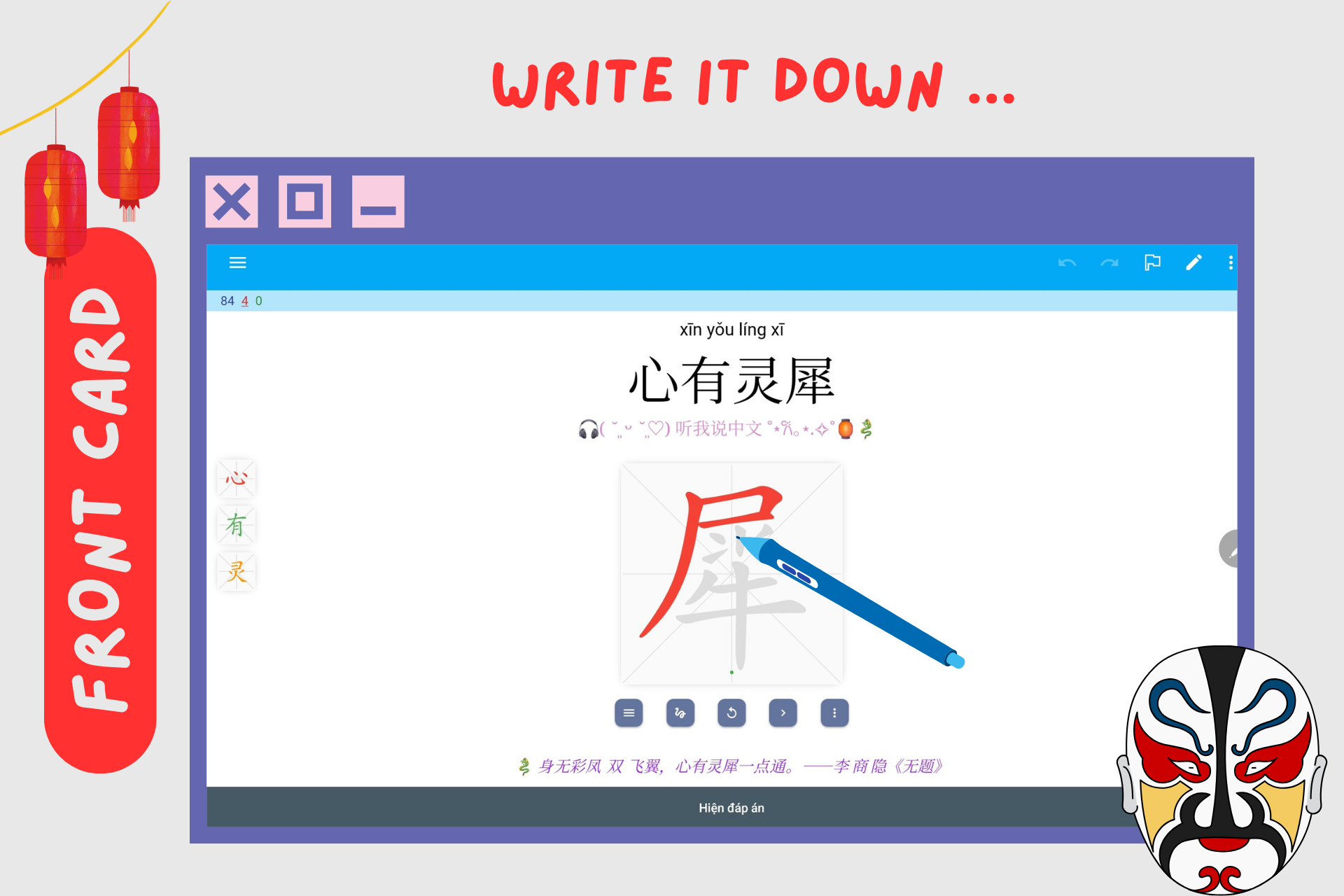
✍️ Button Luyện viết + GIF hướng dẫn: Đây là tính năng mình ưng nhất! Bấm vào nút này, một ô giấy kẻ điền sẽ hiện ra kèm GIF chạy thứ tự nét.
Template này sử dụng Hanzi Writer (một thư viện JavaScript mã nguồn mở) để tích hợp tính năng nhận diện nét bút tự động vào Anki.
- Viết đúng: Nét mực hiện ra đẹp lung linh.
- Viết sai: Máy sẽ “rung” bần bật và báo đỏ ngay lập tức.
💡 Lưu ý: Dùng trên điện thoại/iPad là phê nhất, dùng chuột máy tính thì hơi thử thách nhân phẩm nha.
🔥 Khảo viết chữ Hán
Đây là chế độ nâng cao dành cho lúc cần kiểm tra trí nhớ “cơ bắp” (Muscle Memory).
Logic hoạt động tương tự như nút luyện viết ở trên.
Điểm khác biệt: Không còn hình mờ hay GIF hướng dẫn nữa. Bạn phải tự nhớ và viết thẳng lên màn hình trắng. Sai là báo lỗi ngay.
Tương thích tốt trên cả Điện thoại, iPad và Laptop.
✨ Đặc điểm nổi bật
- 🎯 2 chế độ học: Type chữ Hán (gõ Pinyin) và Kiểm tra viết chữ (Hardcore Mode)
- 💡 Nút gợi ý thông minh: Hiện 2 chữ cái đầu của Pinyin khi bạn bí
- 🏳️ Chế độ chép phạt: Phải gõ lại 2 lần khi bấm “Chưa biết”
- ⚠️ Tự động kiểm tra: Hiện đáp án và yêu cầu gõ lại sau 2 lần sai
- ✍️ Nhận diện nét bút tự động: Viết đúng/sai được phản hồi ngay lập tức
- 🎬 GIF hướng dẫn viết: Hiển thị thứ tự nét chữ Hán
- 📱 Tương thích đa thiết bị: Điện thoại, iPad, Laptop
💡 Cách sử dụng
Type chữ Hán
- Xem mặt chữ Hán và cố gắng nhớ cách đọc (Pinyin)
- Gõ Pinyin vào ô trả lời
- Nếu bí, bấm nút Gợi ý để xem 2 chữ cái đầu
- Nếu không nhớ, bấm Chưa biết → Xem đáp án → Gõ lại 2 lần
- Bấm Luyện viết để tập viết chữ Hán với GIF hướng dẫn
Khảo viết chữ Hán
- Xem Pinyin và nghĩa
- Viết trực tiếp chữ Hán lên màn hình (không có GIF hướng dẫn)
- Hệ thống sẽ kiểm tra và báo đúng/sai ngay lập tức
🧱 Danh sách Fields
Danh sách đầy đủ các Fields mà template đang sử dụng:
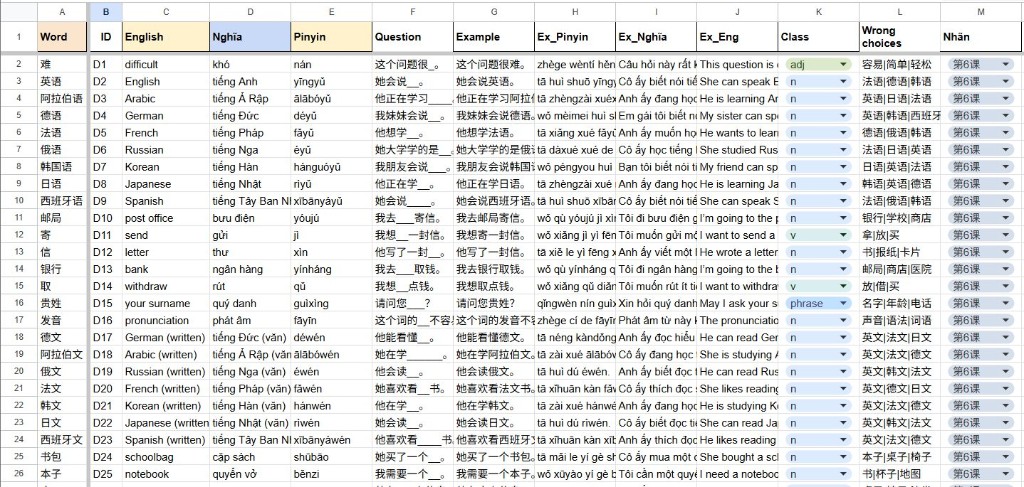
vocabpinyinradicalgiải thíchmẹo nhớposfrenchenglishhán việtvietnamex1_chinex1_pinyinex1_engex1_frex2_chinex2_pinyinex2_engex2_fr_pic 1
📥 Tải xuống
📂 Về phần cài đặt: Cả 2 loại card trên đều dùng chung 1 bộ Fields nên rất tiện chuyển đổi. Mình sẽ để code chi tiết dưới phần bình luận nha!
- Code template (Google Docs): Design Anki – Template Chinese Version
⚠️ Lưu ý: Code sẽ được chia sẻ trong phần bình luận của bài viết gốc. Bạn vui lòng kiểm tra phần bình luận để lấy thêm cập nhật mới nhất nhé!
🧩 Code template chi tiết
Front Template
<div class="cute-card">
<div class="deco-header">
<img src="https://media3.giphy.com/media/v1.Y2lkPTc5MGI3NjExd2Z0dWl3eWx1dmFjajhscjlubzB6YXJjcDlqazUxZ3c3M3B2emZyeSZlcD12MV9pbnRlcm5hbF9naWZfYnlfaWQmY3Q9Zw/Ed8DSUeYGBq4E/giphy.gif" class="cat-gif">
</div>
<div class="image-row">
{{pic 1}}
</div>
<div class="core-box">
<div id="hidden-vocab" style="display:none">{{vocab}}</div>
<div id="hidden-pinyin" style="display:none">{{pinyin}}</div>
<div class="input-wrapper">
<div class="type-hint">
⌨️ Chuyển bàn phím sang <b>Pinyin</b> nhé!
</div>
<input type="text" id="user-input" class="custom-input" placeholder="Gõ chữ Hán vào đây..." autocomplete="off">
<div id="hint-box" class="hint-display" style="display:none"></div>
<div id="msg-box" class="msg-display"></div>
<div class="button-row">
<button class="btn-action btn-hint" onclick="showHint()">💡 Gợi ý</button>
<button class="btn-action btn-check" onclick="checkAnswer()">✅ Kiểm tra</button>
<button class="btn-action btn-giveup" onclick="giveUp()">🏳️ Chưa biết</button>
</div>
<div class="audio-pill">{{tts zh_CN voices=AwesomeTTS:vocab}}</div>
</div>
<div class="pinyin-area">
<span class="pos-badge">✨ <i>{{pos}}</i></span>
</div>
</div>
<div class="meanings-cloud">
<div class="m-bubble fr-bubble">
<span class="m-tag">🇫🇷 FRANÇAIS</span>
<div class="m-word"><i><b>{{french}}</b></i></div>
</div>
<div class="m-bubble hv-bubble">
<span class="m-tag">📜 HÁN VIỆT</span>
<div class="m-word"><b>{{hán việt}}</b></div>
</div>
<div class="m-bubble en-bubble">
<span class="m-tag">🇬🇧 ENGLISH</span>
<div class="m-word">{{english}}</div>
</div>
<div class="m-bubble vn-bubble">
<span class="m-tag">🇻🇳 TIẾNG VIỆT</span>
<div class="m-word">{{vietnam}}</div>
</div>
</div>
</div>
<script>
// --- LOGIC XỬ LÝ ---
var vocab = document.getElementById('hidden-vocab').innerText.trim();
var pinyinFull = document.getElementById('hidden-pinyin').innerText.trim();
var inputEl = document.getElementById('user-input');
var msgEl = document.getElementById('msg-box');
var wrongCount = 0;
// Tự động focus vào ô nhập
setTimeout(() => inputEl.focus(), 100);
// Xử lý phím Enter
inputEl.addEventListener("keypress", function(event) {
if (event.key === "Enter") {
event.preventDefault();
checkAnswer();
}
});
function showHint() {
// Lấy 2 ký tự đầu của Pinyin
var hintText = pinyinFull.substring(0, 2) + "...";
var hintBox = document.getElementById('hint-box');
hintBox.innerText = "Gợi ý: " + hintText;
hintBox.style.display = "block";
inputEl.focus();
}
function checkAnswer() {
var userVal = inputEl.value.trim();
if (userVal === vocab) {
// ĐÚNG -> Lưu trạng thái 0 (OK)
sessionStorage.setItem('anki_result', '0');
flipCard();
} else {
// SAI
wrongCount++;
if (wrongCount >= 2) {
// Sai 2 lần -> Lưu trạng thái 1 (Chép phạt 1 lần)
sessionStorage.setItem('anki_result', '1');
msgEl.innerText = "Sai 2 lần rồi! Xem đáp án nhé 😿";
msgEl.style.color = "#d32f2f";
setTimeout(flipCard, 800);
} else {
// Sai lần 1 -> Rung lắc
msgEl.innerText = "Sai rồi, thử lại nhé! (Còn 1 lần)";
msgEl.style.color = "#f57c00";
inputEl.classList.add('shake-anim');
setTimeout(() => inputEl.classList.remove('shake-anim'), 500);
inputEl.value = "";
inputEl.focus();
}
}
}
function giveUp() {
// Bấm chưa biết -> Lưu trạng thái 2 (Chép phạt 2 lần)
sessionStorage.setItem('anki_result', '2');
flipCard();
}
function flipCard() {
if (typeof pycmd !== "undefined") { pycmd("ans"); }
else if (typeof study !== "undefined") { study.drawAnswer(); }
else if (typeof anki !== "undefined") { anki.answerCard(); }
}
</script>
Back Template
<script src="https://cdn.jsdelivr.net/npm/hanzi-writer@3.5/dist/hanzi-writer.min.js"></script>
<div class="cute-card">
<div class="deco-header">
<img src="https://media.giphy.com/media/v1.Y2lkPTc5MGI3NjExNHJmZzRtc2Z3eG9ueGZ4eGZ4eGZ4eGZ4eGZ4eGZ4eGZ4eGZ4JmVwPXYxX2ludGVybmFsX2dpZl9ieV9pZCZjdD1z/MDJ9IbM5tSi6n6Cy7C/giphy.gif" class="cat-gif flip-cat">
</div>
<div class="image-row">
{{pic 1}}
</div>
<div class="core-box">
<div id="result-area"></div>
<div class="hanzi-gif-section">
<div class="gif-label">✍️ Cách viết chuẩn:</div>
<div id="hanzi-animation-target"></div> <button class="btn-action btn-practice" onclick="openPracticeModal()">
📝 Luyện viết ngay
</button>
</div>
<div class="audio-pill">{{tts zh_CN voices=AwesomeTTS:vocab}}</div>
<div class="pinyin-area">
<span class="py-text"><b>{{pinyin}}</b></span>
<span class="pos-badge">✨ <i>{{pos}}</i></span>
</div>
</div>
<div class="meanings-cloud">
<div class="m-bubble fr-bubble">
<span class="m-tag">🇫🇷 FRANÇAIS</span>
<div class="m-word"><i><b>{{french}}</b></i></div>
</div>
<div class="m-bubble hv-bubble">
<span class="m-tag">📜 HÁN VIỆT</span>
<div class="m-word"><b>{{hán việt}}</b></div>
</div>
<div class="m-bubble en-bubble">
<span class="m-tag">🇬🇧 ENGLISH</span>
<div class="m-word">{{english}}</div>
</div>
<div class="m-bubble vn-bubble">
<span class="m-tag">🇻🇳 TIẾNG VIỆT</span>
<div class="m-word">{{vietnam}}</div>
</div>
</div>
<div class="info-bubble">
<div class="info-head">
<span class="hz-text">{{vocab}}</span>
<span class="rd-text">Bộ thủ: {{radical}}</span>
</div>
<div class="info-body">{{giải thích}}</div>
{{#mẹo nhớ}}
<div class="tip-pill">
💡 <b>Mẹo nhớ siêu tốc:</b> <br><i>{{mẹo nhớ}}</i>
</div>
{{/mẹo nhớ}}
</div>
<div class="grammar-candy">
<div class="gm-label">🌈 <b>Ví dụ thực tế:</b></div>
<div class="ex-bubble">
<div class="ex-hz"><b>{{ex1_chin}}</b> {{tts zh_CN voices=AwesomeTTS:ex1_chin}}</div>
<div class="ex-py"><i>{{ex1_pinyin}}</i></div>
<div class="ex-tr">🇬🇧 {{ex1_eng}}</div>
<div class="ex-tr">🇫🇷 <i>{{ex1_fr}}</i></div>
</div>
<div class="ex-bubble">
<div class="ex-hz"><b>{{ex2_chin}}</b> {{tts zh_CN voices=AwesomeTTS:ex2_chin}}</div>
<div class="ex-py"><i>{{ex2_pinyin}}</i></div>
<div class="ex-tr">🇬🇧 {{ex2_eng}}</div>
<div class="ex-tr">🇫🇷 <i>{{ex2_fr}}</i></div>
</div>
</div>
</div>
<div id="practice-modal" class="modal-overlay" style="display:none">
<div class="modal-content">
<div class="modal-header">
<span class="modal-title">Luyện viết chữ Hán</span>
<button class="btn-close" onclick="closeModal()">❌ Đóng</button>
</div>
<div id="practice-grid" class="practice-grid-container"></div>
<div class="modal-tools">
<div id="practice-status" class="status-msg">Viết đúng nét để hoàn thành!</div>
<button class="btn-action btn-reset" onclick="retryPractice()">🔄 Viết lại</button>
</div>
</div>
</div>
<script>
// --- LOGIC BACK SIDE ---
var status = sessionStorage.getItem('anki_result');
var vocab = "{{vocab}}";
var pinyin = "{{pinyin}}";
var resultDiv = document.getElementById('result-area');
// 1. HIỂN THỊ KẾT QUẢ / CHÉP PHẠT
if (status === '1') { // Sai 2 lần -> Chép 1 lần
resultDiv.innerHTML = `
<div class="punish-box">
<div class="punish-title">⚠️ Sai rồi! Đáp án là: <b>${pinyin}</b></div>
<div class="big-hanzi-sample">${vocab}</div>
<input type="text" class="copy-input" placeholder="Chép lại 1 lần cho thuộc...">
</div>
`;
} else if (status === '2') { // Chưa biết -> Chép 2 lần
resultDiv.innerHTML = `
<div class="punish-box">
<div class="punish-title">😿 Đáp án là: <b>${pinyin}</b></div>
<div class="big-hanzi-sample">${vocab}</div>
<input type="text" class="copy-input" placeholder="Gõ lại từ vựng..." style="margin-bottom:5px">
<input type="text" class="copy-input" placeholder="Chép lần 1..." style="margin-bottom:5px">
<input type="text" class="copy-input" placeholder="Chép lần 2...">
</div>
`;
} else { // Đúng
resultDiv.innerHTML = `
<div class="success-box">
<div class="success-title">🎉 XUẤT SẮC! 🎉</div>
<div class="big-hanzi-success">${vocab}</div>
</div>
`;
}
// Focus vào ô chép
setTimeout(() => {
var inputs = document.querySelectorAll('.copy-input');
if(inputs.length > 0) inputs[0].focus();
}, 100);
// 2. TẠO GIF TỰ VIẾT (HANZI WRITER ANIMATION)
var chars = [];
for (var i = 0; i < vocab.length; i++) {
if (/[\u4E00-\u9FA5]/.test(vocab[i])) chars.push(vocab[i]);
}
var animTarget = document.getElementById('hanzi-animation-target');
animTarget.innerHTML = ''; // Clear cũ
chars.forEach(char => {
var div = document.createElement('div');
div.className = 'anim-char-box';
animTarget.appendChild(div);
var writer = HanziWriter.create(div, char, {
width: 60, height: 60, padding: 2,
strokeColor: '#ef6c00',
radicalColor: '#c62828',
delayBetweenStrokes: 200,
delayBetweenLoops: 2000
});
writer.loopCharacterAnimation();
});
// 3. LOGIC MODAL LUYỆN VIẾT
var modal = document.getElementById('practice-modal');
var practiceGrid = document.getElementById('practice-grid');
var writers = [];
function openPracticeModal() {
modal.style.display = 'flex';
practiceGrid.innerHTML = '';
writers = [];
chars.forEach(char => {
var cell = document.createElement('div');
cell.className = 'practice-cell';
practiceGrid.appendChild(cell);
var writer = HanziWriter.create(cell, char, {
width: 150, height: 150, padding: 5,
showOutline: true, strokeAnimationSpeed: 2,
strokeColor: '#2c3e50', outlineColor: '#ffe0b2',
leniency: 1.5 // Độ dễ tính
});
writer.quiz({
onMistake: function() {
document.getElementById('practice-status').innerText = "Sai nét rồi! 😿";
document.getElementById('practice-status').style.color = "red";
cell.classList.add('shake-anim');
setTimeout(()=>cell.classList.remove('shake-anim'),500);
},
onCorrectStroke: function() {
document.getElementById('practice-status').innerText = "Đúng rồi! 👍";
document.getElementById('practice-status').style.color = "green";
}
});
writers.push(writer);
});
}
function retryPractice() {
writers.forEach(w => {
w.hideCharacter(); w.showOutline(); w.quiz({});
});
document.getElementById('practice-status').innerText = "Luyện lại nào! ✍️";
document.getElementById('practice-status').style.color = "#555";
}
function closeModal() {
modal.style.display = 'none';
practiceGrid.innerHTML = ''; // Clear để giải phóng bộ nhớ
}
</script>
Styling (CSS)
/* --- 1. FONTS & BACKGROUND --- */
/* QUAN TRỌNG: Đặt Import Font lên dòng đầu tiên */
@import url('https://fonts.googleapis.com/css2?family=Comfortaa:wght@400;600;700&family=Noto+Sans+SC:wght@400;500;700;900&display=swap');
@import url('https://fonts.googleapis.com/css2?family=Ma_Shan_Zheng&display=swap');
.card {
font-family: 'Comfortaa', 'Noto Sans SC', sans-serif;
background-color: #fffaf0;
/* Nền chấm bi cam nhạt */
background-image: radial-gradient(#ffe0b2 15%, transparent 16%);
background-size: 20px 20px;
color: #6d4c41;
padding: 10px;
text-align: center;
font-size: 16px;
}
.cute-card {
max-width: 550px;
margin: 0 auto;
background: rgba(255, 255, 255, 0.95);
border-radius: 35px;
padding: 25px;
border: 4px solid #fff3e0;
box-shadow: 0 15px 35px rgba(255, 167, 38, 0.15);
position: relative;
}
/* --- 2. DECORATION (MÈO & ẢNH) --- */
.deco-header { margin-bottom: 10px; }
.cat-gif { width: 60px; border-radius: 10px; }
.flip-cat { transform: scaleX(-1); }
.image-row { display: flex; justify-content: center; gap: 15px; margin-bottom: 20px; }
.image-row img {
max-width: 40%; max-height: 180px; border-radius: 20px;
border: 4px solid #fff8e1; box-shadow: 0 5px 15px rgba(0,0,0,0.05);
transition: transform 0.3s;
}
.image-row img:hover { transform: scale(1.05) rotate(2deg); }
/* --- 3. INPUT AREA & BUTTONS (MẶT TRƯỚC) --- */
.core-box {
background: #fff8e1; border-radius: 30px; padding: 20px;
margin-bottom: 25px; border: 2px dashed #ffe0b2;
}
.type-hint {
font-size: 12px; color: #ffb74d; margin-bottom: 8px;
background: white; display: inline-block; padding: 4px 12px;
border-radius: 15px; font-weight: 700;
}
/* --- CHỈNH SỬA Ô NHẬP LIỆU (STYLE VÀNG KEM & THƯ PHÁP) --- */
.custom-input {
/* Font thư pháp mềm mại */
font-family: 'Ma Shan Zheng', 'KaiTi', 'STKaiti', 'Noto Sans SC', cursive;
/* Kích thước font chữ */
font-size: 34px;
font-weight: 500;
/* Màu chữ: Cam vàng đậm (Orange 800) */
color: #ef6c00;
/* Nền: Vàng kem nhạt (tiệp với màu core-box) */
background: #fff8e1;
/* Viền: Vàng cam nhạt */
border: 2px solid #ffe0b2;
/* Bo tròn hình viên thuốc */
border-radius: 50px;
/* Căn chỉnh */
padding: 10px 25px;
width: 80%;
text-align: center;
outline: none;
margin-bottom: 15px;
letter-spacing: 2px;
/* Hiệu ứng bóng đổ nhẹ vào trong (Inset) */
box-shadow: inset 0 2px 5px rgba(0,0,0,0.03);
transition: all 0.3s ease;
}
/* Chữ gợi ý (Placeholder) */
.custom-input::placeholder {
color: #ffcc80;
font-size: 18px;
font-family: 'Comfortaa', sans-serif;
font-weight: 400;
}
/* Hiệu ứng khi bấm vào ô nhập */
.custom-input:focus {
background: #fffdf0; /* Sáng hơn một chút */
border-color: #ffb74d;
box-shadow: 0 5px 15px rgba(255, 167, 38, 0.15); /* Nổi lên */
transform: translateY(-2px);
}
/* Hàng nút bấm */
.button-row { display: flex; justify-content: center; gap: 10px; margin-top: 10px; flex-wrap: wrap; }
.btn-action {
border: none; padding: 8px 15px; border-radius: 20px;
font-family: 'Comfortaa', sans-serif; font-weight: 700; font-size: 13px;
cursor: pointer; transition: transform 0.1s;
}
.btn-hint { background: #fff9c4; color: #f9a825; box-shadow: 0 3px 0 #fff176; }
.btn-check { background: #c8e6c9; color: #2e7d32; box-shadow: 0 3px 0 #a5d6a7; }
.btn-giveup { background: #ffccbc; color: #d84315; box-shadow: 0 3px 0 #ffab91; }
/* Nút Luyện viết ngay (Căn giữa) */
.btn-practice {
background: #b3e5fc;
color: #0277bd;
box-shadow: 0 3px 0 #81d4fa;
width: auto;
min-width: 200px;
display: block;
margin: 15px auto 5px;
padding: 10px 20px;
}
.btn-reset { background: #ffccbc; color: #d84315; }
.btn-close { background: #eee; border: none; padding: 5px 12px; border-radius: 15px; font-weight: bold; cursor: pointer; }
.btn-action:active { transform: translateY(3px); box-shadow: none; }
.hint-display { margin-top: 5px; color: #f9a825; font-weight: bold; font-style: italic; }
.msg-display { margin-top: 5px; font-weight: bold; min-height: 20px; }
/* Hiệu ứng rung khi sai */
.shake-anim { animation: shake 0.4s; border-color: #d32f2f !important; }
@keyframes shake { 0%, 100% { transform: translateX(0); } 25% { transform: translateX(-8px); } 75% { transform: translateX(8px); } }
/* --- 4. RESULT AREA (MẶT SAU) --- */
.punish-box { background: #fff; padding: 20px; border-radius: 20px; border: 3px solid #ef9a9a; margin-bottom: 20px; }
.punish-title { color: #c62828; font-weight: 800; margin-bottom: 10px; font-size: 15px; }
/* CHỮ MẪU ĐỂ CHÉP PHẠT */
.big-hanzi-sample {
font-family: 'Ma Shan Zheng', cursive;
font-size: 75px;
font-weight: bold;
color: #c62828;
margin-bottom: 10px;
line-height: 1.1;
text-shadow: 1px 1px 0 #ef9a9a;
}
.copy-input {
width: 90%; padding: 10px;
border: 2px solid #ffcdd2; border-radius: 12px;
text-align: center;
font-family: 'Noto Sans SC', sans-serif;
font-size: 24px; font-weight: bold;
outline: none; background: #ffebee;
}
.copy-input:focus { border-color: #ef5350; background: #fff; }
.success-box { margin-bottom: 20px; }
.success-title { color: #4caf50; font-weight: 900; margin-bottom: 5px; font-size: 20px; }
/* CHỮ KẾT QUẢ ĐÚNG */
.big-hanzi-success {
font-family: 'Ma Shan Zheng', cursive;
font-size: 95px;
font-weight: bold;
color: #ef6c00;
text-shadow: 3px 3px 0px rgba(255,224,178, 1);
}
/* --- 5. HANZI GIF & PRACTICE --- */
.hanzi-gif-section { margin-top: 20px; padding: 10px; background: #fff; border-radius: 20px; border: 2px dashed #ffe0b2; }
.gif-label { font-size: 13px; font-weight: bold; color: #ffb74d; margin-bottom: 10px; text-align: left; }
#hanzi-animation-target { display: flex; justify-content: center; flex-wrap: wrap; gap: 10px; }
.anim-char-box { width: 60px; height: 60px; border: 1px solid #ffe0b2; border-radius: 10px; background: #fffaf0; }
/* MODAL PRACTICE */
.modal-overlay { position: fixed; top: 0; left: 0; width: 100%; height: 100%; background: rgba(0,0,0,0.85); z-index: 9999; display: flex; justify-content: center; align-items: center; }
.modal-content { background: #fff; padding: 20px; border-radius: 25px; width: 95%; max-width: 500px; border: 4px solid #ffcc80; display: flex; flex-direction: column; align-items: center; max-height: 90vh; overflow-y: auto; }
.modal-header { width: 100%; display: flex; justify-content: space-between; align-items: center; margin-bottom: 15px; border-bottom: 1px solid #eee; padding-bottom: 5px; }
.modal-title { font-weight: bold; color: #ef6c00; font-size: 18px; }
.practice-grid-container { display: flex; flex-wrap: wrap; justify-content: center; gap: 15px; margin-bottom: 15px; }
.practice-cell {
width: 150px; height: 150px;
border: 3px solid #ef6c00; border-radius: 10px; background: #fff;
/* Kẻ ô điền */
background-image: linear-gradient(0deg, transparent 49%, #ffe0b2 49%, #ffe0b2 51%, transparent 51%), linear-gradient(90deg, transparent 49%, #ffe0b2 49%, #ffe0b2 51%, transparent 51%);
}
.modal-tools { width: 100%; display: flex; flex-direction: column; align-items: center; gap: 10px; }
/* --- 6. CÁC PHẦN KHÁC --- */
.audio-pill { margin-top: 10px; display: inline-block; background: white; padding: 5px 15px; border-radius: 20px; box-shadow: 0 2px 5px rgba(0,0,0,0.05); }
.pinyin-area { margin-top: 15px; }
.py-text { font-size: 30px; font-weight: 800; color: #f57c00; letter-spacing: 1px; }
.pos-badge { font-size: 13px; background: #ffe0b2; padding: 5px 15px; border-radius: 15px; color: #bf360c; font-weight: 700; text-transform: uppercase; }
/* Meanings */
.meanings-cloud { display: grid; grid-template-columns: 1fr 1fr; gap: 15px; margin-bottom: 25px; }
.m-bubble { background: #fff; padding: 12px; border-radius: 25px; border: 1px solid #f5f5f5; text-align: left; box-shadow: 0 5px 0 rgba(0,0,0,0.05); transition: transform 0.2s; }
.m-bubble:hover { transform: translateY(-3px); }
.m-tag { font-size: 9px; font-weight: 800; letter-spacing: 1px; margin-bottom: 3px; display: block; opacity: 0.8; }
.m-word { font-size: 16px; margin-top: 2px; line-height: 1.3; font-weight: 600; }
.fr-bubble { background: #e3f2fd; color: #1565c0; border: 1px solid #bbdefb; } .fr-bubble .m-tag { color: #64b5f6; }
.hv-bubble { background: #fff3e0; color: #e65100; border: 1px solid #ffe0b2; } .hv-bubble .m-tag { color: #ffb74d; }
.en-bubble { background: #f3e5f5; color: #7b1fa2; border: 1px solid #e1bee7; } .en-bubble .m-tag { color: #ba68c8; }
.vn-bubble { background: #e8f5e9; color: #2e7d32; border: 1px solid #c8e6c9; } .vn-bubble .m-tag { color: #81c784; }
/* Info & Grammar */
.info-bubble { background: #fff; border-radius: 25px; padding: 20px; text-align: left; margin-bottom: 25px; border-left: 6px solid #ffca28; box-shadow: 0 4px 15px rgba(0,0,0,0.03); }
.info-head { border-bottom: 2px dashed #eee; padding-bottom: 10px; margin-bottom: 10px; }
/* Chữ Hán trong phần info */
.hz-text { font-family: 'Ma Shan Zheng', cursive; font-size: 42px; color: #d84315; font-weight: bold; }
.rd-text { color: #ffa000; margin-left: 10px; font-size: 16px; background: #fff8e1; padding: 2px 8px; border-radius: 8px; }
.tip-pill { margin-top: 15px; background: #e1f5fe; padding: 12px 20px; border-radius: 15px; font-size: 14px; color: #0277bd; border: 2px solid #b3e5fc; }
.grammar-candy { text-align: left; border-top: 3px dotted #ffecb3; padding-top: 20px; }
.gm-label { font-size: 13px; color: #ffa000; margin-bottom: 15px; font-weight: bold; }
.ex-bubble { background: linear-gradient(to right, #ffffff, #fffdf5); border-radius: 20px; padding: 15px; margin-bottom: 15px; border: 1px solid #fff9c4; position: relative; }
.ex-bubble::before { content: "❝"; position: absolute; top: 5px; right: 10px; font-size: 30px; color: #fff176; opacity: 0.5; }
/* Chữ ví dụ dùng font thư pháp */
.ex-hz {
font-size: 32px;
color: #8d6e63;
margin-bottom: 5px;
font-weight: 700;
font-family: 'Ma Shan Zheng', 'KaiTi', 'Noto Sans SC', serif;
letter-spacing: 1px;
}
.ex-py { font-size: 14px; color: #8d6e63; font-style: italic; }
.ex-tr { font-size: 14px; color: #757575; margin-top: 5px; display: block; }
⚠️ Lưu ý
🔴 QUAN TRỌNG: Card này cần có wifi mới làm được! Vì template sử dụng Hanzi Writer (thư viện JavaScript từ CDN), bạn phải có kết nối internet để tải thư viện này khi học.
- Thiết bị khuyến nghị: Dùng trên điện thoại/iPad để trải nghiệm viết tốt nhất
- Chuột máy tính: Có thể dùng được nhưng hơi khó khăn khi viết
- Tương thích: Template hoạt động tốt trên Anki Desktop và AnkiMobile
- Fields: Cả 2 loại card dùng chung 1 bộ Fields, dễ dàng chuyển đổi giữa các chế độ
- Công nghệ: Sử dụng Hanzi Writer (thư viện JavaScript mã nguồn mở) để tạo hoạt ảnh thứ tự nét và nhận diện nét bút tự động
🌐 Liên kết hữu ích
- Hanzi Writer: https://hanziwriter.org - Thư viện JavaScript mã nguồn mở cho hoạt ảnh thứ tự nét chữ Hán
- NPM Package: hanzi-writer - Package chính thức trên NPM
P/S: Cảm ơn mọi người đã quan tâm đến mấy tấm thẻ nhỏ xinh này của mình. Sắp tới mình sẽ mày mò thêm vụ chèn Youtube vào thẻ và hoàn thiện bộ tiếng Anh để chia sẻ cho mọi người. Stay tuned! ✨
Hashtags: #Anki #ChineseLearning #GeminiPro #JoyceLouisa #TuHoc #ShareTemplate