For the source code, the GitHub link.
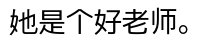
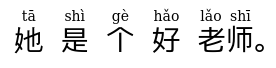
In a nutshell, this addon turns into
The way the addon achieves this is really quite simple. At its core is the recent addition of ruby characters to HTML. Here is a part of above example’s ruby HTML:
<ruby>老师<rt>lǎo shī</rt></ruby>.
Because it’s pure HTML we can directly add the ruby to one of the note’s fields. Make sure to add a field beforehand to your note, as the addon can (currently) only work with existing fields. The addon works whether you already have matching Pinyin. It helps to have matching Pinyin, but the addon is smart enough to generate (usually correct) Pinyin on its own.
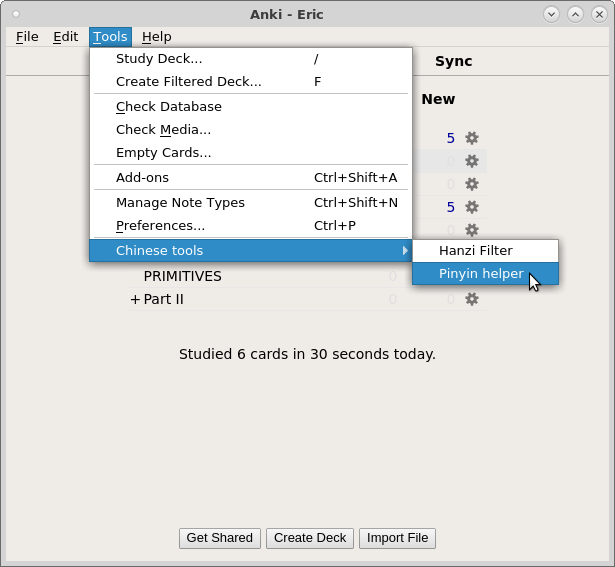
The interface was designed for ease of use. After installation, to start the Pinyin generation, go to
Tools → Chinese tools → Pinyin helper.
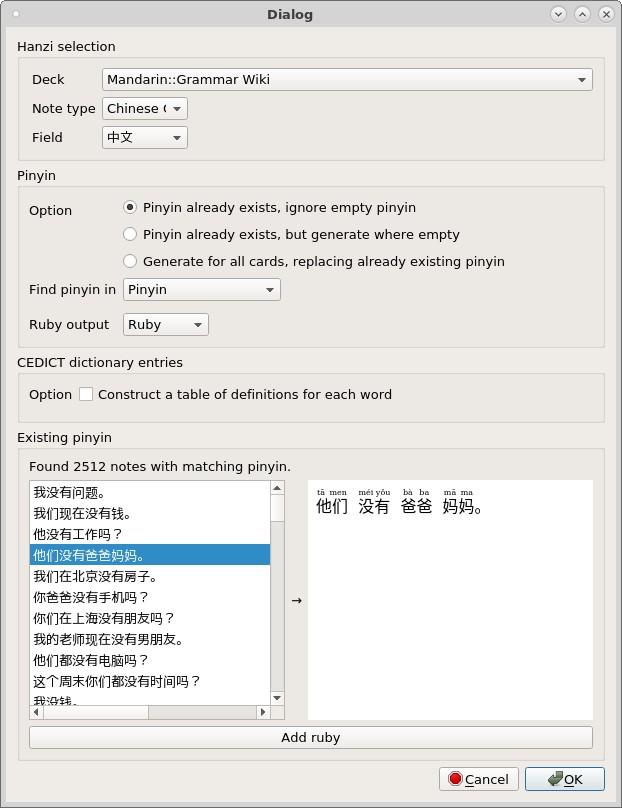
Then choose the deck, note type, and field with the Hanzi characters. If you already have a field with matching Pinyin, select the first option.
The addon will match Hanzi and Pinyin together to the best of its ability. You can preview the output by selecting any one of the Hanzi on the left (from your own cards) and see the matched Hanzi and Pinyin on the right. Make sure to select a field for where the ruby output should go.
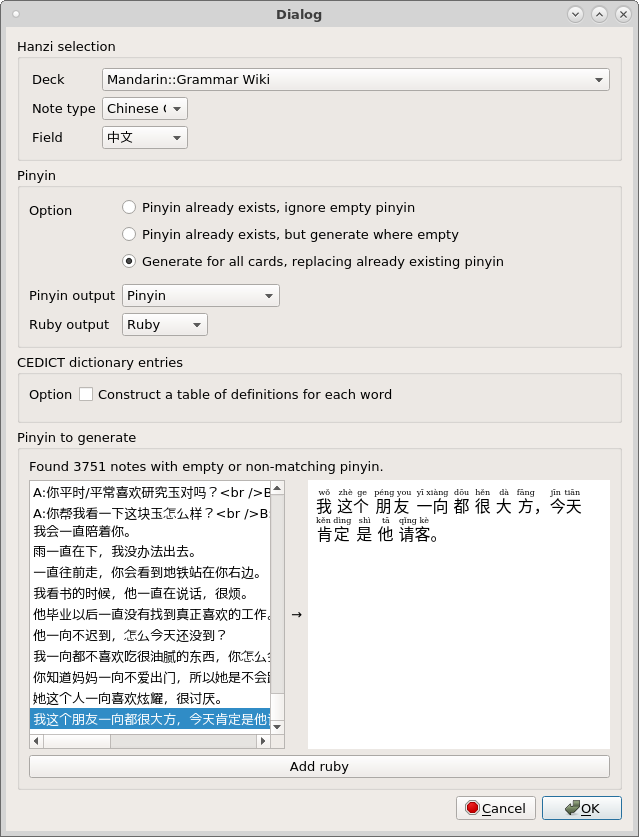
Here is an example of the addon generating Pinyin when there is no pre-existing Pinyin to match with the Hanzi.
The addon goes beyond assigning Pinyin to individual Hanzi, which is error-prone — there are many Hanzi with multiple Pinyin readings. It instead first splits the Hanzi sentence (in which there are usually no spaces) into words, then looks up each word in an internal dictionary. While it may make the occasional mistake it is remarkably adept at assigning the right Pinyin.
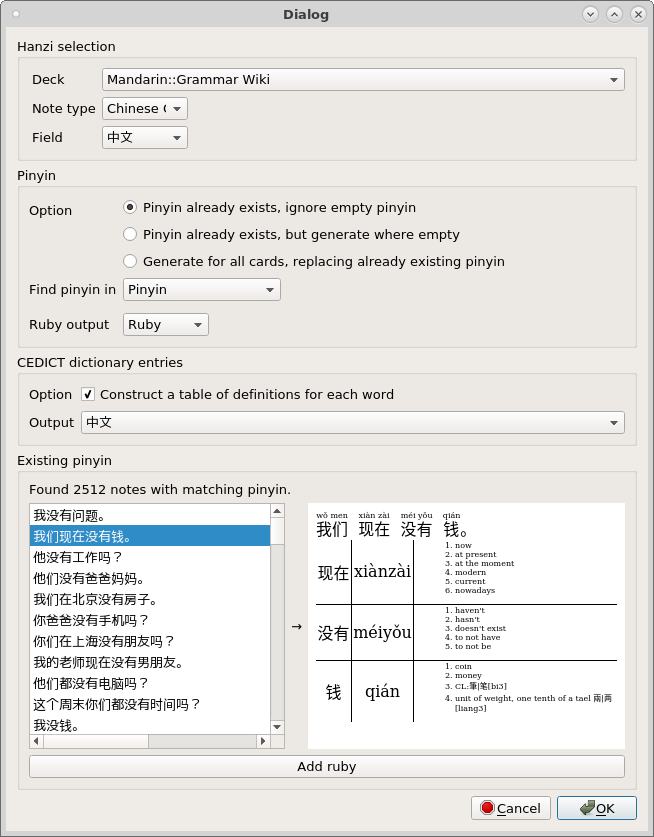
There is also the option of generating a table of definitions from the internal dictionary:
The addon restricts the dictionary entries to match the Pinyin readings, which it finds in the note if you specified a Pinyin field, or generates on its own if you haven’t. The dictionary entries are also entirely in HTML, and come with CSS selectors for the word, Pinyin, and definitions columns. Remember to specify another field in the note where the table of definitions will go.
This addon would not have been possible without two third-party Python modules. I’ve used
jieba for segmenting Hanzi into words, and zhon for correctly splitting joined-up Pinyin as well as the free Chinese dictionary CEDICT. Everything is bundled in the addon, which explains its large download size.
Notes Although ruby generation works for all Pinyin options, when Pinyin is generated where there is none currently existing, the Pinyin will not be saved to the note, despite the option Pinyin output. I have some pretty bare-bones CSS for the definitions table, which I’ll publish soon. I include spacing between Hanzi in the ruby.If you want to preserve the spacing of the original Hanzi, I’ll add that as another option in the addon window.
Screenshots
Liên kết hỗ trợ
Reviews (27)
👍 2026-02-11
Shows weird square characters, I think the encoding is messed up. Please fix
👍 2025-01-09
Simply doesn’t work
👍 2024-02-19
It works. Note you need to use Anki Qt5, and NOT the recent Anki Qt6. In addition, I recommend creating a new (empty) field in which the pinyin can be automatically put.
👍 2023-12-20
BE CAREFUL
Before using this add-on test it thoroughly in a test deck, otherwise, you might mess up all your cards from years of study and you CAN NOT undo it by only pressing CTRL+Z.
Luckily you can force backups from Anki following this guide https://forums.ankiweb.net/t/apaguei-alguns-arquivos-no-gerenciador-do-anki/10078/3
Otherwise it’s a great add-on.
👍 2022-05-19
It certainly does what it says in the description - adds pinyin on top of hanzi, but you might run into a problem if you constantly update your deck - the addon adds pinyin indiscriminately. In other words, you will get a new line of pinyin on top of the previous one each time you use the addon.
👍 2022-01-05
Great add-on ~
For people saying you should put pinyin in a separate field - I routed the output so that the raw hanzi is on the question side of the card, and the pinyin+hanzi is generated on a separate field on the answer side.
👍 2021-10-10
Fantastic add-on, thank you so much
👍 2021-06-02
Amazing add-on. Thank you!
👍 2021-03-25
I think it does the job, however, you can’t undo your preferences. so if you misclicked well you’re out of luck and have to redo the cards you overwrote with this add-on. I wanted to undo the changes because the add-on didn’t quite work with clozed type notes. it displayed the pinyin after each typed in hanzi
👍 2021-03-06
amazing add-on! i recommend pairing this add-on with the lingoes pop-up dictionary for max efficiency and ease doing your anki reviews https://choronghi.wordpress.com/2021/02/02/subs2srs-anki-plugins-dictionaries-authotkey/
lingoes: search chinese
http://www.lingoes.net/en/dictionary/dict_search.php
👍 2021-02-17
Here’s a space-saving theme for the dictionary table:
<style>
.dict-table-word, .dict-table-pinyin, .dict-table-definition {-font-size:50%;}
table {border-collapse: collapse;}
.dict-table-word-border {border-top: 1px solid lightgrey;}
.dict-table-word {white-space: nowrap;}
.dict-table-definition ol {text-align:left; margin:0; padding:0;}
.dict-table-definition li {display: inline-block;}
.dict-table-definition li::before {content: ”• ”;}
ruby {ruby-position: under;} rt {display:table-c
👍 2020-12-20
holy crap. this plus wordquery (for j-k-e dictionaries as well as when pinyin on top of hanzi doesn’t parse correctly which is RARE), subs2srs decks, morphman (priority.db etc), Search cards based on length, Automatically show answer after X seconds have made learning mandarin very easy and fun! https://massimmersionapproach.com/table-of-contents/anki/morphman/ I’m all for avoiding manually copy pasting and clicking crap 5 billion times!
BE SURE YOU DESIGNATE THE CORRECT FIELD OTHERWISE IT
👍 2020-12-19
Such a great Add on, thank you very much
👍 2020-06-12
This is really good though i have a question, once I click close for adding cards in a deck, then using the pinyin helper (I click on the generate for all cards, replacing existing pinyin), the problem is when i make new cards and apply the same add-on it adds a second line of pinyin for my previous cards that I already used the add-on to, so essentially it is not replacing existing pinyin, what is the solution for this?
👍 2020-05-05
As a (Windows) How-To see Anki forum:
“Pinyin on top of Hanzi (417709332) - getting started”
It works!
👍 2019-11-12
Doesn’t work with traditional characters. What a shame.
👍 2019-11-04
tip if you have text that happens to have spaces between the words in hanzi, if you replace the space with \ this plugin will parse better. i don’t think you can find and replace it in anki (you’d have to export, import etc )
👍 2019-09-23
hi this looks like a great addon but because of my stupid mistake i apply this and now my front card has all the pinyin and i cant practice reading them anymore… i only have 1 question, how do i remove pinyin above hanzi? i can manually remove them but i have 2k cards affected by this… is this the only way??
👍 2019-08-08
Great idea, but I found it doesn’t work on complicated sentences. A lot of times the add-on gets confused wether a character is related to the character before or after. Also, when I add pinyin to a sentence, some characters just disappear. Would be awesome if we could just select the words we wanted to generate pinyin for in the “Add card” editor!
👍 2019-07-27
Is anyone else here trying to install the anki 2.0 version of this add-on that is found in the Github link above?
I don’t know whether the interface is different with this version, or if I am simply not installing it correctly when I manually put the file into the add-on folder.
Any help would be much appreciated…
👍 2019-04-11
It’s the most useful Chinese addon available.
👍 2018-11-05
Works really well!
👍 2018-08-25
Love it!
👍 2018-05-03
Thank you for the Add-on, but I am not able to download it. Error message:
“Download failed: Error downloading: 404”
I am able to install other add-ons though. Could you please take a look? Thank you so much!
👍 2018-04-30
Haven’t tried this yet, seems like a GOD idea.
👍 2018-02-10
Addon is quite useful. Much more aesthetic than separate fields.
Though in my opionion the pinyin should not written to the hanzi field, but instead still added as separate pinyin field.
This way you can train to read the hanzi.
The addon allows this. But maybe the default configuration or the documentation should mention this.
Also, better have a working backup before applying the update, the hanzi fields get overrridden.
👍 2018-02-02
Really cool!
I don’t use Anki for learning Chinese, but I’ll definitely be recommending this add-on to other users. Great job!
– G
